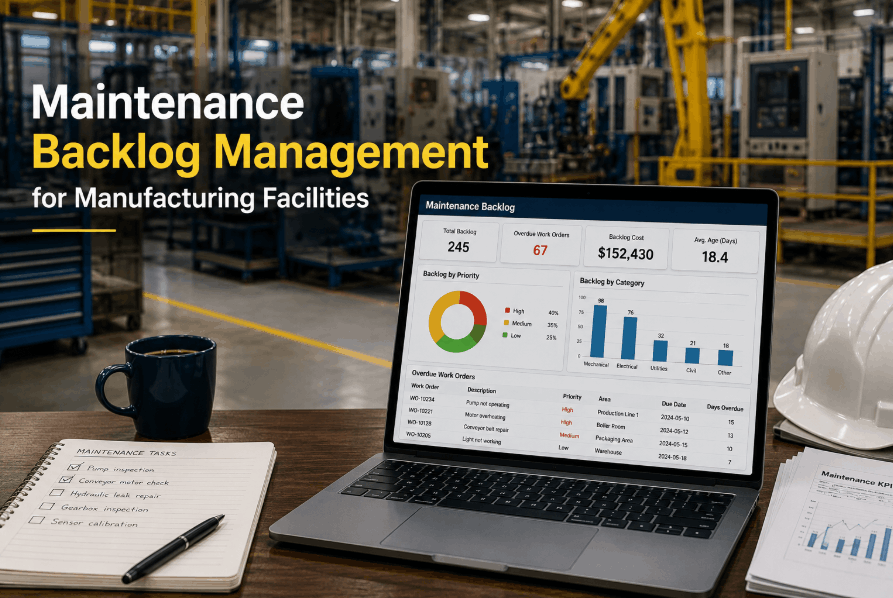
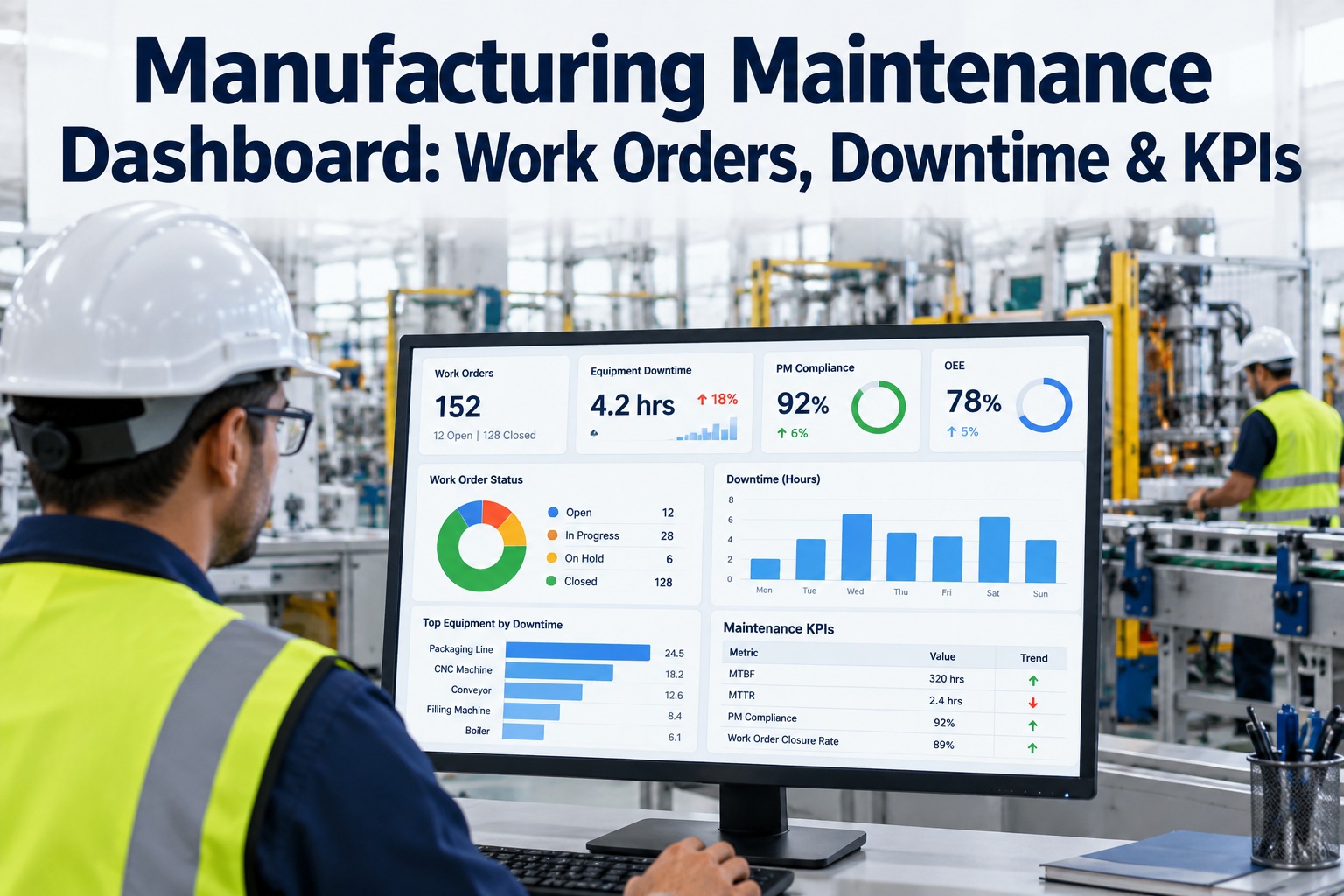
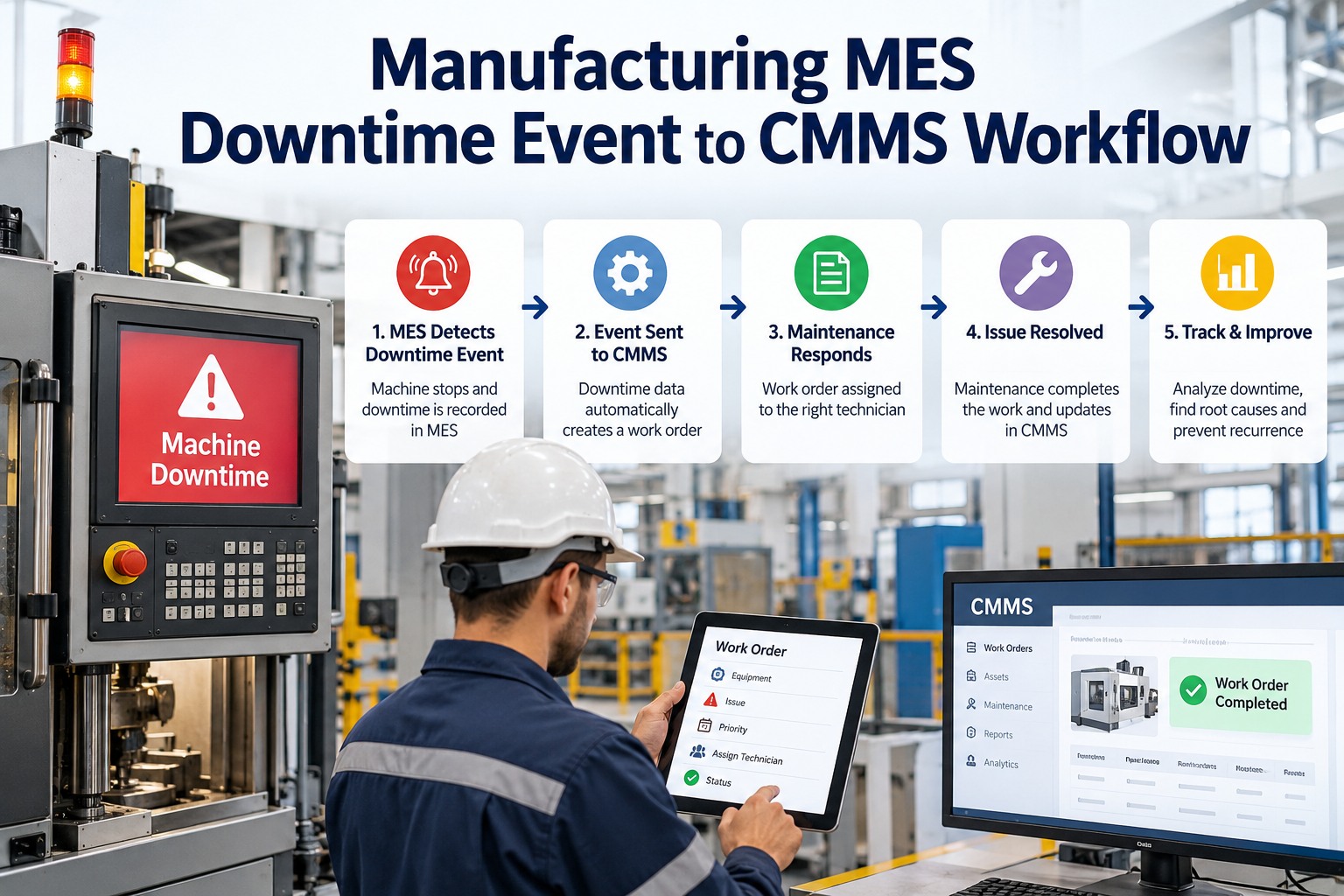
Maintenance backlog is the most reliable predictor of facility failure in mid-sized manufacturing plants. When the volume of open, overdue, and deferred preventive maintenance tasks exceeds the capacity of your maintenance team to complete them, every additional week without a structured reduction strategy pushes your facility closer to unplanned equipment failures, compliance violations, and emergency repair budgets that spiral out of control. The most damaging aspect of maintenance backlog is not its size — it is the invisibility. Without a CMMS to quantify, prioritize, and track backlog in real time, maintenance managers operate blind, making reactive resource decisions that accelerate the spiral. Sign Up Free to bring your full maintenance backlog into a live, prioritized dashboard in Oxmaint. Industry benchmarks show that facilities managing backlog through a CMMS reduce emergency repair costs by 30–50%, extend mean time between failures (MTBF) by 20–35%, and reach planned-to-reactive maintenance ratios above 70% within 12 months of structured backlog management. Book a Demo to see how Oxmaint's backlog management module transforms uncontrolled work queues into a managed, prioritized, and measurable maintenance program.
MAINTENANCE BACKLOG · CMMS · WORK ORDER MANAGEMENT
Take Control of Your Maintenance Backlog in Oxmaint
Real-time backlog visibility, priority-based work order queuing, technician capacity planning, and automated scheduling — reduce backlog without adding headcount.
Why Maintenance Backlog Grows Out of Control
Backlog accumulation is not a technician problem — it is a systems problem. When maintenance planning tools cannot generate accurate capacity forecasts, when PM schedules are not automated, and when work order priority is assigned manually or not at all, backlog grows faster than any team can manage through effort alone. Understanding the structural causes of backlog growth is the first step toward implementing a management strategy that prevents recurrence, rather than just firefighting the current queue. Sign Up Free to identify your facility's backlog root causes through Oxmaint's work order analytics dashboard.
ROOT CAUSES OF MAINTENANCE BACKLOG IN MANUFACTURING FACILITIES
01
No Priority Classification System
When all work orders carry equal priority — or priority is assigned informally — technicians address the most visible or easiest tasks first, leaving complex but critical PM items buried in the queue for weeks or months at a time.
02
PM Intake Exceeds Capacity
New PM work orders are generated at a faster rate than the team can complete them. This intake-to-completion imbalance occurs when seasonal PM peaks (HVAC changeovers, annual shutdowns) coincide with reduced technician availability due to vacations, illness, or high emergency repair volume.
03
Emergency Repairs Consume All Capacity
When reactive maintenance comprises more than 40–50% of total work orders, emergency repairs continuously displace scheduled PM tasks. Each displaced PM increases the probability of a future failure, creating a self-reinforcing cycle of reactive maintenance and growing backlog.
04
Waiting on Parts or Contractors
Work orders are opened but cannot be completed because required spare parts are out of stock or specialist contractors are not available. These blocked orders age in the backlog queue, inflate backlog counts, and skew prioritization data if not tracked separately from active work orders.
05
No Capacity Planning Against PM Schedule
PM schedules are built without validating that available technician hours can actually absorb the total scheduled workload. When planned labor hours exceed team capacity by more than 10–15%, backlog accumulates structurally regardless of how hard the team works.
06
Deferred Maintenance Culture
In facilities where production output consistently outweighs maintenance access requests, maintenance supervisors defer PM tasks to avoid production conflicts. These deferrals compound over weeks and quarters, building a hidden backlog that only surfaces when assets begin failing prematurely.
Backlog Classification Framework: The Four-Category System
Not all backlog is equally urgent or equally damaging. A structured backlog classification system groups work orders by urgency, safety risk, and operational impact — allowing maintenance managers to allocate limited technician time where it delivers the highest value. Book a Demo to see how Oxmaint's automated priority classification engine categorizes and sorts backlog in real time.
BACKLOG CLASSIFICATION SYSTEM — CATEGORIES, CRITERIA & RESPONSE TARGETS
Safety Critical
Fire systems, emergency stops, pressure relief valves, fall protection
Sprinkler systems, boiler safety valves, crane load brakes
Complete within 24–72 hours
Auto-escalate to manager immediately
Production Critical
Single-point-of-failure assets, no redundancy, direct output impact
Main production compressors, primary conveyors, CNC spindles
Complete within 1–2 weeks
Escalate if exceeds 7 days
Compliance-Driven
OSHA, EPA, NFPA required inspections with statutory deadlines
Fire alarm panels, pressure vessels, refrigerant leak checks
Complete before compliance deadline
Notify compliance officer at 14 days overdue
Standard PM
Routine lubrication, filter changes, inspections on non-critical assets
HVAC filters, secondary motors, general facility equipment
Complete within 30–45 days
Review at weekly planning meeting
The 10-Step Maintenance Backlog Reduction Plan
Reducing an entrenched maintenance backlog requires both immediate tactical interventions and structural changes to how PM is planned, assigned, and tracked. This 10-step plan covers both dimensions — giving maintenance managers a concrete execution sequence from current state assessment to sustained backlog control. Sign Up Free to use Oxmaint's backlog reduction planner to sequence these steps and track progress in real time.
10-STEP BACKLOG REDUCTION EXECUTION PLAN
01
Quantify the Full Backlog
Count every open work order by category, age, and estimated labor hours. A backlog you cannot measure cannot be managed. Oxmaint's backlog summary report generates this view in seconds for any facility or asset group.
02
Purge Invalid Work Orders
Review work orders older than 90 days and close those that are no longer valid — decommissioned assets, duplicate entries, resolved issues never formally closed. Removing invalid orders reduces perceived backlog immediately and improves data accuracy.
03
Apply Priority Classification
Apply the four-category classification system to all remaining open work orders: Safety Critical, Production Critical, Compliance-Driven, and Standard PM. This converts an undifferentiated pile of tasks into a prioritized execution queue.
04
Calculate Completion Capacity
Total available technician labor hours per week (accounting for vacation, training, and sick days). Compare to total estimated backlog hours in each category. This calculation reveals whether backlog can be resolved internally or requires contractor augmentation.
05
Assign Backlog Age Targets
Set maximum age thresholds for each category: Safety Critical 72 hours, Production Critical 14 days, Compliance-Driven by deadline, Standard PM 45 days. Configure Oxmaint's escalation alerts to notify managers when tasks approach or breach thresholds.
06
Plan a Backlog Blitz Event
Schedule a concentrated backlog reduction event — typically a weekend or planned shutdown — to clear the oldest high-priority items in bulk. Assign contractors for specialized tasks, pre-stage all required parts, and track completion in real time through Oxmaint's mobile work order interface.
07
Reduce New PM Intake Temporarily
If intake rate exceeds completion rate, temporarily defer non-critical new PM generation by extending intervals by one cycle for Standard PM category only. This creates breathing room for the team to reduce existing backlog without the queue growing simultaneously.
08
Fix Blocked Work Orders
Identify all work orders blocked on parts procurement or contractor availability. Expedite critical parts orders, engage approved contractors for specialist tasks, and track blocked orders separately from active backlog to avoid data distortion in completion rate metrics.
09
Automate PM Scheduling
Once backlog is under control, configure Oxmaint's auto-generating PM engine to create work orders at the correct frequency without manual intervention. Automated scheduling prevents the planning lapses that allowed backlog to accumulate in the first place.
10
Monitor Velocity Weekly
Track backlog velocity (tasks completed ÷ tasks created each week) as your primary control metric. A velocity above 1.0 means backlog is shrinking. A velocity below 1.0 triggers an immediate management intervention — before backlog becomes unmanageable again.
Backlog KPIs: Benchmarks and Targets for Manufacturing Facilities
Backlog measurement without benchmark context is incomplete. These KPIs and manufacturing-validated targets give maintenance managers the framework to assess their current backlog health against industry standards and set realistic reduction goals. Book a Demo to see Oxmaint's automated KPI dashboard tracking all backlog metrics in real time across your facility.
MAINTENANCE BACKLOG KPIs — MANUFACTURING BENCHMARKS & TARGETS
Backlog Weeks
Total backlog hours ÷ weekly technician hours
> 12 weeks
4–6 weeks
1–3 weeks
Backlog Velocity
Tasks completed per week ÷ tasks created per week
< 0.75
0.9–1.0
> 1.1
PM Completion Rate
PM tasks completed on time ÷ PM tasks scheduled
< 55%
70–80%
> 90%
P1 Compliance Rate
Safety critical tasks closed within SLA ÷ total P1 tasks
< 80%
90–94%
98–100%
Reactive Maintenance %
Emergency work orders ÷ total work orders
> 50%
25–35%
< 15%
Backlog Age (Avg)
Sum of all open work order ages ÷ total open work orders
> 60 days
20–35 days
< 15 days
How Oxmaint Powers Manufacturing Backlog Management
Spreadsheet-based backlog tracking fails the moment a second technician or a second production line is added. Oxmaint's CMMS replaces manual backlog management with a real-time, automated work order management engine that maintains visibility, enforces priority, and prevents new backlog from forming through intelligent scheduling. Sign Up Free to replace your backlog spreadsheet with a live dashboard today.
HOW OXMAINT MANAGES MANUFACTURING MAINTENANCE BACKLOG
01
Live Backlog Dashboard
Real-time count of all open, overdue, and blocked work orders by facility, asset class, technician, and priority category — updating automatically as work orders are opened, assigned, and completed without any manual reporting required.
02
Auto-Priority Classification
Oxmaint automatically assigns priority tiers based on asset criticality rating, compliance deadline proximity, and equipment failure risk scores — eliminating subjective priority assignment and ensuring the most critical work always surfaces first in the queue.
03
Capacity vs. Backlog Forecasting
The system compares current backlog labor hours against available technician capacity weeks in advance. When forecasts project backlog growth, Oxmaint triggers contractor planning alerts and PM intake recommendations before the situation becomes critical.
04
Age Escalation Alerts
Configure automatic escalation notifications when work orders exceed their maximum age threshold by category. Safety Critical tasks trigger immediate manager alerts. Standard PM tasks trigger supervisor review at the weekly planning meeting window.
05
Auto-Generating PM Scheduling
Oxmaint's scheduling engine generates and assigns PM work orders automatically at the correct frequency — weekly, monthly, quarterly, or annually — without manual intervention, preventing the planning lapses that cause backlog accumulation in the first place.
06
Compliance Backlog Tracking
Every OSHA, NFPA, EPA, and ISO compliance-related work order is tracked separately in the compliance backlog view, mapped to its regulatory standard and deadline. Digital sign-off and timestamped completion records keep compliance backlog audit-ready at all times.
Frequently Asked Questions
Q1 What is considered a healthy maintenance backlog for a manufacturing facility?
Industry benchmarks define a healthy backlog as 2–4 weeks of total available technician labor capacity. A facility with technicians available for 200 combined hours per week should maintain a backlog totaling 400–800 hours of estimated work. Backlog exceeding 8–12 weeks of capacity is a structural crisis requiring immediate intervention — contractor augmentation, backlog blitz events, or temporary PM intake reduction.
Q2 How do I calculate my current maintenance backlog accurately?
Sum the estimated labor hours of all open, overdue, and blocked work orders that represent genuine required work. Exclude work orders older than 180 days without a confirmed completion plan — these should be reviewed for validity before counting. Divide total hours by weekly technician capacity to express backlog in weeks. This is your backlog coverage ratio — the most actionable single metric for backlog management.
Q3 Should I defer new PM generation while reducing existing backlog?
Selectively. Deferring new Safety Critical and Production Critical PM is never acceptable. For Standard PM tasks, a one-cycle interval extension (extending monthly to 6-week, or quarterly to 14-week) on non-critical assets temporarily reduces intake without material reliability risk. Always restore original PM frequencies once backlog velocity exceeds 1.1 for three consecutive weeks.
Q4 How does maintenance backlog affect compliance audits?
Regulators — OSHA, EPA, NFPA, and local fire authorities — expect documented evidence that required maintenance was completed within mandated intervals. A large, unmanaged backlog of compliance-related inspections directly exposes your facility to citations, consent orders, and operational shutdowns. Safety Critical and Compliance-Driven backlog categories must be treated as non-negotiable regardless of total backlog volume.
Q5 What is backlog velocity and why does it matter?
Backlog velocity is the ratio of work orders completed per week to work orders created per week. A velocity of 1.0 means backlog is neither growing nor shrinking. A velocity above 1.0 means backlog is actively decreasing. A velocity below 1.0 means backlog is accumulating despite the team's efforts. Tracking velocity weekly gives maintenance managers early warning before backlog becomes a crisis — typically 4–6 weeks before it becomes visible through increased failure rates.
Q6 How can a CMMS prevent backlog from accumulating long-term?
A CMMS prevents backlog accumulation through four mechanisms: automated PM scheduling that never misses a work order generation cycle; capacity forecasting that flags intake-to-completion imbalances weeks before they become critical; age escalation alerts that surface overdue tasks before they become buried; and real-time completion dashboards that keep maintenance managers informed without manual reporting. Together, these tools make large-scale backlog accumulation structurally impossible.
Q7 How long does it take to reduce a large maintenance backlog to target levels?
Realistic reduction timelines depend on initial backlog volume and available resources. A 12-week backlog can realistically be reduced to 4-week benchmark levels within 4–6 months using structured reduction strategies combined with CMMS-based automation. Attempting faster reduction through unsupported team effort without tools or contractor augmentation typically stalls within 6–8 weeks as emergency repairs re-absorb available capacity.
BACKLOG MANAGEMENT · MANUFACTURING CMMS · OPERATIONAL RELIABILITY
Start Reducing Your Maintenance Backlog in Oxmaint Today
Real-time backlog dashboards, automated priority classification, capacity vs. backlog forecasting, and age escalation alerts — built for manufacturing maintenance managers who need results fast.