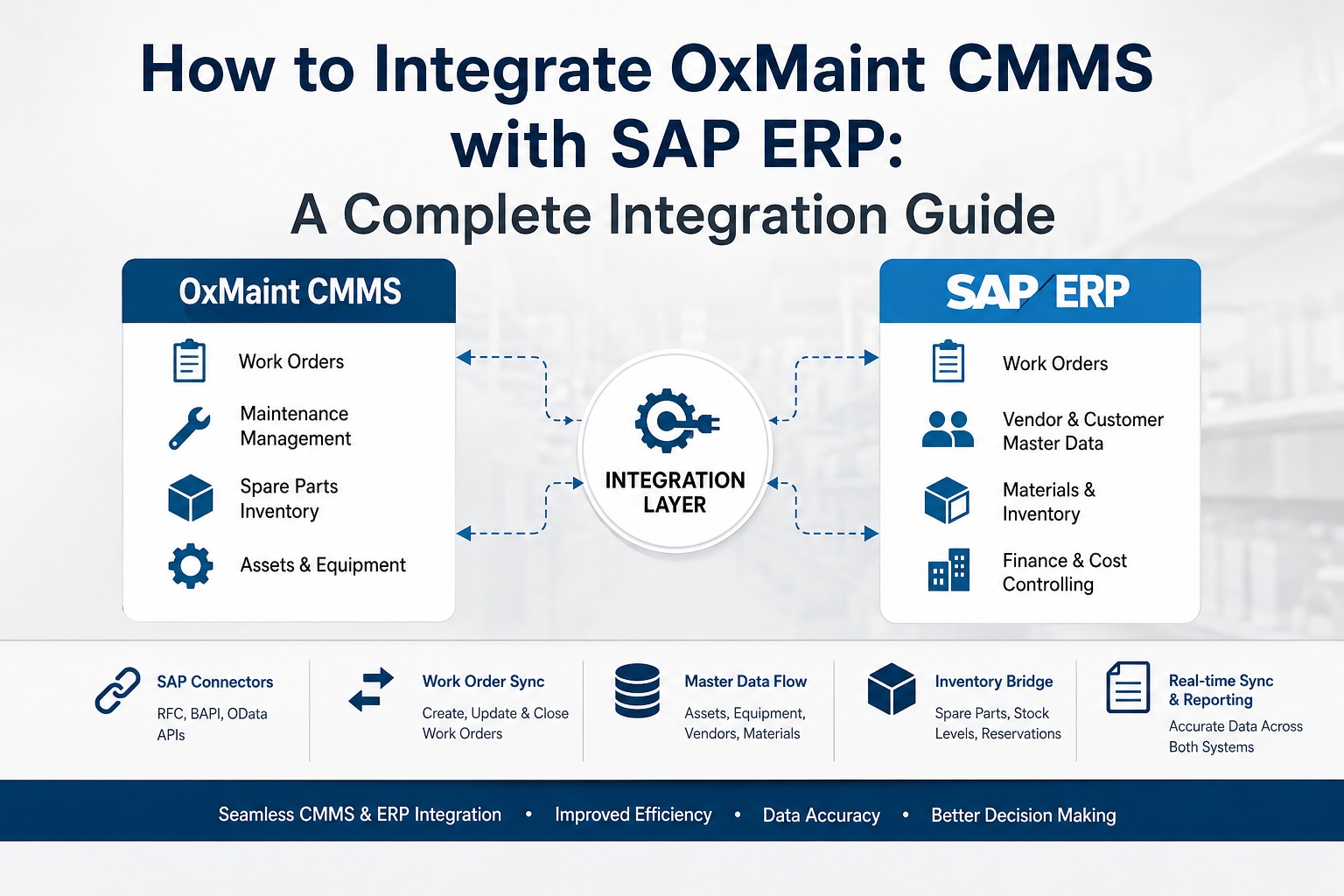
Connecting OxMaint CMMS to SAP ERP is not a single integration — it is a set of bidirectional data flows that close the gap between the shop floor and the financial system of record. This guide walks IT managers, ERP architects, and maintenance leaders through the exact protocols, BAPIs, OData endpoints, and sync patterns required to bridge work orders, equipment masters, spare parts, and cost postings between OxMaint and SAP. Every section is written for engineers who need to ship the integration, not evangelists who want to talk about it.
The Four Integration Protocols You Need to Know
SAP exposes four distinct interface layers that an external CMMS can use to talk to it. Each has a specific use case, performance profile, and best-fit data flow. A well-architected OxMaint-SAP integration uses all four in different places — not one universally. Get this layering right before writing a single line of mapping configuration.
Modern, upgrade-stable, cloud-native HTTP/JSON interface. Native to S/4HANA. Read and write supported. Best for real-time, transaction-safe operations.
Object-oriented business APIs with stable signatures and guaranteed backward compatibility. Sits on the RFC transport. Mandatory commit/rollback discipline.
Structured, asynchronous document exchange. Best for high-volume batch master data sync. Change-pointer driven. Native error queue and reprocessing.
Underlying transport for BAPIs. Direct RFC calls bypass the business object layer. Use only when no BAPI exists. bgRFC is preferred over deprecated tRFC/qRFC.
Reference Architecture: OxMaint to SAP Data Flow
The integration runs through three logical layers. SAP remains the system of record. OxMaint operates as the mobile-first execution layer for technicians and planners. A middleware layer in the middle handles authentication, retry, transformation, and audit logging. Every byte of data has a defined direction and a defined trigger.
The Six Data Flows That Carry 90% of the Value
A CMMS-ERP integration is not one connection. It is six bidirectional data flows, each solving a specific operational pain. Get these six right and you have captured the bulk of the integration's value before touching any edge cases.
Equipment & Functional Location Master Sync
SAP PM is the master for the physical asset hierarchy. OxMaint receives the equipment master and functional location tree at initial sync and on every change. Direction: SAP → OxMaint (one-way, with field-level CMMS overrides for non-financial attributes).
Work Order Bidirectional Sync
The most operationally critical flow. Planned work orders raised in SAP PM appear on the technician's OxMaint mobile app. Reactive work raised in OxMaint posts back to SAP as a new maintenance order. Status changes flow both ways in near real-time.
Time & Confirmation Posting
When a technician closes a job in OxMaint, labor hours, operation status, and final remarks post back to SAP PM as a confirmation. This is where most legacy integrations leak — manual re-keying introduces errors that take month-end close 3+ days to find.
Spare Parts & Material Master Bridging
OxMaint receives the material master from SAP MM as the parts catalog, including current stock levels and storage location. When parts are issued against a work order, OxMaint posts a goods movement back to SAP, deducting inventory in real-time.
Cost Center & Financial Settlement
Every confirmed work order generates cost — labor hours, parts, external services. These flow to the SAP cost center, internal order, or WBS element defined on the maintenance order. OxMaint never owns the cost master; it only writes to the cost objects SAP authorizes.
Notifications & Breakdown Reporting
When a technician or operator reports a breakdown in OxMaint, a PM notification is created in SAP — feeding the reliability engineer's failure analysis, MTBF/MTTR calculations, and warranty claim workflow. Codes flow from SAP catalog profiles into OxMaint dropdowns.
Field Mapping Reference: SAP PM ↔ OxMaint Objects
Half the work of a CMMS-ERP integration is the field-level mapping. The other half is agreeing on which system owns which attribute. Use this as the starting template for your data dictionary — extend it with custom fields and Z-tables specific to your SAP configuration.
| SAP Object / Table | SAP Field | OxMaint Field | Direction | Source of Truth |
|---|---|---|---|---|
| Equipment (EQUI) | EQUNR (equipment number) | Asset ID | SAP → OxMaint | SAP |
| Equipment (EQUI) | EQKTX (description) | Asset Name | SAP → OxMaint | SAP |
| Functional Location (IFLOT) | TPLNR (FL code) | Location Hierarchy | SAP → OxMaint | SAP |
| Order (AFKO) | AUFNR (order number) | Work Order ID | Bidirectional | SAP for planned; OxMaint for reactive |
| Order (AFKO) | AUART (order type) | WO Type | Bidirectional | SAP |
| Operation (AFVC) | VORNR (operation number) | Task Step | Bidirectional | SAP |
| Confirmation (AFRU) | ISMNW (actual hours) | Labor Hours Logged | OxMaint → SAP | OxMaint |
| Material (MARA) | MATNR (material number) | Part Number | SAP → OxMaint | SAP |
| Stock (MARD) | LABST (unrestricted stock) | Stock On Hand | SAP → OxMaint | SAP |
| Cost Center (CSKS) | KOSTL (cost center) | Cost Center | SAP → OxMaint | SAP |
| Notification (QMEL) | QMNUM (notification number) | Breakdown Report ID | Bidirectional | SAP |
Sync Patterns: Real-Time vs Batch vs Event-Driven
Not every flow needs to be real-time. Forcing real-time on master data sync wastes API quota; forcing batch on breakdown notifications kills response time. Match the sync pattern to the operational tempo of each object — and document the choice so future engineers understand the trade-off.
Real-Time (Sync OData/BAPI)
< 5 seconds round-trip
- Work order status change (Released, In Progress, Closed)
- Breakdown notification creation
- Stock availability lookup before parts issue
- Operator-to-AI breakdown chat trigger
- Critical asset condition alert
Event-Driven (Async)
Seconds to minutes
- Goods movement / parts consumption posting
- Time confirmation against work order
- Order operation completion
- Asset reading / meter posting
- Inspection round result upload
Batch (IDoc / Scheduled)
Hourly to daily
- Material master full refresh
- Cost center hierarchy refresh
- Vendor master replication
- Stock revaluation overnight
- Historical order archive sync
Authentication, Security & Network Topology
An integration that fails its security review never reaches production. Get the authentication, network path, and audit trail right before configuring a single mapping. SAP Basis teams sign off on this section, not the maintenance team.
OAuth 2.0 Client Credentials Flow
For OData and REST endpoints. OxMaint authenticates with SAP Gateway using a service account, scoped to read/write only the PM, MM, and CO endpoints required by the active data flows.
SAP Cloud Connector
For SAP on-premise systems. The Cloud Connector establishes an outbound TLS tunnel from your network to SAP BTP, eliminating inbound firewall openings. OxMaint never connects directly to the SAP application server.
Role-Based Authorization Object
A dedicated SAP role contains exactly the authorization objects required: I_AUART (order types), I_INGRP (planner groups), M_MATE_WRK (material/plant), K_CSKS (cost center). No SAP_ALL, ever.
Full Audit Logging
Every sync event captured with timestamp, source, target, payload size, and outcome. Conflict resolution rules configurable per object: CMMS-wins, ERP-wins, or human-review queue. Meets SOX, FDA 21 CFR Part 11, and internal audit requirements.
Rate Limiting & Backoff
OxMaint connector enforces per-endpoint rate limits aligned with SAP API quotas. Exponential backoff on 429 and 5xx responses. Dead-letter queue for messages that fail after configurable retries — never silent drops.
Deployment Timeline: 4-Week Pilot to 8-Week Plant Rollout
Most teams overestimate how long an integration takes because they have only seen the 12-month nightmares. A pre-built CMMS-SAP connector — not a custom-coded one — completes pilot in 2–4 weeks and full plant rollout in 6–8 weeks. Here is the realistic week-by-week plan.
Discovery & SAP Configuration Mapping
Audit existing SAP PM configuration, map functional locations and equipment hierarchies, identify in-scope order types, list cost centers and internal orders, agree on master data ownership rules.
Authentication & Connectivity Setup
Provision service account in SAP, configure Cloud Connector tunnel, exchange OAuth credentials, verify reachability of each required OData service or BAPI, run smoke tests on read-only endpoints.
Bidirectional Flow Configuration
Activate the six core flows. Configure field mappings against the data dictionary. Set conflict resolution rules per object. Connect to SAP DEV/QA environment first — never directly to PRD.
Pilot Cutover on One Line
Go live on a single production line or critical asset group. Validate data integrity across all six flows. Confirm confirmations, parts consumption, and cost settlements flow correctly to SAP. Daily standup with maintenance, IT, and SAP Basis.
Adjacent Lines & Edge Cases
Roll out to adjacent lines. Address custom fields, Z-tables, and any non-standard SAP transactions. Lock the data dictionary. Train planners on monitoring the sync dashboard.
Full Plant Rollout & Hypercare
Scale to the full plant. Move OxMaint connector to production SAP. Hypercare period with daily review of dead-letter queue. Hand over to operations with documented runbook.
Common Pitfalls & How to Avoid Them
Every CMMS-SAP integration that runs into trouble runs into the same handful of issues. Anticipate them. Most are not technical bugs — they are governance gaps masquerading as bugs.
Missing BAPI_TRANSACTION_COMMIT
BAPIs do not auto-commit. Forgetting the explicit commit after BAPI_ALM_ORDER_MAINTAIN or BAPI_GOODSMVT_CREATE means the data is never persisted. The integration appears to work; the records simply vanish.
Direct database reads instead of APIs
Some teams shortcut by reading SAP tables directly via JDBC or HANA SQL. This bypasses SAP business logic, breaks on upgrades, and is not operationally supported. Always use the released OData or BAPI layer.
Treating master data sync as bidirectional
Equipment and material masters belong to SAP. Letting the CMMS override SAP-owned attributes creates phantom records the auditor will never reconcile. Master data flows one way; only operational state is bidirectional.
Underestimating data cleansing effort
Most plants discover their SAP equipment master is 20–40% wrong the day the CMMS goes live, because the CMMS exposes it to technicians who actually use it. Budget for a cleansing sprint before pilot, not after.
Skipping the dead-letter queue
Network blips, lock timeouts, and authorization errors will occasionally fail. Without a dead-letter queue and reprocessing UI, those records disappear and reappear in month-end as unreconciled gaps.
SAP_ALL service account
Tempting in DEV; lethal in PROD. A scoped role with only the authorization objects required is non-negotiable. Document it. Review it quarterly.
Ready to Bridge OxMaint and SAP?
Get a working session with an OxMaint solutions engineer who has implemented SAP-CMMS sync for plants in your industry. We will map your specific SAP version, module setup, and chart of accounts before writing a single line of configuration.