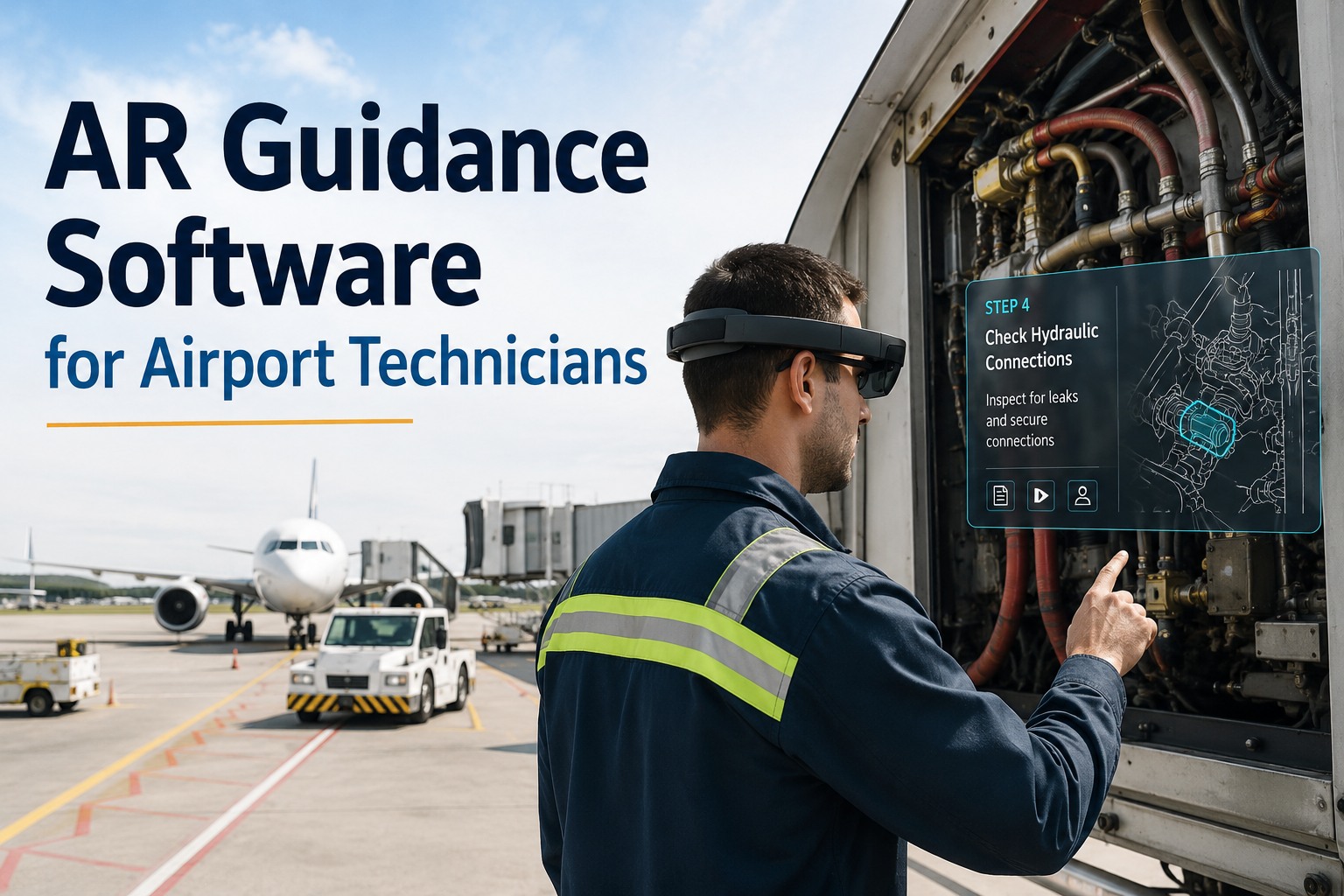
AR guidance for airport technicians has been oversold and under-delivered for years mostly by vendors demoing HoloLens headsets on scripted stage scenarios that never survive contact with a jet bridge in December. But the honest reality is that AR now genuinely earns its keep in specific airport MRO workflows: hands-free work-instruction overlay for BHS conveyor troubleshooting, remote expert guidance for GSE and airfield electrical repairs, torque-spec visualization for line-maintenance tasks, and voice-command documentation capture that eliminates the clipboard entirely. Airports deploying AR programs report 76% improvement in knowledge retention, 40% faster skill acquisition, 32% reduction in safety incidents, and 53% fewer procedural errors on complex tasks. What separates a working AR program from a stalled pilot isn't the hardware — it's whether the AR steps tie back to a real work order, whether the technician's competency is checked before dispatch, and whether the capture from the AR session becomes an audit-ready record. This guide covers where AR actually helps airport technicians, not where the demos say it does — and how OxMaint CMMS connects AR guidance sessions to work orders, competency profiles, and vendor performance data. Start free or book a demo to see AR-linked workflows live.
Aviation · Airport MRO · AR Guidance · CMMS 2026
AR Guidance Software for Airport Technicians
Where AR guidance actually helps airport technicians — with the best 2026 CMMS software. Top platforms delivering real productivity gains for BHS, GSE, electrical, and jet-bridge maintenance — not vendor demos on scripted scenarios.
+76%
Knowledge retention improvement vs classroom training
+40%
Faster skill acquisition for complex MRO procedures
-53%
Procedural errors reduced (USAF Manifest AR deployment)
-32%
Safety incident rate reduction during maintenance activities
Where AR Actually Helps — And Where It Doesn't
The honest split. AR is a genuine productivity tool for specific high-value airport workflows, and a distraction cost with negative ROI for others. Getting the deployment map right the first time is what separates a real program from a shelved pilot. Below is where AR earns its keep in airport MRO. Sign up free and OxMaint's aviation library ships with pre-configured AR-eligible task templates — you'll see which of your current PMs and work orders would actually benefit from AR guidance in your first workspace session.
✓ HIGH-VALUE USE CASES
Complex Procedural Guidance
Multi-step BHS troubleshooting, jet-bridge inspection, GSE hydraulic diagnostics — where forgetting step 7 of 24 means a rework or safety event.
Remote Expert Support
Junior tech on airfield, specialist 1,000 miles away — expert overlays annotations on tech's live view. Cuts callout costs and closes the skills gap.
Hands-Free Torque/Spec Reference
Line maintenance where the tech's hands are on the tool and the spec sheet would otherwise be on the floor. Voice-command lookup replaces clipboard flip.
Documentation Capture
Voice + photo capture at the work site — evidence goes straight to the WO, no retyping, no forgotten details at end-of-shift.
✗ LOW-VALUE USE CASES
Simple Repetitive Rounds
Daily walkdown checklists a seasoned tech has done 400 times — AR adds cognitive overhead, not productivity. Mobile checklist is enough.
High-Noise / High-Wind Ramp Work
Voice commands fail on the ramp near active aircraft. Headset visibility degrades in bright sun. Use tablet form-factor instead.
Emergency Response
Time-critical events — no time to boot up a headset, load a work instruction, or wait for connectivity. Voice radio + printed emergency procedure wins.
Compliance Signature Capture Alone
If AR is just replacing a paper sign-off with a digital sign-off, don't buy the headset — use mobile CMMS on the tech's phone.
The 5 Airport MRO Workflows Where AR Guidance Pays Back
Below are the five workflows where AR consistently delivers measurable ROI in real airport deployments — not vendor demos. Each has been implemented at scale with documented outcomes. Book a 30-minute demo and an OxMaint aviation specialist will walk these workflows against your specific airport asset mix — BHS, GSE, jet bridges, HVAC, airfield lighting, generator sets — and show you which two or three would pay back first before you commit to a trial.
01
BHS Conveyor Diagnostics
Baggage system faults isolate to specific belt sections, sensors, and drive motors. AR overlay shows fault code location, wiring diagram, and step-by-step isolation procedure on the tech's view. First-time-fix rate climbs, mean time to repair drops.
02
GSE Hydraulic & Electrical Troubleshooting
Belt loaders, pushback tractors, cargo loaders — remote expert can see what the tech sees, mark points on the live feed, guide the diagnosis without a physical visit. Cuts specialist callout costs and airside expert scheduling delays.
03
Jet Bridge Inspection & Repair
Complex mechanical assemblies with 30+ inspection checkpoints. AR shows checkpoint location, acceptance criteria, and torque spec at the point of inspection. Reduces missed steps, improves audit-trail evidence quality.
04
Airfield Electrical & Lighting
Substation switchgear, constant-current regulators, LED transitions — AR guides breaker racking, LOTO application, testing sequence. Cuts safety incidents and re-work on infrastructure a normal tech touches once a quarter.
05
HVAC & Terminal Infrastructure
Chillers, AHUs, RTUs, boilers — high-complexity assets where AR overlays P&IDs, refrigerant charge specs, and diagnostic sequences onto the physical unit. Especially valuable for less-frequent seasonal maintenance.
An AR Session That Doesn't Tie Back to a Work Order Is a Very Expensive YouTube.
The AR industry has plenty of impressive demos. What airports need is AR guidance that connects to the work order, checks technician competency before dispatch, captures evidence into the asset record, and feeds vendor performance data. OxMaint links AR sessions to the full MRO discipline — competency check, WO context, evidence capture, and cost against the asset that consumed the spend.
The AR Guidance Value Chain — Session to Work Order
An AR session in isolation is a demo. An AR session tied into the maintenance workflow is a program. Below is the value chain that separates the two — the missing link every stalled AR pilot has skipped. Sign up free and OxMaint's aviation library supports AR device integrations from the major vendors (HoloLens 2, Magic Leap, Vuzix) and connects sessions to work orders, competency records, and evidence archives natively — no bespoke integration engineering.
1
Work Order Assigned
CMMS dispatches WO to tech's device — with the AR-enabled procedure attached.
→
2
Competency Check
System verifies tech is certified for this task class before session starts.
→
3
AR Session Execute
Step-by-step overlay on the equipment. Voice + gesture navigation. Remote expert on-call.
→
4
Evidence Capture
Photos, voice notes, torque values captured at each step — attached to WO automatically.
→
5
WO Close + Cost Roll-Up
Time, parts, vendor cost captured against the asset. Feeds MRO cost discipline dashboard.
Hardware Reality — What Actually Works Airside
Vendor stage demos always use HoloLens 2 in ideal lighting. Actual airport MRO happens in low-light hangars, bright ramp glare, wind, noise, and gloved hands. Below is the honest device-to-workflow map. Book a scoping call and an OxMaint aviation engineer will walk hardware selection against your specific work environments — you'll leave with a device-to-workflow map before you commit to a hardware purchase.
Microsoft HoloLens 2
✓ Best for indoor hangar / workshop / terminal-side complex tasks
✗ Struggles airside in bright sun, wind, over-ear PPE conflicts
Magic Leap 2
✓ Better outdoor visibility than HoloLens, lighter form factor
✗ Smaller field of view, ecosystem still maturing for aviation
Vuzix / RealWear Monocular
✓ Rugged, hard-hat compatible, works in noise/dust/rain
✗ Not true AR overlay — head-up display style, not spatial anchoring
Tablet / Phone AR
✓ Cheap, familiar, works everywhere, no PPE conflict
✗ Not hands-free — but often the right answer for 60%+ of tasks
Vendor Demo Promises vs. What OxMaint-Backed AR Actually Delivers
Every AR vendor pitch sounds identical. The difference shows up 90 days later, when the pilot either goes into production or gets quietly shelved. Below is the honest comparison. Start free — no credit card, unlimited users, and the aviation library ships with AR-eligible workflows pre-mapped, so you can prove the value on real tasks before you sign a hardware contract.
The airports getting real ROI from AR aren't the ones buying the most headsets — they're the ones connecting AR sessions to the same discipline that runs their MRO cost, competency, and audit programs. Start your free forever workspace to build your first AR-integrated workflow this week, or book a demo to see AR sessions driving live work orders on a similar airport operation before you commit.
"
We piloted AR headsets for jet-bridge and BHS maintenance for six months on standalone software and got exactly one benefit: senior techs could sometimes remote-support junior techs. Everything else — the training content, the checklists, the evidence — lived in a silo. When we moved the AR sessions into OxMaint as the wrapper, competency checks got enforced before any session started, evidence flowed into the WO automatically, and vendor callouts dropped meaningfully because our juniors were getting expert overlay instead of a specialist truck-roll. First-time-fix on BHS troubleshooting is up 28%, and I can finally tell my finance director what an AR headset actually costs per closed WO instead of hand-waving about "productivity."
Head of Airport Facilities Engineering · 42-Gate International Airport · Northern Europe
Frequently Asked Questions
Does AR actually work in airport MRO or is it still vendor hype?
Both. AR delivers measurable ROI on specific workflows — complex procedural guidance, remote expert support, torque-spec reference, evidence capture — with documented outcomes of 76% knowledge retention improvement, 40% faster skill acquisition, and 32% safety incident reduction. AR is not a fit for simple repetitive rounds, high-noise ramp work, or emergency response. The vendor hype problem is deploying AR to the wrong workflows and then blaming the technology when ROI doesn't show.
Do I have to buy expensive AR headsets to get value?
No. Roughly 60% of airport AR use cases are equally well served by tablet or phone-based AR — cheaper, familiar, no PPE conflict, and works in every environment. Wearable headsets (HoloLens 2, Magic Leap 2) earn their premium only on hands-free-critical tasks. Start with mobile AR on existing devices to prove the workflow value before committing to hardware CAPEX.
Sign up free to configure mobile AR workflows on existing devices.
Which AR headset works best airside?
Honest answer: none of them work perfectly airside. HoloLens 2 struggles in bright sun and conflicts with over-ear hearing PPE. Magic Leap 2 handles outdoor light better but has a smaller field of view. Vuzix and RealWear monocular displays are rugged and hard-hat compatible but aren't true spatial AR. For most airside use cases, ruggedized tablet AR is the pragmatic choice. Headsets shine indoor (hangar, workshop, terminal-side).
How does OxMaint integrate with AR platforms?
OxMaint integrates with major AR platforms (Manifest/Taqtile, Scope AR, AR Genie, Nsflow) via API. Work orders push to the AR device with the procedure attached, competency check runs before session unlock, evidence captured during the session flows back into the WO record. Vendor lock-in is avoided — swap AR platforms without losing the CMMS integration.
What's the typical ROI timeline for an AR + CMMS program?
Airports typically see full ROI in 9-15 months on well-scoped deployments. Primary value drivers are avoided specialist callout costs (remote expert overlay), faster first-time-fix, reduced procedural rework, and safer execution on complex low-frequency tasks. A single avoided GSE fleet-wide field visit ($8K-$20K in specialist travel + downtime) often pays for months of AR platform cost.
Book a demo for a workflow-specific ROI estimate.
Does OxMaint support Part 139 and EASA compliance evidence?
Yes. Every AR-driven work order captures the required evidence chain — timestamped procedure execution, technician e-signature, competency verification, photos and voice notes at each step, and linked corrective actions — exportable as an audit-ready package for Part 139 self-inspection programs, EASA Part-ADR aerodrome maintenance obligations, and internal reliability governance.
Is a credit card or CAPEX approval needed to start?
No. OxMaint's free forever plan requires no credit card, no CAPEX request, and no consulting engagement — you can
sign up in under 2 minutes and configure your first AR-eligible workflow on existing mobile devices the same shift. Aviation asset templates ship pre-built for BHS, GSE, jet bridges, terminals, and airfield infrastructure.
Skip the Headset Demos. Build AR Where It Actually Pays Back.
OxMaint connects AR guidance sessions to the full airport MRO discipline — work orders, competency checks, evidence capture, vendor cost tracking, and Part 139 / EASA audit trails. Buy hardware only where the workflow proves the value. Start free — no credit card, unlimited users, forever. Or book a demo for an honest workflow-to-hardware assessment before you sign anything.