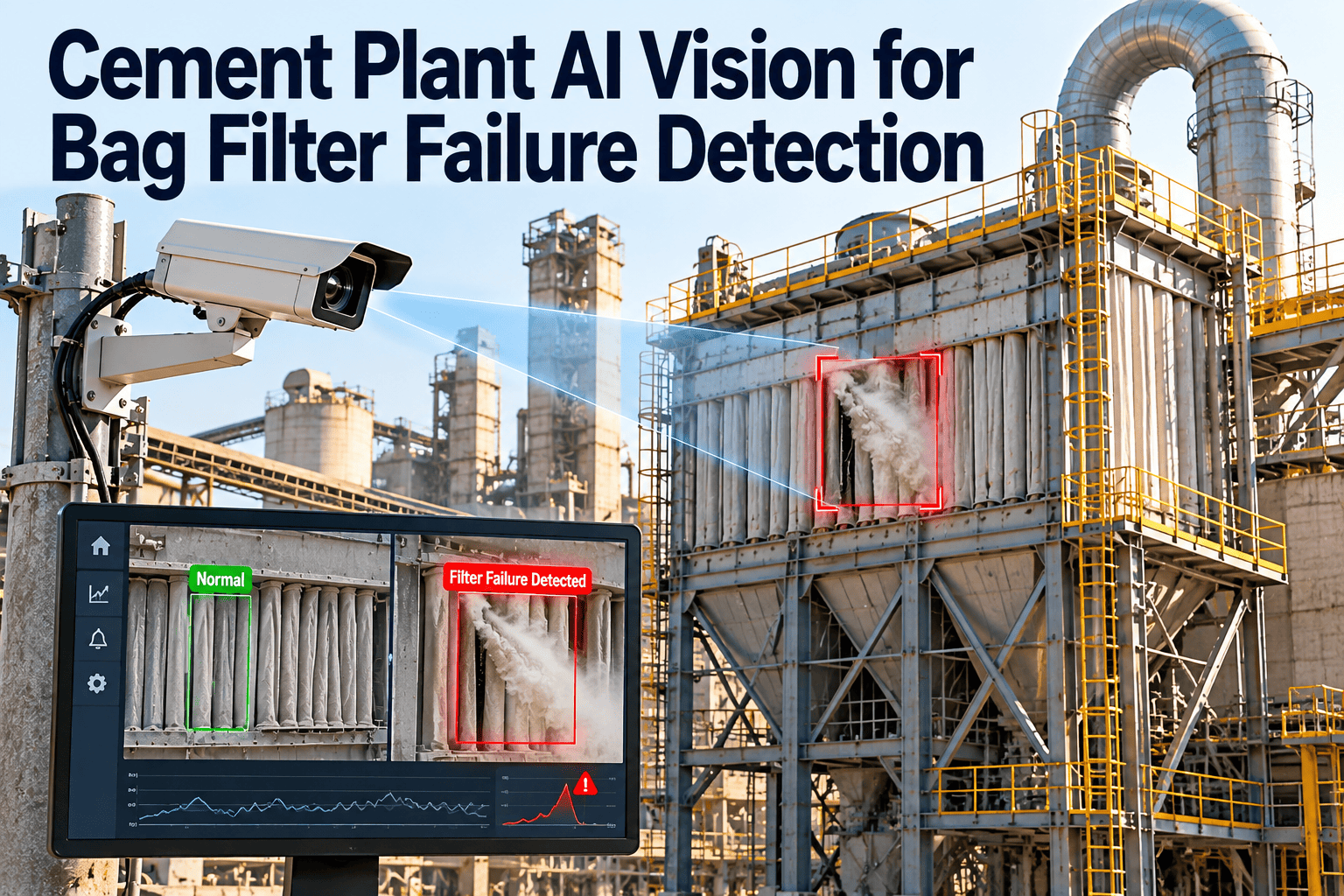
A single torn bag in a cement plant baghouse can start as a faint change at the stack and end as an emissions excursion, a stressed fan, and a rushed shutdown. Manual checks and periodic readings often catch the problem late, because failures grow between inspection rounds. AI vision adds continuous eyes on the clean side, the hopper and the ductwork. This page explains what it detects, where its limits are, and how a connected maintenance workflow turns every alert into verified work.
Cement Plant AI Vision for Bag Filter Failure Detection
Dust control equipment must perform every hour the kiln, mills and coolers run. Oxmaint connects AI vision alerts, filter condition data, mobile inspections and work orders, so a suspected bag failure is located, repaired and recorded before it becomes a compliance event.
Why bag filter failures escalate so quickly
Dust escapes the clean side
A damaged bag lets dust pass through, raising emissions at the stack and coating the clean-air plenum.
Compliance exposure
Emission limits and permit conditions apply continuously, so even short excursions create reporting and investigation work.
Fan and process stress
Abrasive dust on downstream equipment, unstable draft and higher fan load can reduce kiln or mill stability.
Unplanned repair
Finding a failed bag late means isolating compartments under pressure, with limited time and spare parts.
How cement plant baghouses fail, and where vision helps
| Failure mode | Common cause | Typical symptom | Vision detection value |
|---|---|---|---|
| Torn or holed bag | Abrasion, cage defects, over-cleaning | Dust at stack or clean plenum | Strong |
| Bag or cage damage at the seal | Poor installation, corrosion | Localized leakage, intermittent puffs | Strong |
| Hopper or duct leak | Corrosion, worn seals, bridging | Visible dust, thermal anomalies | Strong |
| Blinded bags | Moisture, oil, low temperature | Rising pressure drop | Partial |
| Pulse valve or diaphragm fault | Wear, dirty compressed air | Uneven cleaning, local blinding | Partial |
| Acid dew point corrosion | Low gas temperature with acid gases | Shell corrosion, repeated bag damage | Indirect |
| Inlet abrasion | High velocity and poor baffle condition | Repeated failure near the inlet | Indirect |
Vision is strongest where failures are visible
Leakage and hot spots show up in images, while blinding and valve faults show up mainly in pressure and cleaning data. The best programs combine both.
Why cement plant bags fail earlier than planned
| Root cause | How it damages bags | Maintenance response |
|---|---|---|
| Filter media not matched to conditions | Temperature or chemistry exceeds what the media tolerates | Review media against real operating temperature and gas chemistry |
| Temperature excursions | Heat spikes or cold spells cause degradation or condensation | Track gas temperature and investigate excursions |
| Over-cleaning or poor pulse settings | Excess pulse energy wears the fabric and cages | Verify pulse pressure, duration and interval |
| Dirty or wet compressed air | Moisture and oil blind the media and stress valves | Maintain dryers, filters and drains |
| Installation errors | Poor seating and damaged cages create leak paths | Use install checklists and inspect after changes |
| Inlet abrasion | High-velocity dust cuts bags near the inlet | Inspect baffles and wear plates |
Three vision views that catch different bag filter problems
Visible emission behavior
- Changes in plume density or color
- Intermittent puffs linked to cleaning cycles
- Dust deposits at clean-air outlets
Heat and leakage patterns
- Hot spots on ducts, doors and hoppers
- Temperature changes suggesting air ingress
- Compartment temperature differences
Material and leak signs
- Dust accumulation around seals and doors
- Bridging or blocked discharge signs
- Spillage that points to leaking equipment
Where to place cameras for useful bag filter coverage
| Location | What it should see | Practical note |
|---|---|---|
| Stack or outlet duct | Plume density and color changes | Avoid glare and background clutter, and clean the lens regularly |
| Clean-air plenum access | Dust deposits and localized leakage signs | Needs safe mounting and clear lighting |
| Thermal view of doors and ducts | Hot spots and air ingress patterns | Set emissivity assumptions and keep the field of view stable |
| Hopper discharge area | Spillage, bridging and rotary valve leaks | Protect housings from dust and impact |
Fix the view before tuning the model
Consistent framing, lighting and lens cleanliness improve results more than any later model adjustment. Document each camera position in the asset record so a moved camera never goes unnoticed.
What differential pressure is telling you alongside the images
| Pressure drop pattern | Possible meaning | Useful next step |
|---|---|---|
| Steady rise over days | Blinding, high dust load or weak cleaning | Check cleaning settings, air quality and inlet conditions |
| Sudden drop | Bag failure, bypass or a leak | Compare with camera alerts and inspect the compartment |
| Erratic readings | Pulse valve problems or transmitter faults | Check valves, tubing and sensor condition |
| High after restart | Condensation or wet dust | Review warm-up procedure and gas temperature |
What each team needs from a bag filter monitoring system
Maintenance
Exact compartment, likely failure type, images and a work order with parts, so the repair starts with the right information.
Environmental and EHS
Time-stamped evidence of detection, response and repair that supports permit reporting and incident review.
Operations
Early notice of process risk, so load and draft can be managed before a compartment must be isolated.
From camera frame to closed work order
Capture
Cameras record stack, thermal and hopper views on a fixed schedule or continuously.
Analyze
Models compare frames with the normal baseline and flag deviations.
Correlate
Alerts are checked against pressure drop, temperature and cleaning data.
Alert
Confirmed anomalies reach the right team with images and location.
Act
A work order assigns inspection, leak testing and bag or cage replacement.
Learn
Findings improve alert rules and bag life records for that compartment.
How to triage an AI vision alert
Confirmed
Inspection or leak testing finds the failed bag or seal. The work order moves to repair, and the finding is logged against the compartment.
False alert
Steam, glare or a dirty lens caused the flag. Record the cause and adjust view, cleaning or rules to prevent a repeat.
Inconclusive
Keep the alert open, increase checks and review pressure drop and emission readings until the situation is clear.
AI vision compared with other bag filter monitoring methods
| Method | Strength | Limitation | Best role |
|---|---|---|---|
| Manual inspection rounds | Finds physical damage and housekeeping issues | Periodic, depends on access and experience | Verification and repair |
| Opacity or particulate monitors | Quantifies emissions for compliance | Shows that dust is present, not where | Regulatory monitoring |
| Pressure drop trends | Shows cleaning and blinding behavior | Weak on small leaks | Filter health trend |
| AI vision | Continuous visual coverage and early anomaly flags | Needs baselines, good views and validation | Early warning and location clues |
Turn bag filter alerts into verified repairs, not open questions
See how alerts, inspections, spares and records connect in one maintenance system.
What AI vision cannot do, and how to validate it
It supports, not replaces, compliance monitors
Regulatory emission measurement stays with approved instruments. Vision adds early warning and location clues around them.
Conditions affect image quality
Steam, rain, glare, night lighting and camera dust can cause false alarms or missed events, so placement and cleaning matter.
Alerts need physical confirmation
Confirm suspected leaks with inspection and, where appropriate, leak testing methods such as fluorescent powder tests.
Validation checklist before you trust an alert
- Compare each alert with pressure drop and cleaning data.
- Record whether the alert was confirmed, false or inconclusive.
- Review false alerts weekly and adjust views or rules.
- Clean camera housings and lenses on a fixed schedule.
- Repeat the baseline after major filter or process changes.
Planning a compartment bag change without losing time
Isolate safely
Isolate the compartment, cool it as needed and apply lockout under your site procedure.
Confirm the entry permit
Check confined space, dust and hot surface controls before anyone enters.
Locate the failure
Use leak test results and images to find the damaged bag, cage or seal.
Replace and inspect
Replace damaged parts and inspect neighbors, cages and tube sheet seating.
Restart and verify
Return the compartment to service and check pressure drop and camera view.
Record the change
Log parts, cause and photos so bag life history stays reliable.
Where manual bag filter inspection falls short
- Rounds happen at intervals, while a bag can fail minutes after the technician leaves.
- Clean-side access is often limited, so small leaks are hard to see without shutting down.
- Findings depend on who is inspecting and how much time they have.
- Notes on paper rarely link to the compartment and bag position that failed.
Vision fills the gaps between rounds
Cameras do not replace technicians. They tell technicians when and where to look, so rounds focus on confirmation and repair instead of searching.
Fire, explosion and dust safety still come first
Baghouses serving fuel grinding and handling systems have extra fire and explosion protection needs. Camera-based detection does not replace explosion venting, temperature monitoring, spark detection or the procedures your site already follows.
Use vision as one more layer
- Keep protection systems on a tested inspection schedule.
- Treat thermal hot spot alerts as urgent until inspection rules out combustion.
- Record every protection system test in the same asset history.
Data to record every time a bag or cage is replaced
- Compartment and exact bag position.
- Reason for replacement and how the fault was detected.
- Media type, supplier and batch or lot reference.
- Operating hours since the previous replacement.
- Condition of cages, tube sheet and seals.
- Photos of the failed part and the installed replacement.
Keeping dust control records that stand up to review
What regulators and auditors ask for
- When an anomaly was detected and by which method
- Who inspected, what was found and when it was fixed
- Which compartment, bags, cages or valves were replaced
- Calibration and maintenance of monitoring equipment
Why records matter
- Requirements vary by country, state and permit
- Time-stamped closeout supports incident investigation
- Bag life history supports better replacement planning
- Repeat failures become visible across compartments
Baghouse maintenance tasks that support vision-based detection
| Frequency | Task | Purpose |
|---|---|---|
| Daily or per shift | Review pressure drop, cleaning cycle and camera alerts | Spot changes early |
| Weekly | Check compressed air supply, drains and pulse valve operation | Prevent uneven cleaning |
| Monthly | Inspect hopper discharge, access doors and seals | Reduce leaks and bridging |
| Quarterly | Verify transmitters, camera views and alert rules | Keep data reliable |
| At planned stops | Inspect bags, cages, tube sheets and inlet baffles | Replace worn parts on schedule |
Metrics that show whether bag filter reliability is improving
A practical pilot for AI vision on one baghouse
Weeks 1 to 4: prepare
- Select the baghouse with the most repeat failures.
- Model compartments and bag positions as assets.
- Capture baseline pressure drop and images.
- Agree who receives and confirms alerts.
Weeks 5 to 12: validate
- Classify every alert as confirmed, false or inconclusive.
- Tune camera views, cleaning and alert rules.
- Link confirmed alerts to work orders and parts.
- Review detection lead time against past failures.
Trends shaping dust control monitoring in cement
- Edge-based image analysis lets cameras flag anomalies locally, without streaming everything to a central system.
- Plants are combining camera data with pressure, temperature and cleaning-cycle data to reduce false alerts.
- Environmental expectations keep rising, so proof of fast detection and repair carries more weight.
- Smaller maintenance teams need alerts that already say where to look, not general warnings.
How Oxmaint connects AI vision alerts to maintenance action
AI vision for bag filters: frequently asked questions
Can AI vision detect a failed bag by itself?
It can flag likely leakage and its area, but physical inspection confirms the exact bag or seal.
Does vision replace opacity or particulate monitors?
No. Approved monitors remain the compliance record. Vision adds early warning around them.
How do alerts become maintenance tasks?
Confirmed alerts create work orders tied to the compartment. Set up your baghouse assets to try it.
What conditions cause false alarms?
Steam, glare, rain and dirty lenses are common causes. Good placement and weekly review reduce them.
Where should we start?
Choose the baghouse with the worst failure history. Book a demo to plan the pilot.
Detect bag filter failures early and prove they were fixed
Bring alerts, inspections, spare parts and compliance records into one workflow, and give your environmental and maintenance teams the same clear picture.