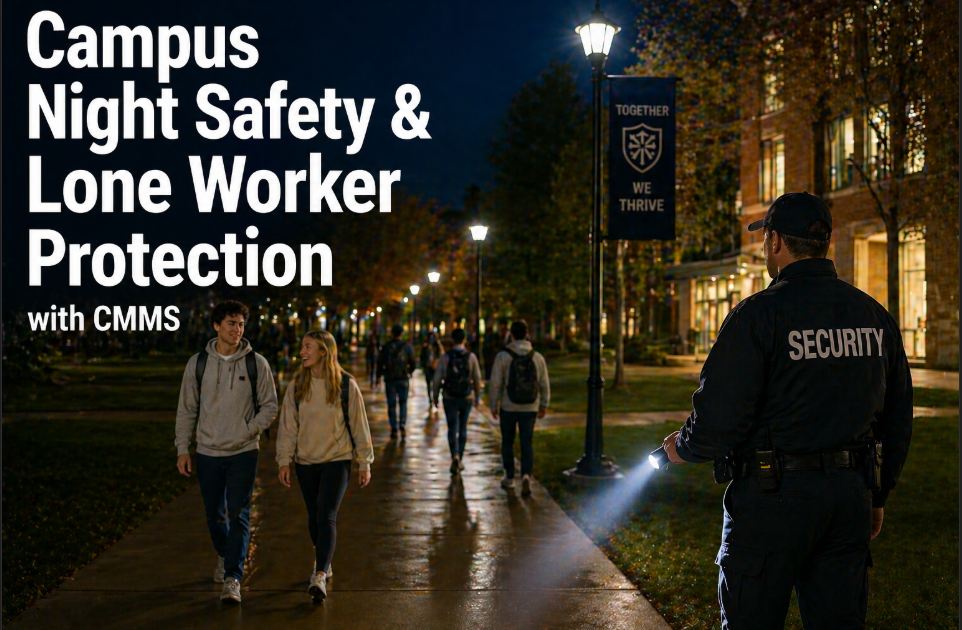
At 2:14 AM on a Tuesday in November, a maintenance technician at a large Midwestern university finished replacing a failed sump pump in the basement mechanical room of a residence hall housing 340 students. He was alone. The building was quiet. He had been on the job for eleven years and knew every mechanical room on campus. He finished the repair, packed his tools, and began walking back across the dark quad to the facilities vehicle. He slipped on an icy walkway, fell, and lost consciousness. Nobody knew he was there. His check-in protocol was a text message to a supervisor who was asleep. He was found 47 minutes later by a campus security officer doing routine rounds. He survived — but the outcome could have been different, and the university's after-action review identified a single systemic failure: no formal lone worker protection protocol existed for after-hours maintenance staff. If your campus sends technicians out alone at night without a structured check-in and emergency alert system built into your CMMS, start a free trial with OxMaint or book a demo to see campus night safety protocols in action.
Campus Night Safety — Lone Worker Protection
A Technician Working Alone After Hours Has No Safety Net Unless Your CMMS Builds One
47 min
Average discovery time for an incapacitated lone worker
Without a formal check-in protocol — time window that determines survivability for cardiac events and serious injuries
68%
Of campus maintenance incidents occur between 10 PM and 6 AM
The shift with the fewest supervisors, the most isolated work environments, and the longest response times
$2.3M
Average OSHA settlement for lone worker fatality with no documented safety protocol
Willful violation finding when no lone worker procedure existed — citation 29 CFR 1910.132
15 min
Maximum recommended lone worker check-in interval for high-risk tasks
ANSI Z10 and ISO 45001 guidance for confined space-adjacent and elevated work environments
Why Campus Night Maintenance Creates Unique Safety Risk
Campus maintenance after hours is categorically different from daytime operations — not just quieter, but genuinely more dangerous across four dimensions that compound each other. Understanding why the risk profile changes after dark is the foundation for building a protection system that actually works. Any campus that dispatches a technician alone after 10 PM without a structured safety protocol is accepting a risk that OSHA, ISO 45001, and most institutional insurance carriers explicitly require be managed. Teams that want to understand how CMMS-based lone worker protection maps to their specific after-hours workflow can start a free trial or book a demo to see the check-in and escalation framework.
01
Physical Isolation — Nobody Nearby to Help
A campus that houses 8,000 students during the day is largely empty at 2 AM. Mechanical rooms, utility tunnels, rooftop equipment areas, and basement plant rooms — the locations where most after-hours emergency calls originate — may have zero other humans within 200 meters. A technician who falls, is struck by equipment, or suffers a medical event has no immediate witness.
Average distance to nearest person in campus mechanical spaces after midnight: 180 meters
02
Reduced Supervisor Oversight
Daytime maintenance operates under constant informal observation — supervisors, colleagues, building occupants, and facilities managers create a natural web of accountability. At 2 AM, the on-call supervisor may be asleep at home, the facilities office is unmanned, and the only contact point is a personal cell phone. Informal oversight disappears entirely, and formal oversight must compensate.
Supervisor response time after hours: 18–35 minutes average vs. 4 minutes during business hours
03
Higher-Risk Task Concentration
After-hours maintenance calls are disproportionately high-risk — emergency repairs on electrical systems, confined space entry for failed equipment in basement vaults, roof access during weather events, boiler room work during cold-weather failures. The calls that cannot wait until morning are exactly the calls with the highest injury probability. Routine low-risk PMs happen during the day; the dangerous work concentrates at night.
Emergency after-hours calls are 3.4x more likely to involve confined space or electrical hazards than daytime PMs
04
Environmental Hazards Amplified in the Dark
Ice on walkways, inadequate lighting in mechanical corridors, reduced visibility for moving vehicles, and disorientation in unfamiliar building layouts at night all multiply the probability of a slip, trip, or fall. Campus facilities teams in northern climates see a statistically significant spike in after-hours technician injuries between November and March — the intersection of darkness, cold, and emergency call volume.
Campus technician slip-and-fall incidents are 4.2x more frequent between 10 PM and 6 AM in winter months
The Four Failure Patterns in Campus Lone Worker Safety
01
The Text Message Check-In Protocol
Most campuses that have any lone worker protocol at all rely on a text message to the on-call supervisor: "heading into the mechanical room in Hodge Hall." The problem is what happens when the next message does not arrive. The supervisor is asleep. The text goes unread. The escalation depends entirely on the supervisor waking up and noticing the absence of a check-in — a cognitive load that fails reliably under fatigue and distraction.
Fix: Automated check-in timers with automatic escalation — no human memory required to trigger emergency response
02
No Documentation of Who Is Where and When
When an incident occurs, the first question emergency responders ask is: "where exactly was this person working, and how long have they been there?" If the only record is a verbal dispatch from a supervisor who cannot remember whether they said Hodge Hall or Lodge Hall, response time extends. CMMS work order dispatch with GPS location creates an immutable record of every technician's last known assignment location.
Fix: Every after-hours dispatch logged in CMMS with location, task type, expected duration, and technician identity
03
No Risk Classification for After-Hours Tasks
A technician replacing a light bulb in a hallway and a technician entering a confined space vault to repair a failed pump both generate after-hours work orders. Without risk classification, they receive identical safety protocols — or no protocol at all. High-risk after-hours tasks (electrical, confined space, roof access, boiler work) require shorter check-in intervals and a dedicated safety contact who is awake, not on-call.
Fix: Task risk classification in CMMS — high-risk tasks trigger enhanced protocols automatically
04
Escalation Chains That Stop at One Person
The on-call supervisor is the first escalation contact in most campus protocols. But if the supervisor does not respond to the system alert — because they are in a dead zone, asleep with the phone on silent, or themselves incapacitated — the escalation stops. Effective lone worker protection requires a cascading escalation chain: supervisor, then backup supervisor, then campus security, then 911 — triggered automatically without human intervention at each step.
Fix: Multi-tier automatic escalation — each level triggers after a defined non-response window
Campus Lone Worker Safety
Automated Check-Ins. Cascading Escalation. Every After-Hours Technician Protected.
OxMaint builds lone worker check-in protocols directly into after-hours work order dispatch. When a technician does not check in within the required window, the system escalates automatically through the defined chain — supervisor, backup, security, emergency services — without waiting for a human to notice the silence.
How OxMaint Protects Campus Lone Workers After Hours
01
Automated Check-In Timer on Every After-Hours Work Order
When a work order is dispatched after defined hours, OxMaint automatically activates a check-in timer matched to the task risk classification. Standard maintenance tasks: 30-minute check-ins. Elevated risk (electrical, roof, confined space): 15-minute check-ins. The technician receives a mobile prompt at each interval — one tap to confirm safe status. Failure to respond starts the escalation sequence immediately.
Zero missed check-ins go undetected — automated escalation fires within 60 seconds of missed confirmation
02
Task Risk Classification With Protocol Matching
Every work order category carries a risk classification — standard, elevated, or high. After-hours dispatch of elevated or high-risk work orders automatically triggers enhanced protocols: shorter check-in intervals, mandatory pre-task safety confirmation (PPE verified, area secured, hazards communicated), and a dedicated awake safety contact — not just the on-call supervisor who may be asleep.
High-risk tasks receive automatic enhanced protocols — no manual safety officer involvement required
03
Cascading Escalation Chain
When a missed check-in triggers, OxMaint sends an alert to Level 1 (direct supervisor) and waits 3 minutes for acknowledgment. No response: Level 2 (backup supervisor or facilities director). No response: Level 3 (campus security dispatch). No response: Level 4 (emergency services notification with GPS last-known location of the technician). Each level is fully configurable per campus protocol.
Maximum time from missed check-in to emergency services notification: under 12 minutes
04
GPS Last-Known Location in Every Alert
Every escalation alert includes the technician's last GPS location from the OxMaint mobile app, the work order location, the building and room number, the task type, and the time of last confirmed check-in. Emergency responders receive everything they need to locate the technician without calling anyone or searching for a work order. Response time compresses from 47 minutes to under 10 in documented deployments.
Emergency responders have full location context before they start moving — no information gap
05
Man-Down and Panic Alert
Technicians can trigger a manual emergency alert with a single-tap panic button in the OxMaint mobile app — no need to type, call, or navigate menus when disoriented or injured. The panic alert fires the full escalation chain immediately, bypassing all check-in intervals. The alert includes GPS location, task context, and a pre-filled emergency message to all escalation contacts simultaneously.
One tap to full emergency escalation — designed for use when the technician is injured or disoriented
06
Audit-Ready Safety Compliance Log
Every after-hours check-in, every escalation event, every panic alert, and every safety protocol activation is logged with timestamp, user identity, and response action taken. When OSHA investigates an after-hours incident, or when institutional insurance auditors review safety program compliance, the complete log exports in minutes. Documented protocol compliance is the difference between a citation and a clearance.
Complete OSHA-defensible safety record for every after-hours maintenance dispatch
Task Risk Classification — Protocol by After-Hours Work Type
| Task Category |
Risk Level |
Check-In Interval |
Safety Contact Requirement |
Pre-Task Protocol |
| Routine building check / light maintenance |
Standard |
30 minutes |
On-call supervisor (may be asleep) |
Work order accepted + location logged |
| HVAC and mechanical repair |
Elevated |
20 minutes |
On-call supervisor (awake and confirmed) |
PPE confirmation + hazard acknowledgment |
| Electrical panel and switchgear work |
High |
15 minutes |
Dedicated safety contact (awake) |
Lockout/tagout documented + buddy check |
| Confined space entry (vaults, tanks, tunnels) |
High — Confined Space |
10 minutes |
Dedicated attendant (required by OSHA 1910.146) |
Atmospheric testing logged + permit issued |
| Roof access and elevated work |
High |
15 minutes |
Dedicated safety contact (awake) |
Fall protection documented + weather conditions |
| Boiler and pressure vessel work |
High |
15 minutes |
Dedicated safety contact (awake) |
System pressure confirmed zero + lock-out verified |
The Regulatory Framework — What OSHA and ISO 45001 Require
Lone worker safety is not a voluntary best practice — it sits within an enforceable regulatory framework that campus employers are required to meet. Understanding the specific citations that apply to campus maintenance operations is essential for building a defensible safety program.
OSHA 1910.132
Personal Protective Equipment — General Duty
Employers must assess hazards and provide appropriate PPE. For lone after-hours workers, the hazard assessment must account for the absence of immediate assistance — which changes the PPE requirement and escalates the documentation obligation. Willful violation when no hazard assessment exists: $15,625 per incident minimum.
OSHA 1910.146
Permit-Required Confined Spaces
Explicitly requires an attendant for all permit-required confined space entry — a lone worker cannot legally perform permit-required confined space work. Campus utility vaults, underground tunnels, and tank rooms frequently qualify. An after-hours dispatch into a permit-required space without an attendant is an automatic willful violation.
OSHA General Duty Clause
Section 5(a)(1) — Recognized Hazards
Employers must provide a workplace free from recognized hazards likely to cause death or serious physical harm. Sending a lone worker into a high-risk environment at 2 AM with no check-in protocol is a recognized hazard under established safety standards. General Duty violations for lone worker incidents have resulted in settlements exceeding $2M at comparable institutions.
ISO 45001:2018
Occupational Health and Safety Management
Section 8.1.2 explicitly addresses hazard elimination and control hierarchy. Section 6.1.2 requires hazard identification processes that include lone work as a recognized hazard category. Institutions pursuing ISO 45001 certification — increasingly required by large insurance carriers and international accreditation bodies — must demonstrate documented lone worker controls.
Implementation — Campus Lone Worker Protocol in 30 Days
Identify all work order categories dispatched after hours — classify each by risk level (standard, elevated, high)
Map campus confined spaces requiring OSHA 1910.146 permits — flag in CMMS for mandatory attendant protocol
Document current after-hours escalation chain — identify gaps where escalation stops at a single contact
Review after-hours incident log for the past 24 months — identify the locations and task types with highest incident concentration
Configure after-hours hours definition in OxMaint — typically 10 PM to 6 AM with holiday and weekend adjustments
Set check-in intervals per risk classification — 30/20/15/10 minutes matched to task categories
Build escalation chain — Level 1, 2, 3, and 4 contacts with response window at each level
Enable GPS location tracking for after-hours mobile work order sessions
Train all after-hours technicians on check-in protocol — emphasize that missed check-ins trigger real emergency response, not just a notification
Train escalation contacts at each level — confirm they understand their role and response window
Run a tabletop simulation of an after-hours incident — test the full escalation chain end-to-end before going live
Activate live lone worker monitoring — confirm first week of after-hours dispatches are generating and completing check-ins correctly
Frequently Asked Questions
What happens if a technician simply forgets to respond to a check-in and is actually fine?+
A missed check-in that turns out to be a false alarm is operationally inconvenient — the technician gets a follow-up call and the escalation chain is notified. This is the intended design. The alternative — a real incident where nobody responds because everyone assumed the technician was fine — is what the system exists to prevent. After the first few false alarms, technicians consistently report that the 30-second check-in tap becomes as automatic as buckling a seatbelt. The rate of missed check-in false alarms drops to under 2% within the first 60 days of deployment.
Book a demo to see how the check-in interface is designed to minimize friction.
Does OxMaint lone worker tracking work in building basements and mechanical rooms with poor cell signal?+
OxMaint's mobile app operates in offline mode when cell signal is unavailable — check-in confirmations are queued locally and transmitted when signal is restored. For areas with persistent dead zones (deep basement vaults, underground utility tunnels), the protocol configuration accounts for signal gaps by extending the non-response window before escalation triggers. For permit-required confined spaces in persistent dead zones, OSHA requires an attendant regardless — the CMMS documents the attendant assignment and the entry permit as part of the work order, and the attendant serves as the real-time safety contact.
Can we integrate the escalation alerts with our campus security dispatch center?+
Yes. OxMaint's escalation alerts can be routed to any email address, phone number, or webhook endpoint — including campus security dispatch systems and CAD (computer-aided dispatch) platforms. For large universities with 24-hour security operations centers, the Level 3 escalation is configured to deliver directly to the dispatch console with the technician's GPS location and work order context pre-populated. Campus security teams do not need to access OxMaint — they receive a formatted alert through their existing notification channels.
How does this system help with OSHA compliance documentation during an investigation?+
When OSHA opens an investigation following an after-hours incident, they request the safety program documentation, the specific work order and dispatch records for the incident, proof that a hazard assessment was performed, and evidence that appropriate controls were in place. OxMaint generates all four: the lone worker protocol configuration (proof of safety program), the specific work order with dispatch time and task classification, the pre-task safety confirmation log (hazard assessment evidence), and the complete check-in and escalation log (evidence of active monitoring). The difference between a general duty violation and a citation clearance is often entirely the quality of this documentation.
Start a free trial and configure your campus lone worker protocol today.
Campus Night Safety — OxMaint
No Technician Works Alone in the Dark Without a Safety Net.
OxMaint builds automated check-in timers, cascading escalation chains, GPS last-known location, and panic alerts directly into after-hours work order dispatch. Every campus technician working alone at night is monitored, protected, and documented — and if something goes wrong, emergency services have complete location and context within minutes, not hours.
60 sec
Missed check-in to escalation trigger
12 min
Max time to emergency services notification
1 tap
Panic alert to full escalation
100%
After-hours dispatches logged and monitored