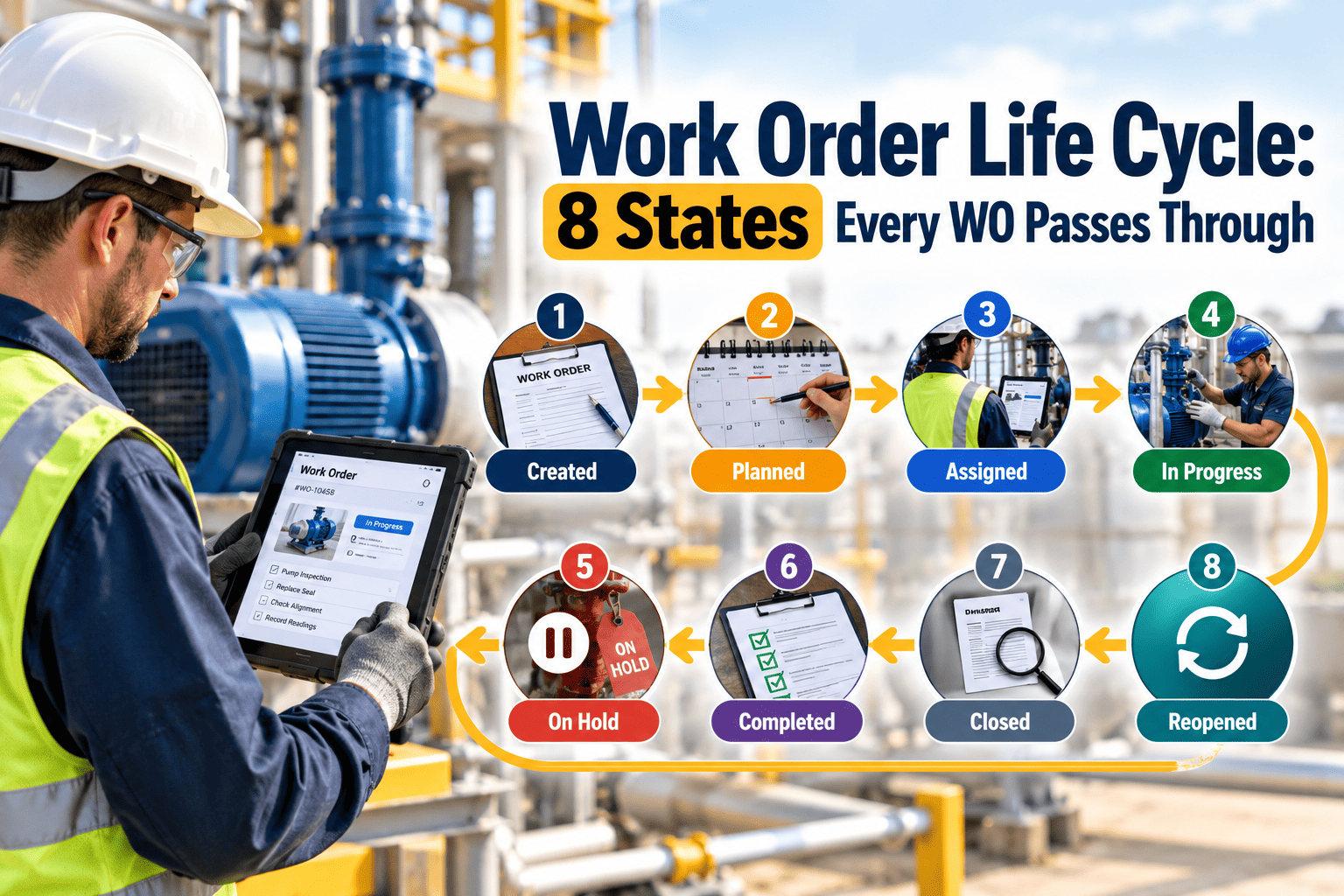
A work order that jumps from "open" straight to "closed" tells you almost nothing. You cannot see how long it waited for approval, whether parts delayed it or who confirmed the fix. Reports built on those records inherit the gaps. A defined work order lifecycle gives every job the same path, with clear entry and exit rules at each step. This guide describes eight states for facility maintenance and the data each should capture, using a CMMS workflow as the reference model.
Work Order Life Cycle: 8 States Every WO Passes Through
Enforce one state model so response time, backlog, wait time and completion data mean the same thing across every site.
What goes wrong when states are skipped
| Skipped step | What disappears from the data | KPI that becomes unreliable |
|---|---|---|
| Review | Priority and approval record | Response time and emergency share |
| Planning | Estimated hours, parts and procedure | Planning accuracy and parts availability |
| Scheduling | Commitment date | Schedule compliance and backlog age |
| On hold | Reason for delay | Cycle time and root cause of waiting |
| Work complete | Technician finish time and findings | Labor hours, MTTR and failure history |
| Closed | Supervisor verification | Cost totals and repeat-failure analysis |
The eight states in detail
Requested
Reviewed
Planned
Scheduled
In progress
On hold
Work complete
Closed
Rejected and cancelled requests are outcomes recorded with a reason code at the review step. They do not need extra states.
Enforce one work order path across every site
Oxmaint tracks work orders from request to close, so planners, technicians and managers all see the same status and history.
Allowed transitions: a simple state machine
| From | Permitted next states | Control to apply |
|---|---|---|
| Requested | Reviewed, or rejected with reason | Reviewer role only |
| Reviewed | Planned, or Scheduled for urgent work | Priority must be set |
| Planned | Scheduled, On hold | Parts status visible |
| Scheduled | In progress, On hold | Assignee required |
| In progress | On hold, Work complete | Labor entry required before completion |
| On hold | Scheduled, In progress | Reason code required to enter |
| Work complete | Closed, or back to In progress if rejected | Verifier cannot be the technician |
| Closed | None; raise a new linked order for follow-up | Edits restricted to administrators |
Which metrics each state unlocks
Practical rules that keep the model honest
Make hold reasons a short list
Parts, access, approval, contractor, weather and other. A free-text reason cannot be summarized.
Let emergencies compress, not vanish
Urgent work may skip planning, but it should still pass through review and completion data capture.
Separate complete from closed
The technician says the work is done, a second person confirms it. This catches missing notes and unfinished repairs.
Link follow-up work
If a repair uncovers another issue, open a new order connected to the first rather than extending the original.
Audit state age weekly
Look for orders sitting in the same state beyond your service targets, especially Reviewed and Work complete.
Where the software supports the lifecycle
Configure once, apply everywhere
In Oxmaint, work orders connect to assets, locations, PM schedules and inspections. Mobile workflows let technicians record start, labor, parts and completion notes at the job, and reports show status, backlog and aging.
Preventive and corrective work share the model
PM tasks and corrective orders can follow the same states, which keeps schedule compliance and reactive work measured on a consistent basis.
Set up checklist
- Define states and allowed transitions
- Create hold reason and failure codes
- Set required fields by state
- Assign roles for review and verification
- Train technicians on mobile entry
Who is responsible for each state
| State | Typical owner | May change status | Should not change status |
|---|---|---|---|
| Requested | Requester or help desk | Requester can withdraw | Technicians working the job |
| Reviewed | Supervisor or dispatcher | Reviewer, planner | Requester |
| Planned | Planner | Planner, supervisor | Technician, unless covering for the planner |
| Scheduled | Scheduler or supervisor | Scheduler, supervisor | Requester |
| In progress | Assigned technician | Technician, supervisor | Anyone not on the job |
| On hold | Technician and the blocker owner | Technician, planner | Requester |
| Work complete | Technician | Technician | Anyone who did not do the work |
| Closed | Supervisor or verifier | Verifier only | The technician who did the work |
How the lifecycle adapts to different work types
Preventive maintenance
PM orders are generated from a schedule, so they usually start at Planned with tasks and parts already defined. Keep them in the same states so compliance is measured consistently.
Corrective work
Corrective orders use the full path. The Reviewed and Planned states are where repair or replace decisions and parts needs are captured.
Emergency work
Review and scheduling happen in minutes, often by phone. Record the call time and approver afterwards rather than skipping the fields.
Inspection findings
A defect found during a round enters as a request linked to the inspection, so the origin of the work stays visible.
Contractor work
Use the same states, with the contractor's arrival, completion and sign-off recorded. Verification stays with your own supervisor.
Project work
Large projects can be a parent order with child tasks, each following the lifecycle, so progress and cost roll up cleanly.
Which service clock runs in which state
Agree pause rules in writing
If contracts or service level agreements allow clock pauses, define exactly which hold reasons qualify. Otherwise On hold becomes a place to hide late work and the clocks lose credibility.
Moving from a loose status list to eight states
Weekly lifecycle audit questions
Look for stuck work
Filter by state age. Orders in Requested for days suggest triage is overloaded. Orders in Work complete for days suggest verification is being skipped. Orders On hold with no release date are likely forgotten.
Look for shortcuts
Check for orders that went from Requested directly to Closed, orders closed with zero labor and orders with identical timestamps for every state. These patterns usually show data being filled in after the fact.
Audit list
- Orders in one state beyond target
- On hold without a reason code
- Closed without completion data
- Closed by the same person who did the work
- Follow-up work not linked to the original
A state model works when people can see a reason for it. Show technicians and supervisors the reports that the extra data makes possible, and the discipline tends to follow.
One job through all eight states: an illustrative example
What the data now shows
The record tells a complete story: how fast the request was acknowledged, how long planning took, that the delay came from a parts mismatch and how much active repair time was needed. A single "open to closed" status would have shown only a slow job. The parts hold reason also points to a fix for the stock list, so the next failure of that actuator is repaired in one visit.
Notice that nothing in this example required extra effort from the technician beyond entering a reason and a few completion details. The lifecycle works best when each state asks for only the data that the next person genuinely needs, and when the reports built from that data are shared back with the people who entered it. Review the model after a quarter and remove any required field that nobody uses.
Frequently asked questions
What are the work order life cycle states?
This model uses requested, reviewed, planned, scheduled, in progress, on hold, work complete and closed. Adapt the names, but keep the separation of steps.
Do emergency work orders follow all eight states?
They can compress planning and scheduling, but should still record review, labor, completion details and verification so the data stays usable.
Why separate work complete from closed?
It adds a second check that notes, hours and quality are right before the record locks. This improves cost and failure data.
Can a CMMS enforce these states?
Yes, when required fields and role permissions are configured. Oxmaint tracks work orders through their statuses with history.
How do I adapt this for my sites?
Start with the eight states, then adjust names and approval rules per site. You can book a demo to walk through a configuration.
Give every work order a clear path from request to close
Consistent states produce consistent data. Oxmaint helps maintenance teams track each job, hold and completion with a history they can report on.