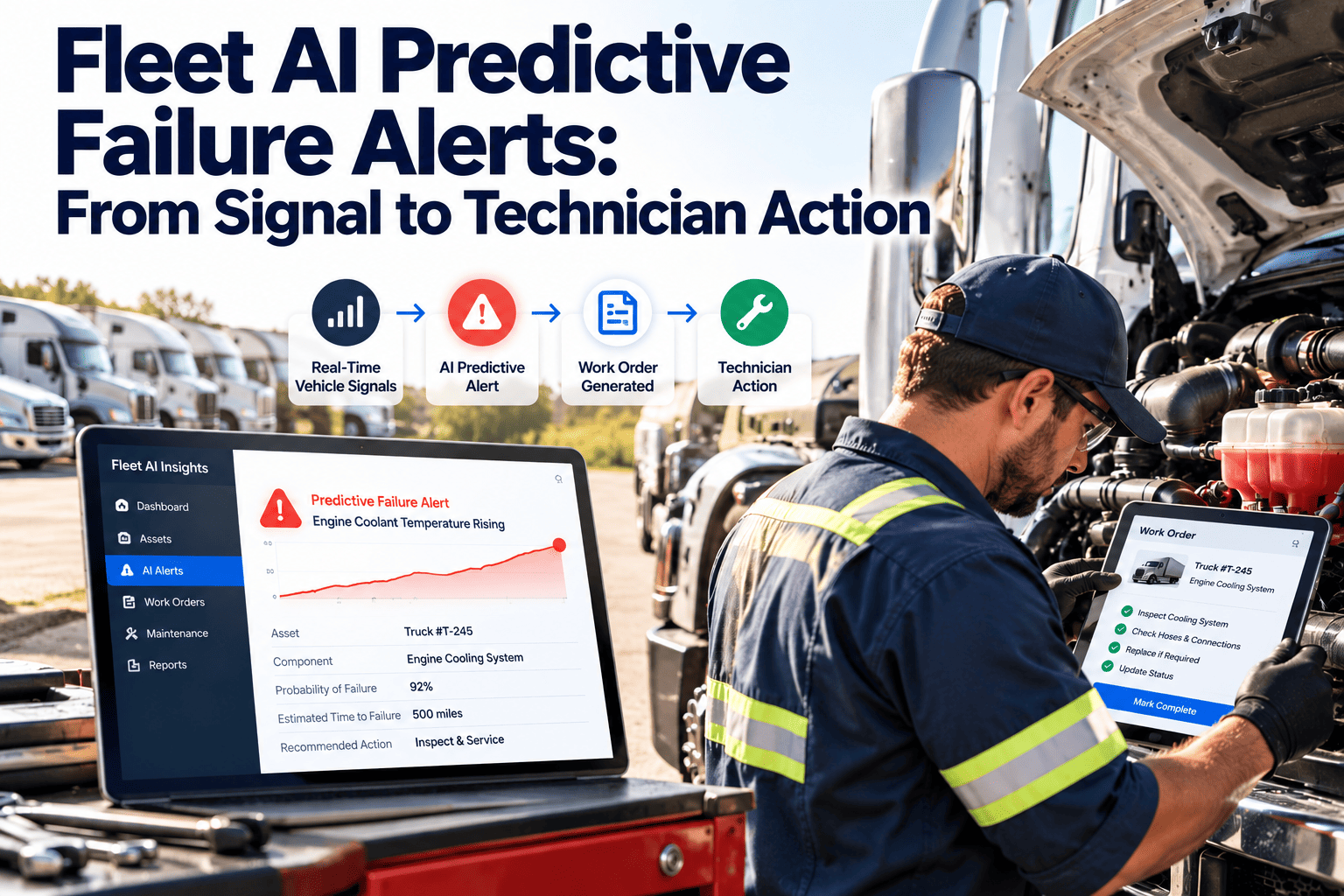
A predictive alert is only valuable if a technician does something useful with it. Many fleets now receive fault codes, sensor trends, and model-generated warnings, yet the alert often ends in an inbox or a dashboard nobody checks. The gap sits between the signal and the shop floor. This article follows an alert from detection to a closed work order, and shows how a work order driven CMMS turns warnings into scheduled, tracked repairs.
Fleet AI Predictive Failure Alerts: From Signal to Technician Action
Predictions prevent breakdowns only when they become assigned, parts-ready, verified work. Close the gap between the alert and the wrench.
Where Alerts Come From
Predictive alerts are only as good as the signals behind them. Most fleets draw from several sources.
Engine and vehicle fault codes
Diagnostic trouble codes from the engine and aftertreatment systems, read through telematics.
Usage data
Odometer, engine hours, idle time, and duty cycle that show how hard each unit works.
Condition readings
Battery voltage trends, tire pressure and temperature, coolant and oil indicators.
Inspection trends
Repeated driver-reported defects on one unit, such as brake wear or leaks.
Maintenance history
Past repairs and parts lifespans that help judge what is likely to fail next.
Why Alerts Fail to Become Repairs
Fleets that invest in predictive tools still miss the benefit when the handoff is weak.
Triage Rules: Decide What Each Alert Triggers
Write the response in advance. Technicians and planners should not debate every alert from scratch.
| Alert class | Example condition | Response | Target timing |
|---|---|---|---|
| Stop now | Fault indicating immediate safety or engine damage risk | Pull vehicle from service, emergency work order | Immediately |
| Schedule soon | Worsening trend on a critical component | Work order with parts reserved, next available bay | Within a short set window |
| Plan with PM | Early wear indicator on non-critical item | Add task to the next scheduled service | At next PM |
| Watch | Isolated reading inside tolerance | Log and monitor, no work order yet | Review if it repeats |
Give Every Alert an Owner and a Due Date
Route warnings into assigned work orders with history attached. Start free or review your alert workflow with our team.
The Technician-Ready Alert Package
A technician acts faster when the work order carries everything needed. Aim for this content on every alert-driven job.
The code or trend, with the date and reading.
Recent repairs, open defects, and repeat faults on this unit.
A short diagnostic checklist from your own procedures.
Likely parts reserved and specialist tools flagged.
Linked to the triage rule above, so urgency is clear.
Was the predicted fault found? What was the cause? What was replaced?
Managing False Positives and Missed Alerts
No model is perfect. Track outcomes so the rules improve rather than erode trust.
Alert, fault found
Confirmed catch. Record the cause and parts used.
Alert, nothing found
False alarm. Log it and review the threshold.
No alert, failure occurred
Missed signal. Review what data could have warned earlier.
No alert, no failure
Normal operation. Nothing to act on.
- Review confirmed, false, and missed outcomes at a regular meeting.
- Ask technicians to record findings at closure, since their notes are the training data for better rules.
- Adjust thresholds by vehicle class, not fleet-wide.
Measuring Whether Predictive Alerts Pay Off
Use measures tied to action, not just alert volume.
What a CMMS Contributes to the Last Mile
Detection tools find the problem. The maintenance system organizes the response.
- Work orders created from alerts or inspections, with priority, owner, and due date.
- Scheduling that fits repairs into bay time and combines them with scheduled service.
- Asset history showing previous faults, repairs, and costs on the same vehicle.
- Inventory so likely parts are checked and reserved before the vehicle arrives.
- Mobile access for technicians to see the job, record findings, and attach photos.
- Preventive and condition-based workflows that adjust service timing as evidence accumulates.
- Reports on repeat failures, planned work share, and downtime.
Frequently Asked Questions
Do we need AI to start condition-based maintenance?
No. Fault codes and inspection trends with clear triage rules already add value. Models can come later.
How do we reduce alert fatigue?
Group alerts by severity, suppress duplicates, and send only actionable classes to technicians.
Should every alert create a work order?
No. Watch-level readings can be logged, while serious or worsening conditions should become assigned jobs.
How do we prepare for parts?
Link common alerts to a likely parts list and track inventory against those jobs.
Can we see this workflow first?
Yes. Book a demo to review how alerts, work orders, and history connect.
Turn Warnings Into Completed Repairs
Connect your signals to assigned work, ready parts, and recorded results your team can learn from.