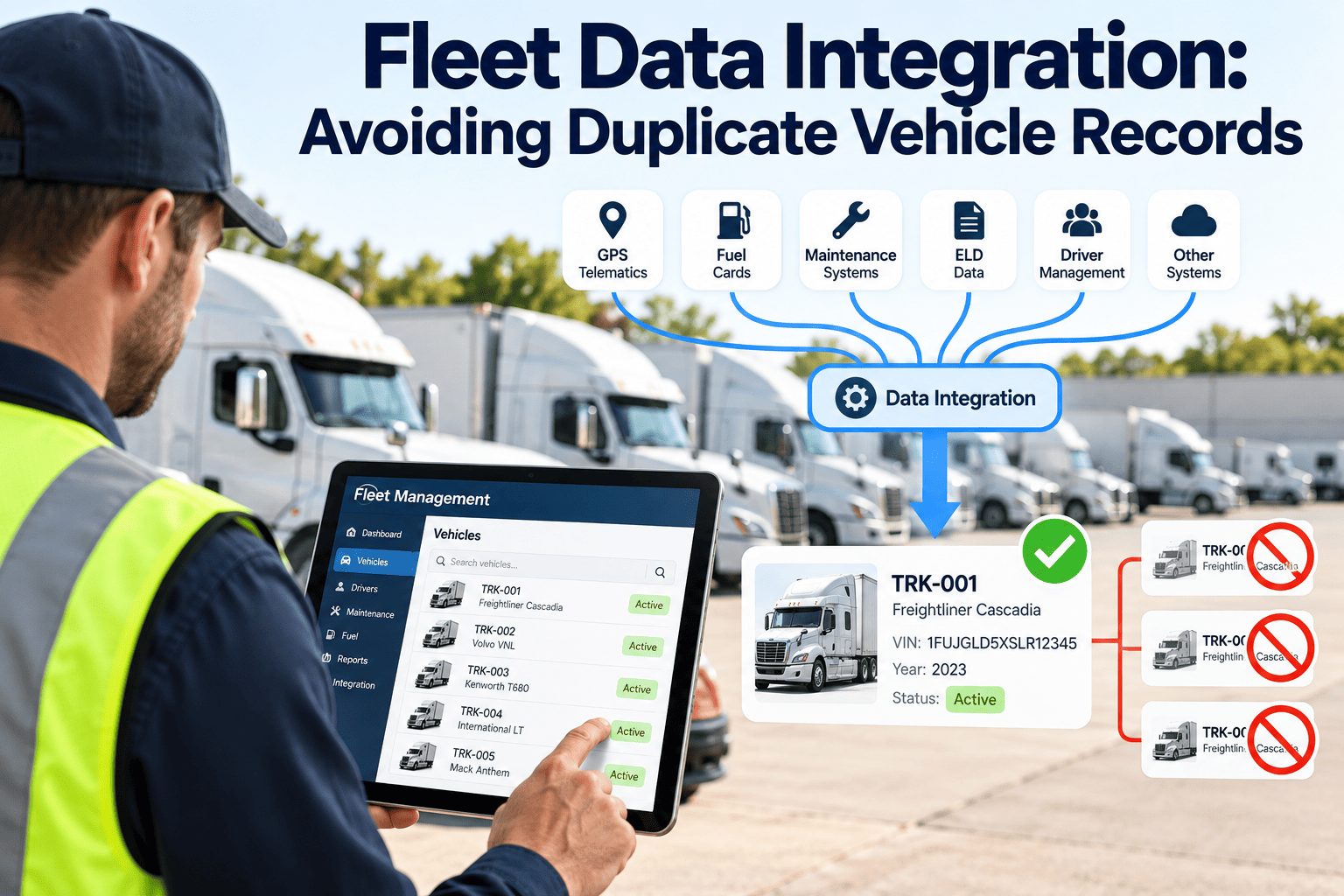
A fleet rarely runs on one system. GPS and telematics live in one platform, fuel cards in another, maintenance records in a CMMS, compliance documents in a shared drive, and every one of those systems has its own way of identifying a vehicle. The moment a VIN gets entered with a trailing space, a lowercase letter, or a slightly different format across two of those systems, that single truck splits into two records — and neither one shows the complete picture. This guide covers why duplicate vehicle records happen, what they cost a maintenance operation, and how a CMMS-anchored integration prevents them going forward.
Fleet Data Integration: Avoiding Duplicate Vehicle Records
One canonical vehicle record that every connected system references, so maintenance history, telematics, and compliance data never split across two profiles of the same truck.
How One Truck Becomes Two Records
Duplicate vehicle records rarely happen because someone typed the same VIN twice on purpose. They accumulate quietly, one small formatting mismatch or system migration at a time, until a fleet manager pulls up a vehicle and realizes half its service history is missing.
VIN Formatting Inconsistency
A VIN entered with a trailing space, a lowercase letter, or an extra character looks identical to a human eye but reads as a completely different value to most systems, silently creating a second record.
Orphaned Telematics Devices
A GPS or ELD device stays registered to a vehicle that was sold, totaled, or removed from service, while the physical unit gets reinstalled in a replacement vehicle under a new record.
System Migrations
Switching telematics providers, fuel card vendors, or maintenance platforms often means re-entering the fleet roster by hand, and any mismatch against the prior system's naming convention creates a fresh, disconnected profile.
No Single Source of Truth
Without one canonical asset ID that every system references, each platform maintains its own version of "the fleet," and those versions inevitably drift apart within months.
What Split Records Actually Cost a Maintenance Team
| Operational Area | Impact of Duplicate Records |
|---|---|
| Preventive maintenance scheduling | Mileage or engine hours split across two records means neither one triggers PM at the correct interval |
| Technician diagnosis | A technician pulling up the vehicle sees only half its repair history, repeating diagnostic work already done |
| Warranty and recall tracking | A recall or warranty claim matched to the wrong or incomplete VIN record can be missed entirely |
| Compliance audits | Inspection and service records scattered across two profiles make it harder to produce a complete history on demand |
| Fleet reporting | Utilization and cost-per-mile figures undercount or double-count assets, skewing fleet-wide decisions |
A Five-Stage Path to Clean Fleet Data
Cleaning up split records is not a one-time delete — it is a structured pipeline that audits what actually exists before merging anything, so history is preserved rather than lost in the cleanup.
Audit
Export every device ID, vehicle record, and driver assignment across all connected systems, cross-checked against the fleet's actual physical vehicle count.
Deduplicate
Identify records that represent the same physical vehicle under different VIN formatting or naming, and merge their history into a single profile rather than discarding either side.
Normalize
Apply a consistent VIN and asset-ID format across every connected system, so a future data entry mismatch is caught before it creates a new duplicate.
Validate
Confirm mileage, engine hours, and service history line up correctly on the merged record, and flag any device with no reported activity in the past 30 days as potentially orphaned.
Sign-Off
A fleet administrator confirms the cleaned roster matches the physical fleet count, establishing the baseline that every future integration references going forward.
See how many duplicate records are hiding in your current systems
Most fleets running more than three connected systems have at least a handful of split vehicle profiles they don't know about.
Before and After a Unified Asset Master Record
- Telematics, fuel cards, and maintenance history live in separate, disconnected platforms
- PM intervals miscalculate because mileage is split across two vehicle profiles
- Answering "what's going on with this truck" means checking three dashboards
- Every new system migration risks creating another duplicate
- One canonical vehicle profile aggregates data from every connected system
- PM triggers calculate correctly from complete mileage and engine-hour data
- Complete asset history, diagnostics, and documents in a single view
- New integrations reference the existing master ID instead of creating a new one
How Oxmaint Prevents Duplicate Records Going Forward
Single Asset Master Record
Every vehicle gets one canonical ID that telematics, fuel card, and compliance data all reference, eliminating the odometer discrepancies and split histories that come from parallel systems.
Native Connectors
Direct integrations with major telematics and fuel card providers map incoming data to the existing asset record automatically, rather than requiring a manual CSV import that risks introducing new formatting mismatches.
Multi-Provider Flexibility
Vehicles can migrate between telematics providers as contracts expire without a data migration project — only the provider tag on the asset record changes, and the maintenance history stays continuous.
Complete Reporting
Because every data source ties back to one record per vehicle, fleet-wide utilization, cost-per-mile, and downtime reports reflect the actual fleet count instead of inflated or undercounted totals.
Data Governance Checklist Before Your Next Integration
- Catalog every system that touches vehicle data. Most fleets discover at least one connection running through email or a shared spreadsheet they had forgotten about.
- Define the single source of truth for VINs. Decide which system owns the canonical vehicle ID before connecting a new platform, not after.
- Standardize VIN formatting rules. Enforce consistent capitalization and character rules at data entry to prevent invisible duplicates from forming.
- Start with one high-value connection. A telematics-to-CMMS integration typically proves value fastest; expand from there instead of connecting every system simultaneously.
- Review orphaned devices quarterly. Devices with no reported activity for 30 days or more should be investigated before they become another disconnected record.
Frequently Asked Questions
How do duplicate vehicle records typically happen?
Most often through VIN formatting differences between systems, orphaned telematics devices, or a system migration where the roster was re-entered by hand instead of matched against the existing record.
Will merging duplicate records lose maintenance history?
A structured merge preserves history from both records rather than discarding one side — the goal is a single complete profile, not a clean slate.
Can Oxmaint connect to our existing telematics and fuel card providers?
Yes, Oxmaint offers native connectors for major telematics and fuel card platforms, mapping incoming data to the existing asset master record automatically.
How long does a data cleanup and integration project take?
Timelines vary with fleet size and the number of connected systems, but starting with a single high-value integration and expanding from there is faster and lower-risk than attempting everything at once.
What prevents new duplicates from forming after cleanup?
Standardized VIN formatting rules combined with a single asset master record that every new integration references, rather than a fresh import — book a demo to see the setup for your systems.
Give every vehicle one complete record, not three fragmented ones
Connect your telematics, fuel cards, and maintenance data to a single asset master and stop losing history to formatting mismatches.