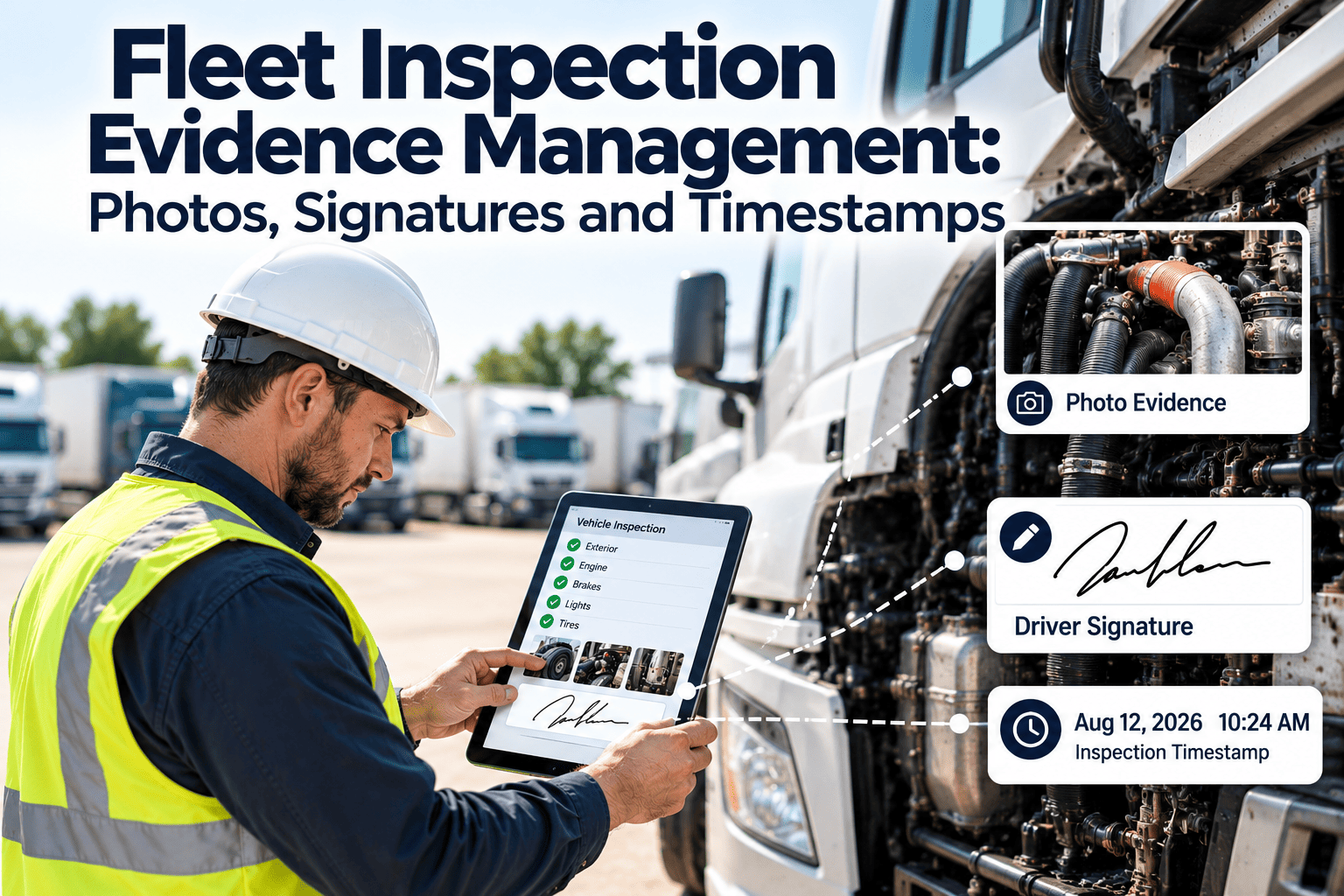
A fleet inspection is only as useful as the proof behind it. When a roadside officer, an insurer, a lessor, or a plaintiff's attorney asks what condition a vehicle was in on a given day, a checkbox is not an answer. Photos, signatures, and timestamps turn a routine inspection into a record that can be retrieved, trusted, and defended. This guide shows how fleet teams can capture that evidence consistently across drivers, shops, and yards, and how a maintenance-first CMMS such as Oxmaint keeps it attached to the right asset and work order.
Fleet Inspection Evidence Management: Photos, Signatures and Timestamps
Capture defensible inspection evidence once, link it to the vehicle and the work order, and retrieve it in minutes when an audit, claim, or dispute arrives.
Why inspection records fail when someone challenges them
Most fleets inspect vehicles faithfully. The weakness is in what gets kept afterward, and three failure patterns show up again and again.
What this costs a fleet
- Warranty and lessor claims denied because there is no proof of condition at hand-back or at the time of failure.
- Longer roadside inspection and audit conversations because records take hours to assemble.
- Weak position in accident investigations when pre-trip and maintenance history cannot be produced quickly.
- Repeat defects that go unnoticed because earlier findings are scattered across drivers, shops, and file formats.
Anatomy of a defensible inspection record
A strong record answers five questions without anyone having to explain it: which vehicle, which item, what was found, who found it, and when. Each element below closes a specific gap.
| Evidence element | What it proves | Common gap | How to capture it |
|---|---|---|---|
| Asset identity | The inspection belongs to this exact unit | Unit number typed from memory or confused with a trailer | Scan a tag or QR code at the vehicle to open the correct record |
| Checklist item result | A specific component was examined, not skipped | One overall "OK" for the whole vehicle | Item-by-item pass, fail, or not applicable with required notes on fail |
| Photo | The visible condition at that moment | Blurry, distant, or unlabeled images | In-app capture tied to the checklist item, with a close-up and a wide shot |
| Signature | A named person takes responsibility for the finding | Initials, shared logins, or no sign-off at all | Individual login plus a signature at inspection, repair, and review |
| Timestamp | The sequence of inspection, repair, and release | Dates entered manually after the fact | Time recorded by the system, kept even when the device was offline |
| Odometer or hours | Usage at the time of the finding | Reading skipped or copied from the last entry | Required numeric field, validated against the previous reading |
Photo standards technicians and drivers can actually follow
Photo rules fail when they are long. Keep them short, tied to each zone of the vehicle, and enforced by the inspection form rather than by memory.
Five rules that keep photo evidence usable
- Capture inside the inspection app so the image inherits the vehicle, item, user, and time.
- Take one wide shot for context and one close-up for detail on every defect.
- Require a photo on any failed item, and allow optional photos on passed items for high-risk assets.
- Take a repair-complete photo from the same angle as the defect photo to show the fix.
- Never delete or overwrite images; add new ones so the history stays intact.
Who signs, and what each signature means
A signature is a statement of responsibility. Each role should sign something different, and the system should record which statement was made.
Making electronic signatures hold up
- Tie every signature to an individual login, never a shared account.
- Store the signer name, role, and time with the signature image or confirmation.
- Lock the signed record so later edits create a new version instead of overwriting the original.
- Confirm with your compliance team how your regulators and insurers treat electronic signatures.
Timestamps are about sequence, not just the date
The value of a timestamp is the order it proves. A defect reported before a trip, a repair before release, and a sign-off after the repair tell a clear story only when each time can be trusted. The example below is illustrative.
Timestamp pitfalls to design out
- Device clocks that are wrong or changed by the user, so rely on server time alongside device time.
- Time zones across multi-region fleets, which should be stored consistently and displayed locally.
- Offline capture in remote yards, where the record must keep its original time when it syncs later.
- Back-dated entries, which should be visible as late entries rather than silently accepted.
Stop hunting for the one photo that matters
See how inspection photos, signatures, and timestamps can sit on the same asset record as the work order that fixed the defect.
From defect to closed work order with evidence at every step
Evidence should be collected as a side effect of doing the work, not as a separate chore. This is how the flow looks when inspection and maintenance share one system.
Retention rules to build your evidence policy around
For US motor carriers, several FMCSA rules shape what must be recorded and how long it must be kept. Treat this table as a starting point and confirm current requirements with your compliance team.
| Record | Reference | Typical requirement | Evidence to attach |
|---|---|---|---|
| Driver vehicle inspection report | 49 CFR 396.11 | Original report, repair certification, and review kept for three months | Defect photos, driver signature, mechanic certification |
| Inspection, repair, and maintenance records | 49 CFR 396.3 | Kept where the vehicle is housed for one year and six months after it leaves your control | Work order, parts, labor, technician sign-off |
| Periodic or annual inspection report | 49 CFR 396.21 | Retained for fourteen months | Inspector qualifications, checklist, dated report |
| Lease or insurer requirements | Contract terms | Often longer than regulatory minimums | Condition photos at delivery and return |
A practical rule
- Keep digital evidence for the longest requirement that applies to the asset, not the shortest.
- Set retention by record type inside the system so deletion is deliberate, not accidental.
- Keep accident-related records until legal counsel confirms they can be released.
What changes when evidence is captured at the source
Metrics that show whether your evidence is good enough
Evidence quality can be measured like any other maintenance process. Track these and review them monthly.
Four situations where evidence earns its keep
Getting drivers and technicians to capture evidence willingly
Evidence programs succeed when the process is faster than the old way. They fail when they feel like extra paperwork.
- Keep the checklist short and specific to the vehicle type, so each step is relevant.
- Make photo capture a single tap from the failed item, with no separate upload step.
- Show people what happens next, such as the defect becoming a work order and a repair.
- Train on a few real defects in the yard rather than only in a classroom.
How Oxmaint supports inspection evidence management
Oxmaint is a maintenance management platform, so inspections, work orders, and asset records live together rather than in separate tools.
- Mobile inspection checklists with required notes and photos on failed items.
- Defects that convert into corrective work orders carrying their evidence forward.
- Asset records that hold inspection history, repair history, meter readings, and parts used.
- Preventive maintenance schedules and reminders that keep recurring inspections on time.
- Reports and dashboards that show completion rates, open defects, and repeat issues.
Frequently asked questions
Make every inspection something you can prove
Put photos, signatures, and timestamps on the same asset history as your work orders, and answer audits and claims from one record.