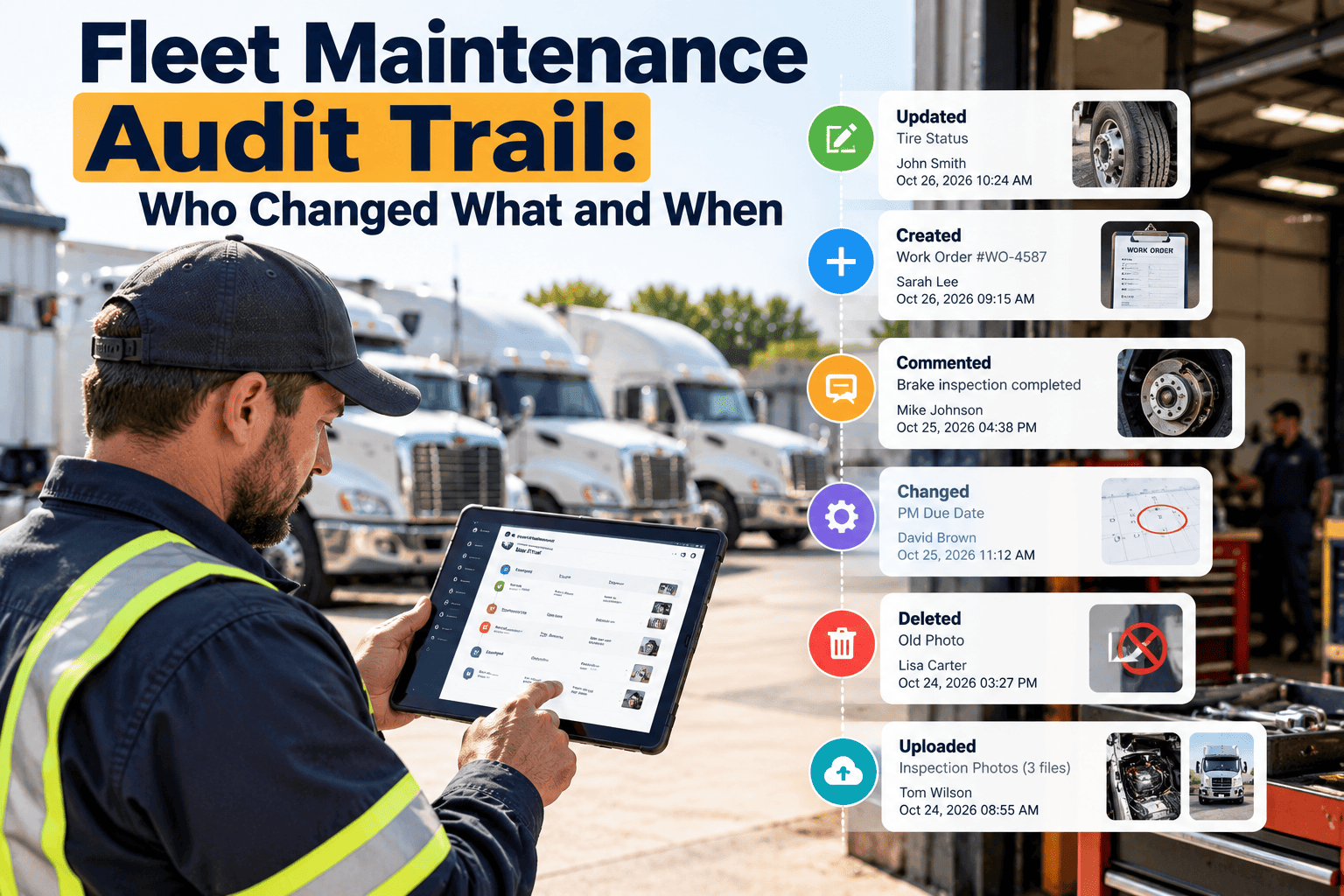
A maintenance record is only as trustworthy as its history. When a brake inspection is marked complete, a due date moves, a part cost changes or a defect is closed, someone should be able to see who did it, what changed and when. Without that visibility, fleets cannot settle disputes, pass audits or trust their own reports. An audit trail turns a list of records into evidence. This guide explains what to track, which changes carry the most risk, and how fleet maintenance software supports traceability.
Fleet Maintenance Audit Trail: Who Changed What and When
Build a maintenance change history that answers the questions auditors, insurers and managers ask: who made the change, what was changed, when it happened and why.
The five questions every audit trail should answer
If a change cannot be explained with these five points, it cannot be defended. Design your records so each one is captured automatically wherever possible.
Why fleets lose track of changes
Audit gaps rarely come from bad intent. They come from everyday practices that leave no trace.
Common causes
- Spreadsheets that anyone can overwrite without history.
- Shared logins used by an entire shop shift.
- Paper work orders that are rewritten or recopied.
- Verbal approvals that are never recorded.
- Multiple systems holding different versions of the same record.
Operational consequences
- Disagreement over whether a service was actually done.
- Inability to explain a cost increase or a closed defect.
- Weak evidence during safety, insurance or regulatory reviews.
- Reports that cannot be trusted by finance or operations.
- Long hunts for information after an incident.
Audit trail readiness checklist
Work through each group and tick what is already true for your fleet. Any unticked line is a gap to assign and close.
Users and access
- Every user has an individual login
- No shared or generic accounts
- Roles match job duties
- Leavers removed the same day
- Administrator actions reviewed
Records and fields
- Changes show user, field, old and new value
- Timestamps come from the system
- Reason required for critical edits
- Defect closures link to a repair
- Meter edits need approval
Evidence and attachments
- Inspections carry photos and timestamps
- Invoices attached to work orders
- Parts issued against jobs
- Sign-off recorded on completion
- Corrections added, never erased
Review routine
- Weekly exception review scheduled
- Monthly check of moved due dates
- Quarterly user and role review
- Findings logged with owners
- Repeat issues trigger training or permission changes
Retrieval
- History searchable by asset
- Filter by date, user and location
- Export keeps context
- Retention periods documented
- Legal hold process defined
Compliance
- Applicable regulations identified
- Counsel consulted on retention
- Accident register linked to records
- Audit requests tested with a sample
- Results reported to management
High-risk changes to monitor first
Not every edit deserves the same attention. Start with changes that affect safety, compliance or cost, and review them more closely.
| Change type | Why it is sensitive | What to capture |
|---|---|---|
| Closing a defect | An unresolved safety issue may be marked as fixed | User, time, repair reference and sign-off |
| Completing a PM or inspection | Compliance depends on the service actually being done | Technician, checklist results, readings, completion time |
| Changing a PM due date or interval | Overdue work can be hidden by rescheduling | Old and new values, approver, reason |
| Editing meter readings | Mileage drives service triggers and warranty | Original reading, corrected reading, reason |
| Changing parts or cost | Affects cost reports and inventory accuracy | Part, quantity, price, user and work order |
| Reassigning or deleting a work order | Work can disappear from the record | Previous owner, new owner, reason |
| Changing user permissions | Access expands without oversight | Administrator, role change and date |
| Altering asset status | Out-of-service units may be returned to use early | Status change, authorizer and time |
Know exactly how your maintenance records changed
Keep work orders, inspections, assets and parts history in one maintenance system with individual user accounts.
Permissions: limiting who can change what
An audit trail explains changes after the fact. Permissions reduce the number of changes that need explaining. Combine both.
Adapt this to your organization
- Each person uses an individual login, never a shared one.
- Access is removed promptly when someone changes roles or leaves.
- Critical changes require a reason before they can be saved.
- Administrator actions are reviewed by someone outside the maintenance team.
Tracing a record: an investigation walkthrough
When something looks wrong, a consistent method keeps the review fast and fair.
Identify the record
Locate the asset, work order or inspection in question and note the date range under review.
Review the change history
List every edit in order, showing user, field, old value, new value and time.
Compare with supporting evidence
Check photos, parts issues, meter readings and technician notes against the recorded changes.
Confirm the reason
Ask the user why the change was made and whether it was authorized, then record the answer.
Correct and learn
Fix any error by adding a new entry, not by erasing history, and adjust training or permissions if needed.
Spreadsheet records versus a controlled maintenance system
The difference becomes obvious the first time someone asks for proof.
Uncontrolled records
- Anyone can overwrite or delete a cell.
- Version history is partial or missing.
- Changes cannot be tied to one person.
- Reports depend on manual cleanup.
- Audits require hours of reconstruction.
Controlled records
- Roles limit who can edit or approve.
- Status and field changes are tracked over time.
- Each action links to an individual user.
- Reports draw from one consistent data set.
- Histories can be reviewed by asset or work order.
Building a regular audit review routine
Traceability has value only if someone looks at it. Schedule short, repeatable reviews rather than waiting for an external audit.
Weekly
- Defects closed without a linked repair.
- Work orders reopened or reassigned.
- Meter readings corrected.
Monthly
- PM due dates moved more than once.
- Cost changes after completion.
- Users with unusual edit activity.
Quarterly
- User list and role review.
- Sample of completed inspections against evidence.
- Retention and export test.
Compliance and recordkeeping considerations
Regulators and insurers expect maintenance records to be accurate and retrievable. Requirements differ by region and vehicle class, so confirm them with your compliance team.
Accuracy
Records should reflect the work actually performed, with corrections shown as new entries and not silent edits.
Retention
Keep inspection, repair and maintenance records for the periods required by the rules that apply to your fleet.
Retrievability
Records should be searchable by vehicle, date and work order so they can be produced promptly on request.
What an auditor or insurer will ask for
External reviews follow predictable patterns. Prepare the evidence in advance so requests can be answered from the system rather than by searching files.
| Request | Evidence that answers it | Where it should live |
|---|---|---|
| Proof a vehicle was inspected on a date | Inspection record with user and timestamp | Asset inspection history |
| Proof a defect was repaired | Linked work order with parts, labor and sign-off | Work order record |
| Proof PM was kept current | Completed PM history with due and completion dates | PM schedule history |
| Explanation of a changed due date | Change entry with old value, new value and reason | Change history on the schedule |
| Proof a part was installed | Inventory issue tied to a work order | Work order parts section |
| Proof of who had access | User list with roles and change dates | User administration |
Integrity problems that weaken a record
These patterns do not prove wrongdoing, but they invite questions. Look for them during routine reviews.
Timing signals
- Many work orders closed in a burst at the end of a period.
- Completion times that precede the start of the work.
- Inspections submitted long after the trip they cover.
- Records created in bulk with identical notes.
Content signals
- Closed defects with no repair, parts or labor.
- Meter readings that decrease or jump sharply.
- Costs edited after invoices were paid.
- Repeated reassignment of the same job.
Handling corrections and exceptions properly
Mistakes happen. What matters is that corrections are visible and justified instead of hidden.
Do not overwrite silently
Make the correction as a new, labeled change so the original value remains visible in the history.
State the reason
Record a short explanation, such as a keying error, a missing reading or a corrected vendor invoice.
Get approval where needed
Require supervisor review for safety-critical items such as brake findings, defect closures and out-of-service releases.
Review the pattern
If the same error keeps recurring, change the form, the training or the permission instead of repeating the fix.
Evidence quality checklist for each record type
Use these short lists to judge whether a record would stand up under review.
Inspections
- Named inspector and vehicle.
- Pass or fail result for each item.
- Photos for any defect.
- Timestamp from the system.
Work orders
- Clear description of the problem.
- Assigned technician and dates.
- Parts and labor recorded.
- Sign-off on completion.
Asset records
- Unique identifier and status.
- Current meter reading.
- Linked history of services.
- Notes on prior damage.
Setting up traceability in your first 30 days
You do not need a perfect program to start. Focus on the controls that remove the greatest risk first.
Week one: identify users
Give every driver, technician and supervisor an individual account and remove shared logins.
Week two: set permissions
Decide who can complete, approve, reschedule and close records, and apply those rules in the system.
Week three: require reasons
Make a note mandatory for changes to due dates, meter readings, costs and defect closures.
Week four: start reviewing
Hold the first weekly exception review and record what was learned and what changed.
Signs the program is taking hold
- Staff stop asking whose record it is and start asking what it shows.
- Audit requests are answered from the system in minutes.
- Late edits and bulk closures become rare.
- Managers trust reports because the history behind them is visible.
Retention and export readiness
A history that cannot be retrieved is of little use. Test your ability to produce records before anyone asks for them.
Search by asset
Confirm you can pull the full history of any vehicle, including edits, within minutes and without manual assembly.
Search by period
Check that records can be filtered by date range, location and user for audit samples and claim reviews.
Export with context
Make sure exported records keep timestamps, user names and attachments so they remain meaningful outside the system.
How Oxmaint supports traceable maintenance records
Oxmaint centralizes maintenance activity so history stays attached to the asset. Confirm the level of change-log detail you need during a demo.
| Traceability need | Oxmaint capability | Benefit |
|---|---|---|
| Single source of records | Asset management with full service history | One place to review each vehicle |
| Accountability for tasks | Work orders with assignment, status and notes | Clear ownership of each job |
| Proof of inspection | Mobile inspections with photos and timestamps | Evidence captured at the point of work |
| Controlled access | User roles and permissions | Fewer unauthorized edits |
| Oversight | Reporting and dashboards | Faster review of exceptions and trends |
Frequently asked questions
What is a fleet maintenance audit trail?
It is a chronological record of changes to maintenance data showing who made each change, what changed and when. It supports audits, claims and internal reviews.
Which changes should we track first?
Start with defect closures, completed inspections, PM due date changes, meter readings and cost edits. These have the greatest safety and compliance impact.
Why avoid shared logins?
A shared login hides who acted, which defeats the purpose of traceability. Individual accounts make each action attributable.
How should errors be corrected?
Add a corrected entry with a reason rather than deleting the original. Teams can manage this in Oxmaint with roles and notes.
Can we see how this works for our fleet?
Yes. A live demo can cover user roles, work order history and reporting for your operation.
Make every maintenance record defensible
Give your team one system for inspections, work orders and asset history, with clear ownership of every action.