Most fleet compliance reports answer the wrong question. They show how many inspections were completed, but not which vehicles are about to cause a problem. An exception dashboard flips that view. It hides everything that is on track and puts overdue inspections, unresolved defects, missing records, and expiring items in front of the people who can act. Here is how to design one that maintenance, safety, and operations teams will actually use, along with a simple walkthrough you can request if you want to see it live.
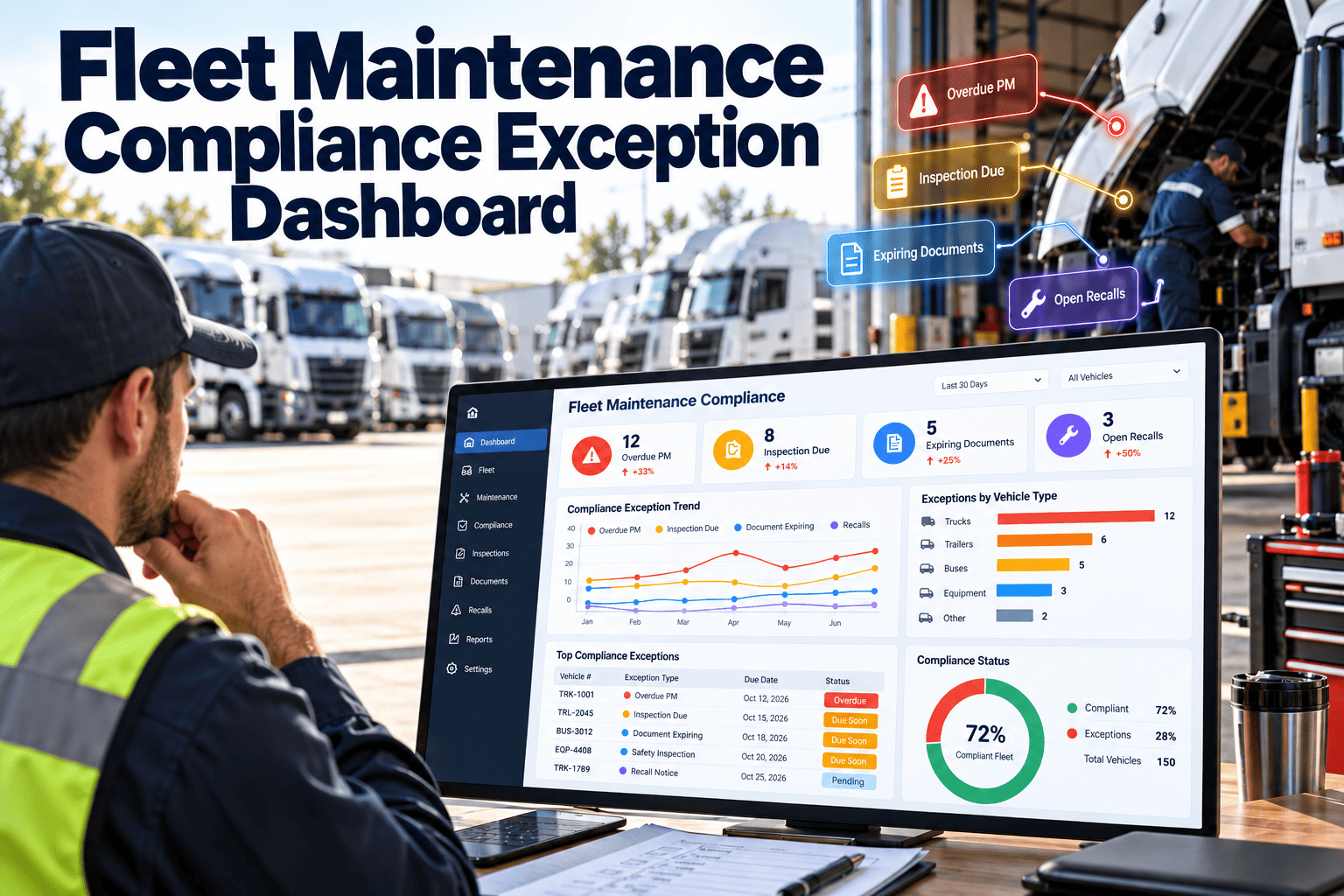
Fleet Maintenance Compliance Exception Dashboard: See What Needs Action Before an Auditor Does
Surface overdue inspections, open defects, and record gaps by exception, so every shift starts with a short, prioritized list instead of a pile of reports.
Why Status Reports Hide Compliance Risk
A report that lists every vehicle forces readers to hunt for the problem. Under time pressure, they skim, and the one overdue item hides among hundreds of compliant ones.
- Averages look healthy while a few vehicles carry most of the risk.
- Monthly summaries arrive after the issue has already aged.
- Paper and spreadsheet trackers are updated by hand and fall out of date.
- Different teams keep different versions of what is due.
An exception view works the other way. It defines what "not okay" means, checks the data continuously, and shows only the items that break a rule.
The Exception Categories Worth Monitoring
Start with a short list tied to real risk. Add categories only when a team is ready to own them.
| Exception | Trigger Rule | Default Owner | Escalation Path |
|---|---|---|---|
| Periodic inspection due | Due date inside the alert window or already passed | Maintenance planner | Shop manager, then safety lead |
| Safety defect open | Defect on brakes, steering, tires, lights, or coupling not repaired | Shop supervisor | Unit held from dispatch |
| Repair not certified | Defect closed without technician or driver sign-off | Lead technician | Shop manager |
| Driver report missing | Dispatched unit with no completed pre-trip or post-trip report | Operations supervisor | Fleet manager |
| PM overdue | Service past due by meter or date beyond tolerance | Maintenance planner | Maintenance manager |
| Repeat defect | Same defect reported again within a set window | Shop supervisor | Root cause review |
| Record gap | Missing signature, photo, or required field on a work order | Work order owner | Compliance coordinator |
Anatomy of a Dashboard People Will Open Every Day
Design for a person with two minutes at the start of a shift. Each panel should answer one question and lead directly to an action.
Replace Monthly Compliance Reports With a Live Exception List
Bring inspections, defects, preventive maintenance, and work order records into one view built around what needs action today.
The Exception Lifecycle: From Detection to Verified Closure
An exception is not resolved when someone reads it. It is resolved when the underlying issue is fixed and the record proves it.
Setting Rules That Reduce Noise Instead of Creating It
A dashboard that cries wolf will be ignored within a week. Tune the rules deliberately.
Use severity tiers
- Critical means a safety or legal issue that stops dispatch until resolved.
- High means action is needed within the shift or the next business day.
- Medium means action is needed within a defined number of days.
Add early-warning windows
- Alert before a due date, not only after it passes.
- Use different windows for different tasks, based on how long the work takes.
Review rules on a schedule
Every month, look at which exceptions were dismissed without action. Those rules need fixing, retiring, or a clearer owner.
Four Stages of Compliance Visibility
Most fleets sit somewhere on this path. Knowing where you are makes the next step clear.
Compliance Foundations the Dashboard Should Reflect
In the United States, FMCSA rules in 49 CFR Part 396 set the core expectations for inspection, repair, and maintenance. Verify the rules that apply to your operation and region.
Fleets outside the United States should map the same ideas to local rules, such as national roadworthiness inspection regimes. Whatever the jurisdiction, translate each written requirement into a rule the dashboard can test, such as a due date, a required signature, or a defect that must be certified before the vehicle returns to service. Review those rules whenever regulations, vehicle types, or operating areas change.
Metrics to Show Beside the Exception List
One Data Set, Four Views: Designing for Each Role
The same exceptions matter to everyone, but each role needs a different slice. Build saved views so nobody has to filter from scratch every morning.
| Role | What They Need to See | Action They Take |
|---|---|---|
| Technician | Assigned defects and inspections due on their bay or route | Complete the work and attach evidence |
| Shop supervisor | Critical and high exceptions, aged items, and unassigned work | Assign, reprioritize, and clear blockers |
| Fleet or regional manager | Trends by location, repeat items, and oldest open exceptions | Allocate capacity and escalate |
| Safety and compliance lead | Required inspections, record gaps, and audit readiness | Verify closure and prepare for reviews |
Turning Inspection Findings Into Exceptions
Driver and technician inspections are the richest source of exception data. The key is translating checklist answers into rules that act without waiting for a person to notice.
Rules that work well
- A failed item on a safety system creates a critical exception and a work order automatically.
- A missing inspection for a dispatched unit raises a medium exception for the operations supervisor.
- A defect closed without a repair certification returns to the lead technician.
- The same item failing twice in a short window flags the unit for root cause review.
Evidence that makes closure credible
- Photos of the defect and the completed repair.
- Technician notes describing the cause and the fix.
- Meter reading and date at the time of repair.
- Signature or confirmation from the person who verified the work.
Data Quality: The Hidden Dependency
An exception dashboard magnifies whatever is in the data. If due dates are wrong or meters are stale, teams will chase false alarms and stop trusting the screen.
A Five-Minute Morning Huddle Built Around the Dashboard
The dashboard earns its place when it replaces a longer, vaguer conversation. A short, standing huddle keeps attention on the right items.
From Daily Exceptions to Continuous Improvement
Closing exceptions keeps you compliant today. Studying them keeps you compliant next quarter.
- If one exception type dominates, change the process behind it rather than clearing items one by one.
- If one location produces most record gaps, improve training or the mobile form there.
- If PM exceptions cluster on one unit group, review intervals, parts supply, and scheduled downtime.
- If repeat defects keep returning, connect them to a root cause review.
Over time, the goal is an exception list that gets shorter because the system prevents problems, not because people stop looking.
Exception Dashboard Versus Traditional Compliance Reporting
- Lists every unit and every task
- Prepared monthly or before an audit
- Owners are implied, not assigned
- Closure is assumed when work is reported done
- Hard to compare locations or categories
- Shows only items that break a rule
- Updated as inspections and work orders change
- Every item has an owner and a due time
- Closure requires evidence and, for risky items, verification
- Trends and filters expose patterns quickly
Preparing for an Audit Without a Scramble
An exception-driven approach changes audit preparation from a project into a habit. When gaps are closed as they appear, there is far less to fix at the last minute.
- Search by unit to pull inspection, repair, and PM history in one view.
- Filter for closed exceptions to show how issues were found, assigned, and verified.
- Check record gaps weekly so missing signatures and photos do not accumulate.
- Keep a short list of open items with clear owners and dates for any reviewer who asks.
Being able to show a controlled process is often more convincing than claiming a perfect record, because it demonstrates that problems are found and handled.
Where Oxmaint Fits in an Exception Dashboard
The dashboard is only as good as the records beneath it. Oxmaint supports the data and the workflow around it.
- Mobile inspections capture defects, photos, and signatures at the vehicle.
- Defects convert into work orders with owners, priorities, and due dates.
- Preventive maintenance schedules track due and overdue services by meter or date.
- Asset history keeps repairs, inspections, and parts in one place per vehicle.
- Dashboards and reports highlight overdue and open items for each team.
- Compliance records stay searchable for internal reviews and audits.
Rollout Plan: Launch Small, Then Expand
Common Pitfalls With Exception Dashboards
- Building the dashboard before agreeing on definitions of overdue and critical.
- Showing exceptions without an owner, so nobody feels responsible.
- Letting items be dismissed without a recorded reason or evidence.
- Tracking too many categories, which dilutes attention from the dangerous few.
- Ignoring the data entry process that feeds the dashboard, so errors flow straight through.
Compliance Exception Dashboard Questions
What is a compliance exception in fleet maintenance?
It is any item that breaks a defined rule, such as an overdue inspection, an unresolved safety defect, or a missing record.
How many exception types should we start with?
Begin with three to five tied to safety and audit risk. Book a demo to see sample rules.
Who should own the dashboard?
Maintenance usually owns the data, while safety and operations share the review. Each exception still needs one named owner.
Can it help during a DOT audit?
It helps you find and close gaps beforehand and retrieve records quickly. It does not replace the underlying compliance duties.
Do we need telematics to build one?
No. Inspections, work orders, and PM dates are enough to start. You can sign up and add data sources later.
Start Every Shift With the Exceptions That Matter
Turn inspections, defects, and maintenance records into a clear, owned, and verifiable list with Oxmaint.