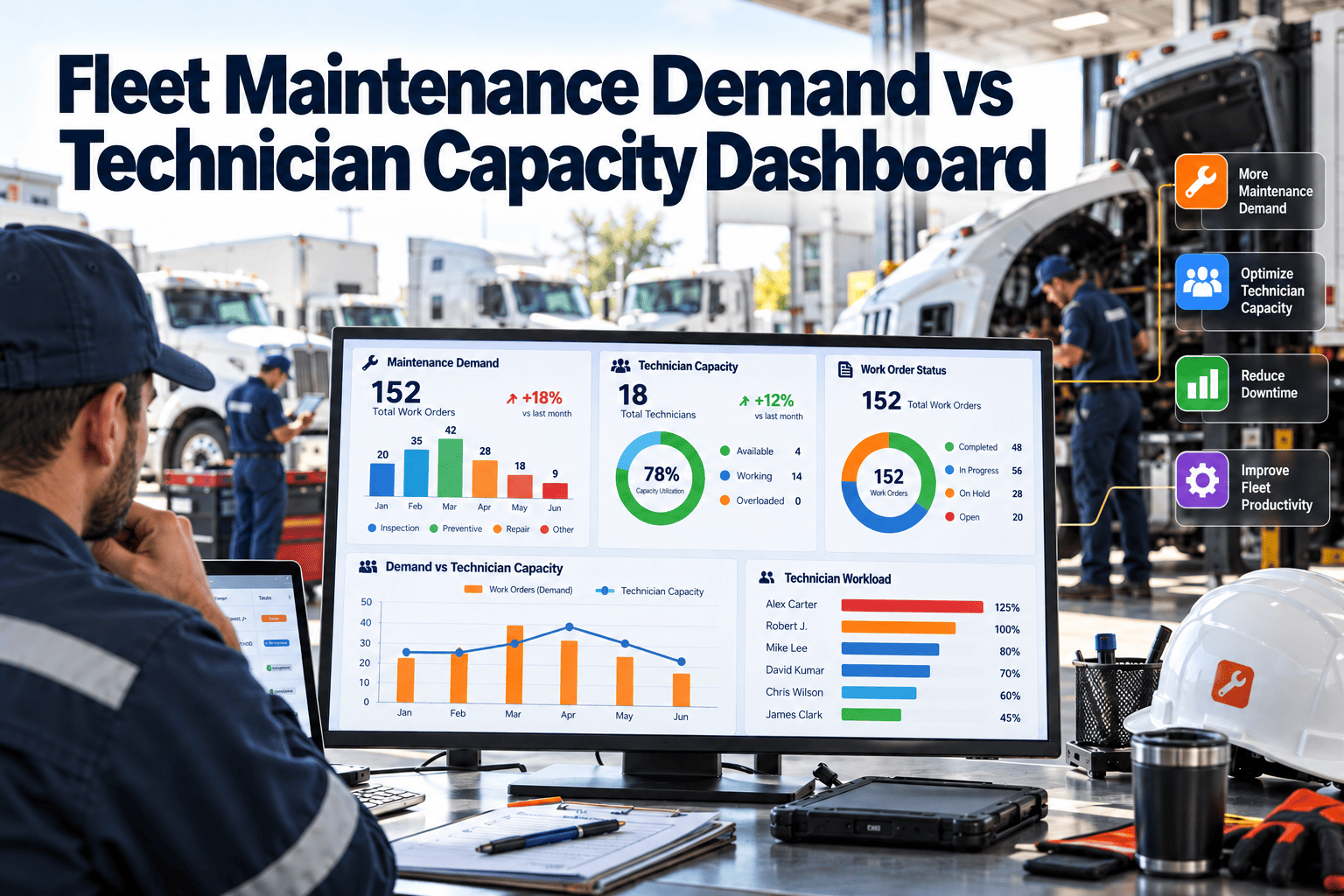
A fleet can look fully staffed and still fall behind on repairs. Work orders, inspection defects, preventive maintenance and recall work arrive in waves, while technician hours are limited by shifts, leave, training and bay availability. A demand versus capacity dashboard puts both sides on one screen, so planners can act before backlog turns into downtime. This guide explains how to build that view and how Oxmaint fleet maintenance software can supply the data behind it.
Fleet Maintenance Demand vs Technician Capacity Dashboard
See how many labor hours your fleet needs this week, how many your technicians can truly deliver, and where the gap will hit uptime first.
Why Fleet Workshops Need Demand and Capacity on One Screen
Most shops track open work orders in one place and staffing in another. The result is a backlog that grows quietly until a vehicle misses a route.
- Planners see how much work is booked, not whether the team can finish it.
- Supervisors know who is on shift, but not how many hours are really productive.
- Managers notice the problem only when vehicles wait for bays.
A shared dashboard turns these separate views into one planning decision: add hours, move work, or defer what is safe to defer.
Before and After: Spreadsheet Planning vs a Live Dashboard
Before
- Weekly staffing plan built from memory
- Backlog counted by work order, not by hours
- Overtime approved after vehicles are late
- Skill shortages found during the job
After
- Demand estimated in hours from job plans
- Capacity adjusted for leave, training and shift length
- Gaps flagged days before they affect routes
- Work matched to certified technicians
The Demand Side: Where Fleet Labor Hours Come From
Demand is more than the open work order list. It includes scheduled work that has not been released yet and work you can predict from history.
| Demand source | How to estimate hours | Planning note |
|---|---|---|
| Preventive maintenance | PM interval due dates multiplied by standard job hours | Most predictable, so schedule it first |
| Inspection defects | Defects raised from driver and technician inspections | Safety-related defects take priority |
| Corrective repairs | Open work orders with estimated hours | Re-estimate when diagnosis changes |
| Breakdown response | Rolling average of unplanned hours per week | Hold a reserve for it |
| Compliance work | Annual inspections, brake checks and other due items | Dates are fixed, so plan early |
| Campaigns and upgrades | Recall or retrofit units multiplied by hours per unit | Spread across weeks if possible |
Standard job hours should come from completed work orders, not manufacturer guesses alone. Over time, actual hours replace estimates.
The Capacity Side: From Paid Hours to Productive Hours
A technician paid for 40 hours does not deliver 40 hours of repair time. Capacity should be calculated in steps so the dashboard stays honest.
Scheduled hours
Shift length multiplied by technicians rostered.
Subtract absence
Leave, sickness, training days and meetings.
Subtract non-wrench time
Waiting for parts, moving vehicles, paperwork and travel.
Apply constraints
Bay count, lifts, special tools and certifications.
Productive capacity
The hours the shop can realistically deliver this week.
A Worked Example With Illustrative Numbers
The figures below are examples to show the method, not benchmarks. Replace them with your own work order and roster data.
| Item | Hours | Reading |
|---|---|---|
| Preventive maintenance due | 180 | Fixed demand |
| Open corrective work | 210 | Backlog carried in |
| Inspection defects | 70 | New this week |
| Breakdown reserve | 60 | Based on recent weeks |
| Total demand | 520 | Needs 520 hours |
| Technicians x scheduled hours | 600 | 15 people at 40 hours |
| Absence and training | -80 | Planned leave |
| Non-wrench time | -120 | Parts waits, moves, admin |
| Productive capacity | 400 | Gap of 120 hours |
On paper this shop has enough people. In practice it is 120 hours short, and the dashboard shows that before the week starts.
Reading the Gap: A Four-State Planning Matrix
High demand, high capacity
Busy but healthy. Protect PM schedules and keep reserves.
High demand, low capacity
Backlog risk. Add hours, outsource, or defer low-risk work.
Low demand, high capacity
Idle time. Pull forward PMs, training and campaign work.
Low demand, low capacity
Check for hidden demand or poorly recorded work.
Dashboard Panels That Planners Actually Use
| Panel | What it shows | Decision it supports |
|---|---|---|
| Demand vs capacity by week | Hours needed against productive hours | Overtime, hiring and outsourcing |
| Backlog aging | Open work grouped by age and priority | Which jobs to release next |
| Skill coverage | Hours by trade against certified technicians | Training and job assignment |
| Bay utilization | Bay hours booked against available | Scheduling and shift changes |
| PM compliance | Completed PMs against due PMs | Whether preventive work is slipping |
| Planned vs reactive mix | Share of hours spent on unplanned work | Reliability priorities |
Slicing Capacity by Skill, Shift and Location
A single fleet-wide number can hide the real constraint. Slice the dashboard in three ways.
By skill
Engine, electrical, brakes, tire, body and diagnostics work need different people. Surplus tire hours do not cover an electrical shortage.
By shift
Vehicles often return in the evening, but technicians work days. Align capacity with when assets are available.
By location
Multi-depot fleets can balance work by moving vehicles or sending mobile technicians where the gap is largest.
Plan Workshop Hours With Real Maintenance Data
Connect work orders, PM schedules and technician availability in one place, then see the gap before it affects routes.
Levers to Close a Capacity Gap
Once the gap is visible, choose the least risky lever first. Safety and compliance work should never be the item deferred.
- Move PMs earlier into low-demand weeks to flatten peaks.
- Reduce non-wrench time by staging parts and kits before the vehicle arrives.
- Reassign technicians across depots or shifts when skills match.
- Use overtime or contractors for defined, short peaks.
- Defer low-priority cosmetic work, with a recorded due date.
- Fix repeat failures so breakdown demand falls over time.
Metrics to Track on the Dashboard
How Oxmaint Supports Demand and Capacity Planning
The dashboard is only as good as the records beneath it. A maintenance-first CMMS captures the inputs as a by-product of daily work.
- Preventive maintenance schedules show upcoming demand by date and asset.
- Work orders hold priority, assignment and labor hours for backlog analysis.
- Asset history helps refine job estimates and spot repeat failures.
- Inventory records show whether parts will delay a job.
- Dashboards and reports give supervisors a shared weekly view.
Rollout Timeline for a Fleet Shop
List vehicles, PM intervals and job plans with standard hours.
Load technician rosters, skills and bay counts.
Run work orders with time logging and compare estimates with actuals.
Review the weekly gap in a planning meeting and adjust assumptions.
Refine estimates and track backlog trends by skill and depot.
Weekly Capacity Review Checklist
- Confirm which PMs and compliance items fall due in the next two weeks.
- Check that open work orders have hour estimates and priorities.
- Update technician leave, training and shift changes.
- Review non-wrench time and parts delays from last week.
- Compare demand and capacity by skill, shift and depot.
- Agree actions for any gap and record the owner.
Fleet Demand vs Capacity FAQs
What is a demand vs capacity dashboard?
It compares the labor hours the fleet needs with the productive hours technicians can deliver in a given period.
How do I estimate demand hours?
Use job plan hours for PMs and open work orders, then add a reserve based on past breakdowns. Try it in Oxmaint.
Why is productive capacity lower than paid hours?
Leave, training, parts waits, vehicle moves and admin reduce time spent on repairs.
How often should we review it?
Weekly for short-term planning, and monthly for trends in backlog, skills and staffing.
Can this work for a small fleet?
Yes. Even a few technicians benefit from seeing hours needed against hours available. Book a demo to see a setup.
Stop Guessing Whether the Shop Can Keep Up
Bring PM schedules, work orders and technician hours together, and plan fleet maintenance with a clear view of demand and capacity.