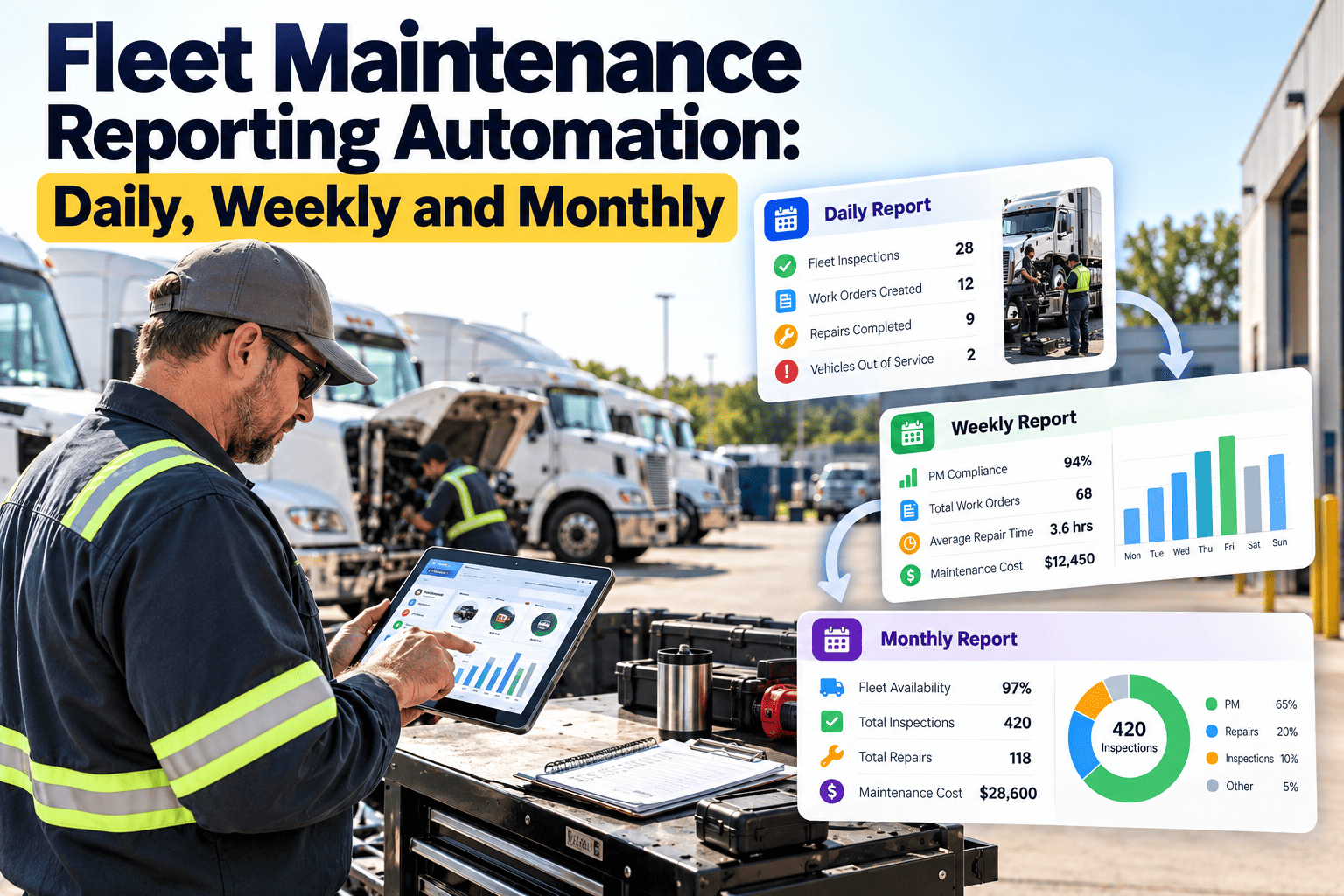
Many fleet maintenance managers spend the first hours of every week building reports instead of acting on them. Data is exported from one place, cleaned in a spreadsheet, formatted and emailed, and by the time it arrives the numbers are already stale. Reporting automation changes that by turning work orders, inspections, inventory and asset data into scheduled reports delivered to the right people at the right time. This guide sets out what belongs in daily, weekly and monthly reports, and how fleet maintenance software reduces manual effort.
Fleet Maintenance Reporting Automation: Daily, Weekly and Monthly
Replace manual spreadsheet reporting with a defined cadence of reports, each built for a specific decision, audience and time horizon.
What manual reporting really costs
The cost is not only the hours spent. It is also the delay, the inconsistency and the decisions made on partial information.
Reporting cadence at a glance
Each cadence answers a different question. Keep them separate so the daily view stays short and the monthly view stays strategic.
| Cadence | Main question | Primary audience | Typical delivery |
|---|---|---|---|
| Daily | What needs attention right now? | Shop supervisors, dispatch, technicians | Early morning dashboard or email summary |
| Weekly | Are we keeping up with planned and corrective work? | Maintenance manager, fleet manager | Start-of-week review pack |
| Monthly | What are the cost and reliability trends, and what should change? | Fleet director, finance, operations leadership | Month-end summary with comparison to prior periods |
Daily reports: keep vehicles moving
The daily report is operational. It should fit on one screen and highlight exceptions, not repeat everything in the system.
What to include
- Vehicles out of service and the reason for each.
- Defects reported from driver inspections since the last report.
- Safety-critical defects still open.
- Work orders due today and those already overdue.
- PM services coming due in the next few days.
- Parts awaiting delivery that block a repair.
Decisions it supports
- Which spare vehicle to dispatch.
- Which repair to start first.
- Which technician to assign to which job.
- Which parts to expedite.
- Which units must stay off the road until repaired.
Stop building reports by hand
Use scheduled dashboards and reports built from live work order, inspection and asset data.
Weekly reports: manage workload and compliance
Weekly reporting shows whether the shop is controlling its workload, not just reacting to it.
| Section | Measures | Why it matters |
|---|---|---|
| Work order flow | Opened, completed and carried over by priority | Shows whether the backlog is growing or shrinking |
| PM compliance | Services completed on time versus due | Predicts future breakdowns and compliance exposure |
| Defect aging | Open defects by age and severity | Highlights items sitting too long |
| Labor use | Planned versus reactive hours by technician or shift | Supports scheduling and staffing decisions |
| Parts and inventory | Items below reorder level, stockouts, pending orders | Prevents repairs stalling for missing parts |
| Repeat repairs | Same defect on the same vehicle within a short window | Exposes quality or diagnosis problems |
Monthly reports: cost, reliability and direction
Monthly reports step back from individual jobs and show patterns leadership can act on.
Cost
- Maintenance cost by vehicle, class and location.
- Labor, parts and outside repair split.
- Planned versus unplanned spend.
- Variance against budget.
Reliability
- Downtime by vehicle and by cause.
- Road calls and repeat failures.
- Vehicles with the highest repair burden.
- Failure patterns by component.
Compliance and process
- Inspection completion rates.
- PM on-time percentage.
- Open safety-related items.
- Work order closure quality.
From data capture to delivered report
Automation works only when each step feeds the next. Fix the weakest link first, which is usually data entry.
Data quality: the foundation of useful automation
Automation speeds up whatever data you give it, including errors. Settle these basics before building reports.
Required data habits
- Every repair is tied to a vehicle and a work order.
- Meter readings are captured at each service.
- Failure and repair types use a short, agreed list.
- Parts are issued against the job that used them.
- Labor time is recorded by task.
Warning signs to fix first
- Work orders closed with no notes or labor.
- Free-text categories that differ between shops.
- Vehicles listed under duplicate asset numbers.
- Back-entered work with inaccurate dates.
- Reports that disagree with the shop floor.
Manual versus automated reporting
The goal is not more reports. It is fewer, better reports that arrive on time without anyone rebuilding them.
Manual process
- Export, clean and format every cycle.
- Different versions in different inboxes.
- Delay between event and visibility.
- Limited drill-down into causes.
- Time spent on assembly, not analysis.
Automated process
- Reports refresh from current system data.
- One definition for each measure.
- Scheduled delivery to the right audience.
- Drill-down from summary to work order.
- Time spent on decisions and follow-up.
Alerts and exceptions: automation beyond reports
Some information should not wait for the next report. Set simple rules that notify someone when a threshold is crossed.
Matching each report to its audience
The same data serves different people differently. Tailor the view so each reader sees only what they can act on.
| Audience | What they need | Best format |
|---|---|---|
| Technicians and shop leads | Assigned jobs, priorities, parts availability | Mobile work list updated through the shift |
| Dispatch and operations | Which vehicles are available, due soon or out of service | Short daily status summary |
| Maintenance manager | Backlog, PM compliance, labor use, repeat repairs | Weekly report with drill-down |
| Finance | Cost by vehicle group, budget variance, outside spend | Monthly summary with period comparison |
| Safety and compliance | Inspection completion, open safety defects, records | Weekly exception list and monthly review |
| Executive leadership | Trends in cost, reliability and uptime | One-page monthly scorecard |
Designing reports people actually use
A report that is hard to read gets ignored, however accurate it is. Apply a few design rules.
Layout principles
- Put the most important number or exception at the top.
- Show trends against the prior period, not isolated values.
- Limit each report to the measures that drive a decision.
- Use consistent names and units across every report.
- Link summary figures to the underlying work orders.
Questions to test a report
- Who reads this, and what will they do differently?
- Would anyone notice if this report stopped?
- Can the numbers be traced to source records?
- Does the reader know what good looks like?
- Is there a clear owner for each exception?
Staging the move to automated reporting
Trying to automate everything at once usually stalls. Build momentum with a staged approach.
Definitions to lock down before you automate
Automation hardens whatever rules you give it. Agree on these definitions first.
Downtime
- When does the clock start and stop?
- Is waiting for parts counted?
- Are scheduled services included?
PM compliance
- What grace window counts as on time?
- Is it measured by date, meter or both?
- How are skipped services treated?
Cost
- Are tires, accidents and outside repairs included?
- How is labor valued?
- When is cost recorded: at order or at invoice?
Running a short weekly report review
A report creates value only when someone acts on it. A fifteen-minute review keeps the cycle moving.
Suggested agenda
- Review exceptions first: overdue PM, aged defects, out-of-service units.
- Check workload against labor and parts availability.
- Confirm owners and dates for every open action.
- Note any measure that looks wrong and trace it to the source.
Common report mistakes
- Too many measures and no clear priority.
- Totals without trends or comparison.
- Different numbers in different versions.
- No owner assigned to follow up on problems.
Measures that add noise instead of insight
Not every number deserves a place in a recurring report. Remove or rework measures that fail these tests.
Weak measures
- Total work orders with no priority or type split.
- Averages that hide a few extreme vehicles.
- Counts that reward closing jobs quickly rather than correctly.
- Figures nobody can explain or influence.
Stronger measures
- Work orders by priority, age and type.
- Distribution or top-ten lists of problem vehicles.
- Repeat repair rates alongside closure speed.
- Measures linked to a named owner and a decision.
Controlling distribution
- Send each report to named roles, not broad lists.
- Restrict cost data to people who need it.
- Keep an archive so past reports can be compared.
- Review the recipient list each quarter as roles change.
How Oxmaint supports reporting automation
Oxmaint keeps maintenance activity in one system so reports draw from the same source your team uses every day.
| Reporting need | Oxmaint capability | Result |
|---|---|---|
| Live operational view | Dashboards for work orders, assets and PM status | Daily visibility without exports |
| Consistent source data | Work orders, inspections and asset records in one system | One version of the numbers |
| Scheduled planning | Preventive maintenance schedules and reminders | Upcoming work visible ahead of time |
| Parts control | Inventory tracking and reorder levels | Stock risk surfaced early |
| Management review | Reporting on cost, downtime and compliance | Weekly and monthly trends in a repeatable format |
Frequently asked questions
Which fleet maintenance reports should be automated first?
Start with the daily out-of-service and overdue report, then weekly PM compliance and backlog. They are used most often and save the most time.
How many metrics should a report include?
Only those tied to a decision for that audience. Daily reports usually need a handful, while monthly reports can carry more with trends.
Does automation fix poor data?
No. Reports reflect what is entered, so set data standards and capture work at the point of service in a system like Oxmaint.
Who should receive each report?
Match the report to the role: supervisors get daily exceptions, managers get weekly performance, leadership gets monthly cost and reliability trends.
Can we tailor reports to our fleet?
Yes, reports can be aligned to your vehicle groups, locations and measures. A demo can show what fits your operation.
Get the right maintenance report to the right person on time
Connect your work orders, inspections, assets and parts data so daily, weekly and monthly reporting runs without manual rebuilds.