A preventive maintenance service should be a planned, predictable job. In many fleet shops it stalls at the parts counter instead. A technician opens the work order, finds the oil filter in stock but the matching seal missing, and the vehicle sits in a bay while someone hunts for a part. Parts kitting solves this by assembling every part and consumable for a service before the unit arrives. This guide explains how to design kits, control the stock behind them and measure results, with practical ways a maintenance-first CMMS like Oxmaint supports the process.
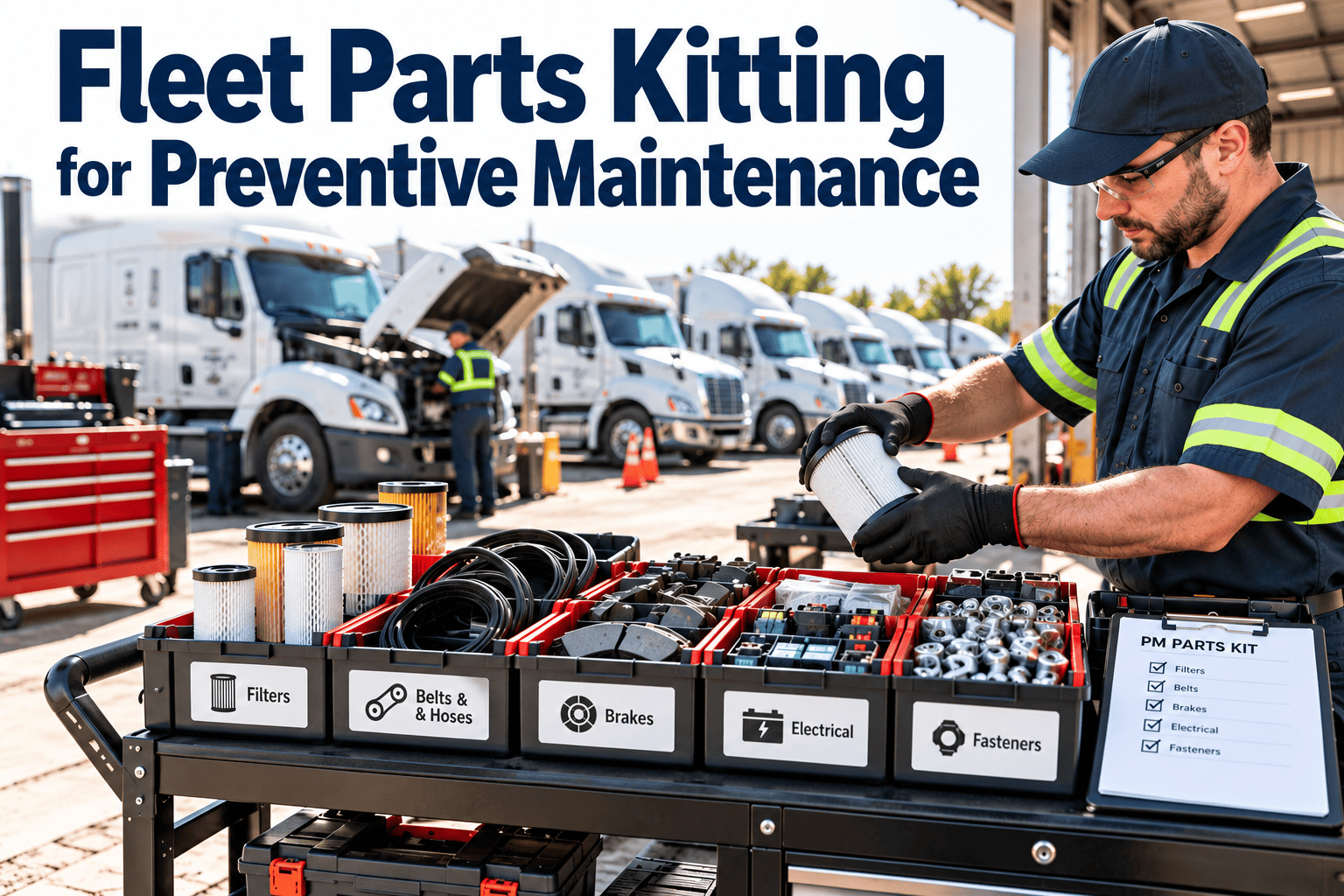
Fleet Parts Kitting for Preventive Maintenance
Build the kit before the truck arrives, so every planned service starts with the right parts in hand and ends on time.
- Engine oil filter
- Fuel filter set
- Air filter element
- Engine oil, per capacity
- Coolant top-off
- Grease cartridge
- Drain plug gasket
- Belt, if due
- Labels and tie wraps
Where PM time really disappears
Technician time is the most expensive part of a service. Searching, waiting and returning to the counter add up without appearing on any work order.
The bars show relative impact for illustration. Measure your own shop with a few weeks of time observation.
Typical consequences
- Vehicles stay in the bay longer, which delays the next unit.
- Technicians substitute parts that are not specified for the asset.
- Services are partly done and rescheduled, which creates repeat visits.
- Emergency parts purchases cost more than planned stock.
Anatomy of a good kit
A kit is more than a box of filters. It is a defined list tied to a service type and an asset class.
| Kit element | What to include | Common mistake |
|---|---|---|
| Core parts | Filters, gaskets, seals and wear items required at every service | Listing parts by memory, not from the OEM schedule |
| Consumables | Oil, grease, coolant and cleaning supplies sized to the asset | Ignoring capacity differences between models |
| Conditional parts | Belts, hoses or brake items added when inspection history calls for them | Keeping them out of kits and discovering the need mid-job |
| Documentation | Work order, checklist, torque notes and safety steps | Printing nothing, leaving technicians to guess |
| Disposal items | Waste containers and labels for used filters and fluids | Missing items that slow clean-up and compliance |
Rules for designing kits
- Create one kit per service type and asset class, not per vehicle.
- Name kits clearly so the counter and the bay refer to the same thing.
- Take part numbers from the OEM service manual and verify supersessions.
- Review each kit after major service findings and warranty changes.
The kitting workflow, from forecast to bay
PM comes due
A meter or calendar trigger creates a scheduled service.
Kit is reserved
The matching kit is reserved against the work order.
Stock is checked
Shortages trigger a purchase request before the date.
Kit is staged
Parts are picked, bagged and labeled with the unit number.
Service is done
Parts are consumed and returned items are recorded.
Where to stage kits
- A labeled shelf or cart near the bay for the next scheduled units.
- Mobile service trucks loaded the evening before field work.
- Satellite depots supplied from a central store on a fixed cycle.
Stock behind the kits
Kitting only works if the underlying inventory is accurate. Kits consume stock, so counts need to be reliable.
Inventory controls that support kits
- Set minimum and maximum levels using usage history and supplier lead time.
- Cycle count fast-moving kit items regularly instead of waiting for annual counts.
- Record approved alternates so a technician can use a valid substitute.
- Link each part to the assets it fits to avoid wrong-part installations.
Mixed fleets, mixed kits
Different asset types need different kit strategies. A single approach rarely fits all of them.
Heavy trucks
Larger fluid volumes and multiple filters. Build kits by engine family and service tier.
Light-duty vehicles
High volume and simple kits. Standardize by make and model group to cut variants.
Equipment and generators
Hour-based tiers. Kits scale up at higher hours and may need specialty items.
Trailers
Axle, brake and light components. Kits focus on wear parts and inspection findings.
Common kitting mistakes and fixes
Traceability, warranty and compliance
Kitting creates a clean record of what went onto each asset. That record is useful well beyond the shop.
- Warranty claims are easier when part numbers and dates are tied to the asset history.
- Recalls and service bulletins can be traced to the units that received affected parts.
- Inspection and repair records support regulatory expectations for commercial vehicles.
- Waste handling steps for used oil and filters follow local environmental rules.
Measuring whether kitting works
- Record a baseline for four to six weeks before changing the process.
- Review the same measures monthly and note which kits cause the most delay.
How Oxmaint supports kitting
A CMMS connects the PM schedule, work orders and stock, so a kit is built from the same data the planner uses.
| Step | CMMS capability that helps |
|---|---|
| Define the service | Preventive maintenance templates with task lists and parts |
| Trigger the work | Scheduling by meter, mileage or calendar |
| Reserve parts | Inventory linked to work orders and asset records |
| Execute in the bay | Mobile work orders with checklists and notes |
| Review results | Reports on cost, PM compliance and parts usage |
To see how your kits would map into work order templates, schedule a working session with sample assets.
Make every PM start with parts in hand
Link kits to work orders and stock, and pilot the process on your most frequent service.
A four-step starting plan
Pick one service
Choose the most frequent PM for the largest asset group.
Define the kit
List parts from the OEM schedule and past work orders.
Verify stock
Count items, set min and max and fix part numbers.
Run and review
Stage kits for a week of PMs, then compare results.
Frequently asked questions
Is parts kitting worth it for a small fleet?
Often yes, starting with your most frequent service. Even a handful of standard kits can cut waiting time.
How many kits should we create?
Start with one per common service and asset class, then add variants only when parts truly differ.
Do kits increase inventory costs?
They can shift stock earlier, but better min and max levels usually reduce emergency buys. Review your setup in a demo.
How do kits handle conditional parts?
Use a core kit plus add-on lists triggered by inspection findings or asset history.
Can I start without changing my whole shop?
Yes. Pilot one service type, then set it up in Oxmaint and expand gradually.
Stop waiting on parts, start finishing services
Connect PM schedules, work orders and inventory so every planned service has the right kit ready at the bay.