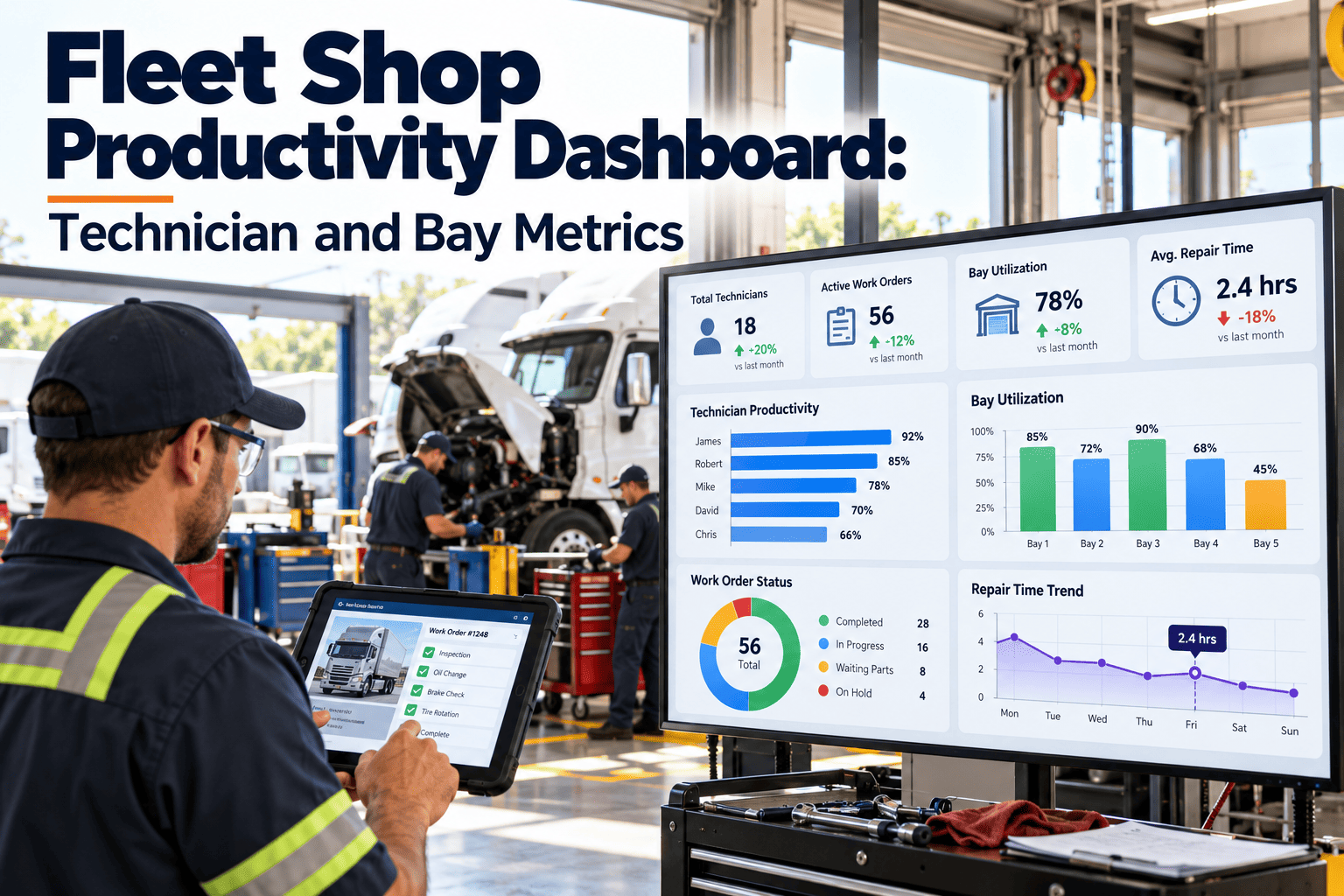
A fleet shop can look busy all day and still deliver late vehicles. Technicians move between bays, wait on parts, chase approvals, and redo work that should have been right the first time. Without clean numbers, supervisors manage by impression, and impressions rarely survive a budget review. A productivity dashboard built on technician and bay metrics replaces guesswork with evidence that comes straight from work orders. Teams that already log labor and downtime can start tracking shop metrics without adding a separate reporting tool.
Fleet Shop Productivity Dashboard: Technician and Bay Metrics
See where labor hours and bay time actually go, so supervisors can remove delays, balance workloads, and return vehicles to service sooner.
Why Most Shop Dashboards Report Activity Instead of Productivity
Many shops count completed work orders and call it productivity. That number hides long waits, repeat repairs, and bays blocked by vehicles nobody is working on.
Activity-Based Reporting
- Counts work orders closed per week, regardless of complexity.
- Treats every hour clocked as an hour of productive repair.
- Ignores vehicles that return for the same defect.
- Cannot explain why a bay sat idle or why a unit sat for days.
Flow-Based Productivity
- Separates repair time from waiting time on every job.
- Compares actual hours against a standard for the task.
- Tracks comebacks against the original work order.
- Shows bay occupancy by state: active, waiting, or blocked.
A useful dashboard answers one question: how long was the vehicle out of service, and what consumed that time?
The Technician Metrics Worth Putting on the Dashboard
Choose a small set of measures that every technician can influence and every supervisor can verify from work order records.
| Metric | How It Is Calculated | What It Reveals |
|---|---|---|
| Wrench Time | Hands-on repair hours divided by hours on shift | How much of the day is spent actually repairing |
| Labor Efficiency | Standard hours for the task divided by actual hours logged | Skill gaps, unclear procedures, or unrealistic standards |
| First-Time Fix Rate | Jobs closed without a repeat visit divided by jobs closed | Diagnosis quality and repair completeness |
| Comeback Rate | Repeat work orders for the same defect within a set window | Rework cost hidden inside normal volume |
| PM Completion on Time | Preventive tasks finished by due date divided by tasks due | Whether scheduled work is protected from reactive demand |
| Open Job Age | Days since a work order was assigned and is still open | Stalled jobs that need a supervisor decision |
Read Individual Numbers in Context
A low efficiency figure is not automatically a performance problem. It may point to missing manuals, a vehicle model the technician rarely sees, or tooling that is shared across bays.
- Compare technicians on similar job types, not on the whole mix.
- Review trends over several weeks instead of single days.
- Use the data to coach and train before using it to rank.
Bay Metrics: Measuring the Space, Not Just the People
A bay is a fixed asset with a daily capacity. Every hour it holds a vehicle that no one is touching is capacity lost.
Bay Utilization
Hours a bay is occupied by a vehicle under active repair, divided by available bay hours.
Bay Turnaround
Elapsed time from vehicle arrival to release, split by job type such as PM, brake work, or electrical diagnosis.
Blocked Bay Hours
Hours a vehicle occupies a bay while waiting on parts, approvals, sublet work, or another technician.
High occupancy is not the goal on its own. A bay that is full of stalled vehicles looks busy and produces nothing.
Mapping a Technician Shift Into Recoverable Time
Once labor is categorized, the dashboard shows which delays are worth fixing first. The split below is a template for categories, not measured data.
- Parts wait: Improve stocking of fast-moving items and link parts requests to the work order.
- Approval wait: Define estimate thresholds so routine repairs need no sign-off.
- Travel and admin: Move data entry to mobile devices at the vehicle.
- Hands-on repair: Protect it with better job prep and clear task instructions.
Turn Work Order Data Into a Shop Dashboard Your Supervisors Trust
Track labor, bay time, and repeat repairs in one maintenance system built around fleet work orders.
How Clean Dashboard Data Is Captured Along the Work Order
Dashboards are only as accurate as the records beneath them. These steps keep the data honest without slowing technicians down.
Common Ways Productivity Metrics Mislead Fleet Shops
Rewarding speed alone
Fast closure without comeback tracking pushes defects back onto the road.
Mixing job types
A PM inspection and an engine diagnosis should never share one efficiency target.
Ignoring unlogged time
If technicians batch entries at shift end, the wait categories become guesses.
Outdated standards
Standard hours that ignore vehicle age or condition make good work look slow.
A Pre-Launch Checklist for the Dashboard
- Every metric has a written definition and a named owner.
- Labor entries use consistent status codes across all technicians.
- Comeback window is agreed, for example a number of days or kilometres.
- Targets are set per job type, not per shop.
- Supervisors review exceptions weekly, not only monthly totals.
Different Roles Need Different Dashboard Views
| Role | Primary Questions | Metrics to Show |
|---|---|---|
| Technician | What is assigned to me and what is blocking it? | Open jobs, job age, parts status, own first-time fix rate |
| Shop Supervisor | Where is work stalled and who has capacity? | Bay board, blocked hours, workload by technician, overdue PMs |
| Fleet Manager | Are vehicles returning to service on time and at what cost? | Turnaround by job type, downtime, comebacks, cost per vehicle |
| Operations Lead | Is the shop supporting route and delivery commitments? | Vehicles out of service, repair backlog, PM compliance |
A Four-Week Path From Paper Logs to a Working Dashboard
How Oxmaint Supports Shop Productivity Tracking
Oxmaint is maintenance management software, so the metrics above come from the records technicians already create.
Teams that want to see this against their own work order flow can book a walkthrough with their real job types.
Fleet Shop Productivity Dashboard Questions
Building Labor Standards That Technicians Consider Fair
Efficiency figures depend on the standard time behind them. A poor standard turns a useful metric into a source of conflict.
Pair Productivity Measures With Quality and Safety Measures
Speed measures alone can push technicians to skip checks. Keep these paired measures on the same view.
| Productivity Measure | Paired Quality or Safety Measure | Why Pair Them |
|---|---|---|
| Labor efficiency | Comeback rate | Fast work that returns is not efficient |
| Turnaround time | Pre-release checklist completion | Speed should not skip safety verification |
| Jobs closed per week | Defects found on audit of closed jobs | Counts hide poor quality |
| Bay utilization | Blocked bay hours | Occupied is not the same as productive |
| PM completion on time | Inspection findings per PM | Completed PMs should find problems, not only tick boxes |
Using the Dashboard in a Ten-Minute Daily Huddle
A dashboard that nobody opens changes nothing. Build it into a short daily meeting at the start of the shift.
- Review blocked vehicles first, with the reason and the owner for each.
- Check any jobs at risk of missing their promised release time.
- Confirm parts due that day and any jobs waiting on them.
- Assign work by technician skill and current workload.
- Note safety-critical defects that need same-day attention.
- Record decisions on the work orders, so the next shift sees them.
Short, regular reviews catch stalled jobs far earlier than a monthly report.
Handovers Between Shifts Without Losing Context
What to hand over
Open jobs, work completed, parts used, and any safety concerns found.
Where it lives
On the work order itself, with notes and photos, not on a whiteboard or loose paper.
How it is checked
The incoming lead reviews open jobs and confirms ownership before the outgoing lead leaves.
Planning Bay and Technician Capacity From the Data
Once the dashboard has several months of history, it can answer capacity questions that were previously guesses.
Questions the Data Answers
- Which hours of the day leave bays empty or overloaded?
- Which job types occupy bays the longest?
- Is demand rising in a particular vehicle class?
- How much planned work is displaced by urgent repairs?
Decisions It Supports
- Shift start times and overlap between crews
- Whether to add a bay, a technician, or a specialist role
- Which work to sublet during peak demand
- How many PM slots to protect each week
Capacity decisions based on measured blocked time often cost less than adding people to fix a parts or approval problem.
Removing the Delays That Technicians Cannot Control
When wait time dominates the dashboard, the fix usually sits outside the technician's hands. Treat these delays as process problems.
- Link parts requests to the work order at the time of diagnosis, so purchasing sees the need immediately.
- Stock common wear items by usage history, and review stockouts every month.
- Set approval limits so routine repairs below a cost threshold start without extra sign-off.
- Stage parts and tools before the vehicle enters the bay, to avoid idle time at the start of a job.
- Track waiting time by cause for several weeks before choosing which delay to attack first.
Give Your Shop the Technician and Bay Metrics It Needs to Move Vehicles Faster
Start with the work orders you already run and let the dashboard show where time is lost.