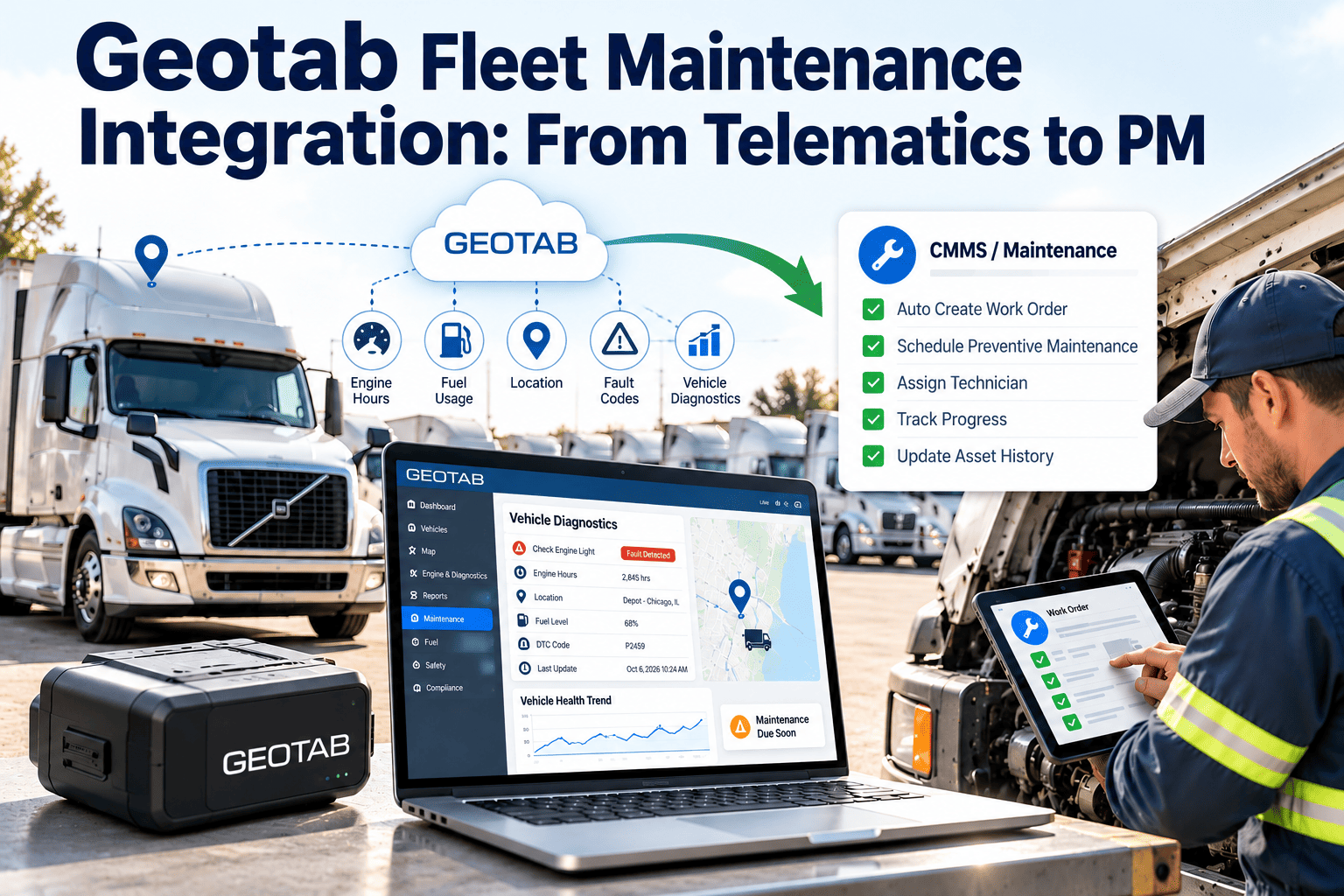
Telematics tells you what a vehicle did. A maintenance system decides what the shop does about it. Fleets that run Geotab already collect odometer, engine hours, fault codes, and driver behavior, yet many still schedule services from spreadsheets or memory. This article shows how to turn telematics signals into preventive maintenance, inspections, and work orders, and how a fleet maintenance CMMS gives those signals a place to become completed, documented repairs.
Geotab Fleet Maintenance Integration: From Telematics to PM
Move from raw vehicle data to scheduled services, faster repairs, and cleaner compliance records.
Vehicle
Odometer, engine hours, fault codes
feeds
Telematics
Geotab data and exceptions
triggers
Maintenance rules
PM due, fault review, inspection
creates
Work order
Assigned, completed, recorded
The gap between telematics and the shop floor
Telematics platforms are built to track location, safety, and utilization. Maintenance needs a different structure: schedules, parts, labor, and approvals.
What telematics is good at
- Live odometer and engine hour readings
- Diagnostic trouble codes reported by the vehicle
- Idle, speed, and harsh event reporting
- Trip history and utilization
Gap
What maintenance still needs
- Service schedules by vehicle class
- Work orders with labor, parts, and vendor cost
- Inspection results and defect follow-up
- A lifetime record per asset for audits
Telematics signals that matter for maintenance
Not every data point deserves a work order. These signals map most directly to maintenance actions.
| Signal | Maintenance use | Typical workflow result |
|---|---|---|
| Odometer | Mileage-based preventive maintenance | PM work order generated when interval is reached |
| Engine hours | Hour-based service for equipment and heavy vehicles | Service due alert and scheduled work order |
| Diagnostic trouble codes | Early warning of engine, emissions, or transmission issues | Review task, then corrective work order if confirmed |
| Battery voltage events | Starting and charging system trends | Inspection or battery replacement task |
| Idle time | Wear on engines and aftertreatment systems | Adjusted service interval or driver follow-up |
| Harsh braking or cornering | Brake, tire, and suspension wear | Targeted inspection of the affected vehicles |
| Driver-reported defects | Safety and compliance | Defect work order with priority |
Give telematics data a maintenance home
Set up preventive maintenance schedules and work orders so every signal ends in a documented action.
From mileage to preventive maintenance
Mileage and hour-based PM is the simplest, highest-value use of telematics data. It replaces manual odometer collection from drivers.
1
Define intervals by vehicle class
Set oil, filter, brake, tire rotation, and inspection intervals in miles, hours, or days, following manufacturer guidance.
2
Keep meter readings current
Update each asset's odometer and hours from telematics, or from regular imports, so due dates stay accurate.
3
Trigger work orders ahead of the due point
Create the order with a lead window so scheduling can fit around routes and shop capacity.
4
Record what was actually done
Technicians log labor, parts, and findings. The meter reading at service resets the next interval.
Handling fault codes without flooding the shop
Diagnostic codes are valuable but noisy. A code can be a temporary glitch, a sensor issue, or a real failure.
Informational
Log against the asset and watch for repeats. No work order unless the code returns.
Needs review
Create a diagnostic task for a technician to confirm cause within a defined window.
Urgent or safety
Open a high-priority work order and flag the vehicle for removal from service if required.
Rules that keep the process manageable
- Group repeated codes on the same vehicle into one task instead of many.
- Set severity by code type with input from technicians, not only by default categories.
- Record the confirmed cause so future alerts can be filtered more accurately.
- Review closed fault tasks monthly to remove noise from the rules.
Integration approaches and what to ask first
Geotab data can reach a maintenance system in several ways. The right choice depends on how fresh the data must be and how much technical support you have.
Scheduled data import
Meter readings and basic asset data are loaded on a regular cycle. Simple to run and often enough for mileage-based PM.
API-based connection
Near-real-time exchange of readings and events through Geotab's API. Needs configuration and clear field mapping.
Reseller or integration partner
Some fleets work through a reseller or partner to manage data access and support. Confirm who owns each step.
Before you commit, ask Oxmaint for the current integration options and data fields supported, then confirm them against your own Geotab account setup in a short demo.
Data mapping checklist before go-live
Most integration problems come from mismatched vehicle records, not from the connection itself.
One shared vehicle identifier, such as VIN or unit number, in both systems
Agreed units for distance and engine hours
Rules for what happens when a vehicle is sold or reassigned
Clear ownership of meter readings when both systems hold one
A test group of vehicles before the full fleet is connected
A named person to review exceptions during the first month
Before and after connecting telematics to PM
| Area | Manual process | Connected process |
|---|---|---|
| Meter readings | Drivers report odometer, often late or wrong | Readings arrive from the vehicle on a regular cycle |
| PM scheduling | Dates tracked in spreadsheets | Work orders generated by interval and lead time |
| Fault codes | Found when the driver complains | Reviewed as tasks before breakdown |
| Audit records | Paper files and email | Service history stored per vehicle |
| Shop planning | Reactive, with surprise arrivals | Forecast of upcoming work by week |
Inspections and compliance in the same workflow
Telematics shows usage, but safety and regulatory records depend on inspections and documented repairs.
Pre-trip and post-trip
- Drivers complete mobile checklists
- A failed item creates a defect work order
- Safety-critical defects can hold the vehicle
Periodic and annual
- Scheduled inspection tasks by vehicle type
- Findings linked to repairs and sign-off
- Records ready for audits and roadside checks
Regulations vary by country, state, and vehicle weight class. Confirm which inspection and record rules apply to your operation.
A rollout plan in four phases
Weeks 1-2
Prepare. Clean the asset list, match vehicle IDs, and choose a pilot group of vehicles.
Weeks 3-4
Connect. Load meter readings, build PM templates, and test due-date calculations.
Weeks 5-8
Pilot. Run real work orders on the pilot group and tune lead times and fault rules.
Week 9 onward
Expand. Add remaining vehicles by class and begin reporting on PM compliance.
Metrics that show the integration is working
PM compliance
Share of services completed before the due point
Meter accuracy
Gap between system readings and spot checks
Fault-to-repair time
Hours from alert to closed work order
Unplanned repair share
Corrective labor against total labor
Overdue inspections
Count of inspections past due by vehicle
Vehicle availability
Days in service against days scheduled
Three end-to-end scenarios
These examples show how a signal becomes a finished repair. They are illustrative workflows, not customer results.
Mileage reaches a service interval
Odometer nears limitPM work order created with lead timeShop schedules the vehicleTechnician completes checklistNext interval resets
Repeated coolant-related fault code
Code appears twice in a weekDiagnostic task openedTechnician confirms a leakCorrective work order with partsCause recorded for future rules
Driver reports a brake defect at pre-trip
Checklist item failsHigh-priority defect orderVehicle held from serviceRepair and sign-offVehicle released with record
How use cases differ by fleet type
The same data supports different priorities depending on what the fleet does.
| Fleet type | Most useful signals | Maintenance priority |
|---|---|---|
| Delivery and last mile | Stop-and-go mileage, harsh braking, idle | Brakes, tires, and short-interval oil service |
| Field service vans | Engine hours, idle, battery events | Batteries, charging systems, and PM on hours |
| Long haul and regional trucking | High mileage, fault codes, speed | Inspection compliance, tires, and emissions systems |
| Construction and vocational | Engine hours, PTO or equipment hours, idle | Hour-based service and hydraulic or body checks |
| Municipal and utility | Low mileage, long idle, seasonal use | Time-based PM and condition inspections |
Getting technicians and drivers to use the workflow
Integration only works if the people on the floor trust the work orders they receive.
For technicians
Show the signal that created the task, such as the code or reading, so they do not start from zero. Let them close tasks with the actual cause.
For drivers
Keep inspection checklists short and mobile friendly. Confirm that a reported defect leads to a visible response.
For managers
Review overdue work orders weekly and use dashboards to settle priority questions with data instead of opinion.
Data governance and access basics
Connecting systems means sharing vehicle data, so set simple rules at the start.
- Limit access by role. Technicians need service data, but not necessarily driver behavior or location history.
- Share only what maintenance uses. Odometer, hours, fault codes, and defects usually cover the need, and everything else can stay in the telematics platform until a clear maintenance use appears.
- Document ownership. Decide who manages credentials, field mapping, and changes when devices are replaced.
- Check privacy rules. Some regions and union agreements restrict how driver-related data is used.
- Keep an audit trail. Record who changed meter readings or closed safety-related work orders.
Troubleshooting common integration problems
| Symptom | Likely cause | First check |
|---|---|---|
| PM due dates look wrong | Meter reading out of date or on the wrong vehicle | Compare system reading with the dash on a sample unit |
| Duplicate work orders | Same fault code rule firing repeatedly | Group alerts by vehicle and code window |
| Vehicle missing from maintenance system | Identifier mismatch or new device installed | Verify VIN or unit number in both records |
| Hours not advancing | Device not reporting or unit parked | Check last reported time for that device |
| Technicians ignore alerts | Too many low-value tasks | Raise thresholds and review closed tasks |
Beyond fixed intervals: condition-based maintenance
Telematics lets fleets move gradually from calendar and mileage PM toward service that reflects how each vehicle is actually used.
| Approach | Trigger | Best for | Watch out for |
|---|---|---|---|
| Time-based | Calendar date | Low-use and standby vehicles | Over-servicing idle units |
| Usage-based | Miles or engine hours | Most active vehicles | Stale meter readings |
| Condition-based | Fault codes, inspection findings, wear trends | Components with clear warning signs | Alert noise without technician review |
Start with usage-based PM, add fault code review, and only then adjust intervals using documented repair history.
Reporting that closes the loop
Once telematics and maintenance records share a vehicle history, new questions become easy to answer.
- Which vehicles generate the most repeat fault codes, and what was the confirmed cause each time?
- Are high-idle vehicles needing service earlier than low-idle vehicles of the same model?
- How many days pass between a safety defect report and a completed repair?
- Which services are consistently completed late, and is the cause scheduling, parts, or labor?
- What does each vehicle cost per mile once maintenance and fuel are combined?
Questions to settle before you start
Which vehicles and equipment will be connected first, and which will stay on time-based PM?
Who approves changes to service intervals, and how are they documented?
How quickly must a fault code be reviewed, and by whom?
What is the backup process if telematics data is delayed or a device fails?
Which reports will leadership expect in the first quarter?
How will drivers learn that defects they report now lead to action?
Answering these early prevents the common problem of a working integration that nobody owns. Write the answers down, share them with the shop and the drivers, and review them again after the pilot so the rules reflect what actually happened.
Pitfalls to avoid
- Turning every alert into a work order. Technicians stop trusting the system and ignore it.
- Trusting meter data blindly. Spot check odometer values, especially after device or vehicle changes.
- Ignoring non-connected assets. Trailers, small equipment, and older units still need time-based PM.
- Skipping technician input. Rules built without the shop miss real failure patterns.
- Leaving history behind. Load past service records so intervals start from the true last service.
What Oxmaint adds on the maintenance side
Oxmaint focuses on the work that follows the data, so insight turns into completed maintenance.
| Oxmaint capability | How it supports a telematics-driven fleet |
|---|---|
| Preventive maintenance scheduling | Meter, hour, and calendar-based services with lead times |
| Work orders | Assignment, labor, parts, vendor cost, and completion notes |
| Mobile inspections | Checklists for drivers and technicians with defect follow-up |
| Asset history | Full service record for each vehicle for audits and resale |
| Inventory | Parts tracking and reorder control for common service items |
| Reports and dashboards | PM compliance, downtime, and cost per vehicle |
Frequently asked questions
Why connect Geotab data to a maintenance system?
It keeps meter readings current and ties fault events to work orders, so services happen on time and are documented.
Can odometer data trigger preventive maintenance?
Yes. Accurate readings let a CMMS create PM work orders when a vehicle nears its interval. Try it free.
Should every fault code create a work order?
No. Sort codes by severity and repeat frequency so only meaningful alerts reach the shop.
What integration options does Oxmaint support?
Options and supported fields change, so confirm current details in a short demo against your Geotab setup.
Does this help with compliance records?
It keeps inspections, defects, and repairs in one asset history, which supports audit preparation.
Turn vehicle data into scheduled maintenance
Build PM schedules, inspection workflows, and work order tracking around the telematics data you already collect.