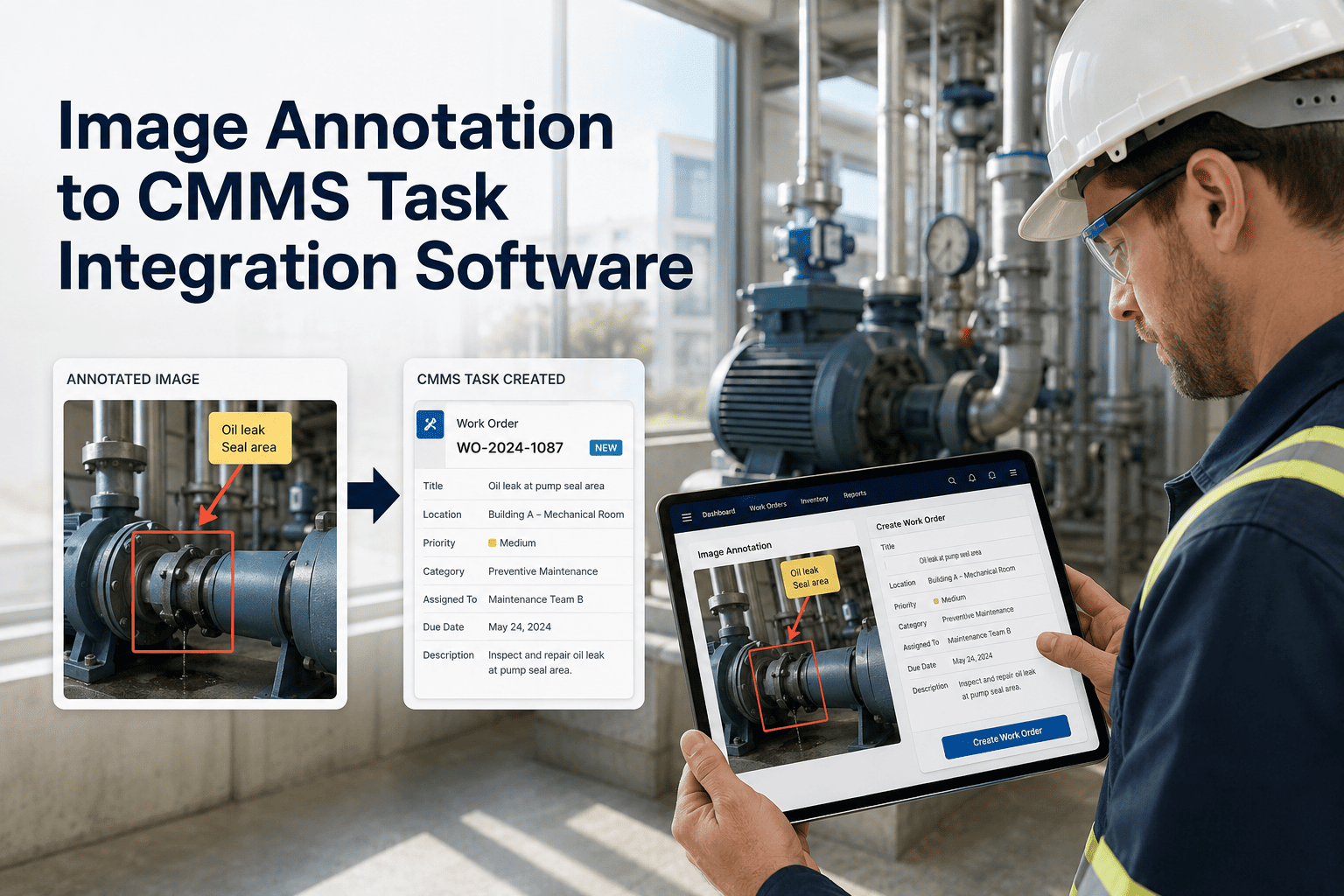
When an inspector photographs a defect on a bridge abutment or a pump station valve, the photo itself contains more information than any text description — but only if the right person can read it correctly and the annotation gets linked to the right asset record and task in the CMMS. Without a structured connection between what an inspector marks on an image and what the CMMS receives as a work order, the photo becomes a file that sits in a folder while someone else types a description of it from memory. OxMaint's Image Annotation to CMMS Task Integration Software creates that connection automatically: inspectors annotate defect zones directly on captured images, and OxMaint translates those annotations into structured CMMS tasks with asset reference, defect classification, severity score, and priority — without any re-entry step. For government maintenance teams managing dozens of asset types across multiple locations, this eliminates the translation layer that loses context between field capture and task creation. Start a free trial and see your first annotation become a CMMS task in under 60 seconds.
Image Annotation · CMMS Integration · Government Maintenance
Annotate Once. CMMS Task Created. No Re-Entry Required.
OxMaint connects image-level defect annotation directly to CMMS task creation — translating field inspector markings into structured government maintenance work orders with asset reference, defect type, and severity automatically assigned.
Integration Workflow
From Field Photo to CMMS Task — 5 Steps, Zero Manual Re-Entry
Inspector photographs the asset defect in the OxMaint mobile app — photo is automatically geo-tagged and time-stamped at capture
Inspector draws bounding box or polygon on defect zone in the image — selects defect type from asset-class-specific pick list
OxMaint AI assigns severity score based on annotated defect type, defect area, and asset condition history — inspector confirms or adjusts
Annotation is matched to the correct CMMS asset record — OxMaint selects the right work order template based on defect type and asset class
CMMS work order is created with annotated photo, severity, asset history, and team assignment pre-filled — ready for manager approval
Annotation Types Supported
Defect Annotations OxMaint Translates to CMMS Tasks
| Annotation Type |
Asset Class |
CMMS Task Generated |
Information Pre-Filled |
| Crack bounding box |
Bridge / Structure |
Structural Inspection WO |
Crack location, estimated area, severity tier, prior WO history |
| Corrosion zone polygon |
Steel structures / Vehicles |
Corrosion Treatment WO |
Affected area percentage, surface location, asset age, last treatment date |
| Fluid pooling mark |
Pump stations / Utilities |
Leak Investigation WO |
Fluid location, proximity to electrical assets, urgency flag if near panel |
| Surface damage box |
Roads / Pavements |
Pavement Repair WO |
GPS coordinates, road segment ID, estimated repair area, traffic class |
| Missing component flag |
Guardrails / Safety assets |
Safety Component Replacement WO |
Asset ID, component type, standard specification, replacement priority |
OxMaint · Image Annotation · CMMS Task Integration
See How Inspector Annotations Become CMMS Tasks Automatically
A live demo shows the complete annotation-to-task workflow: photo capture, defect marking, severity assignment, CMMS task creation, and work order queue visibility — from a single field submission with no re-entry step.
Time and Quality Impact
What Government Teams Gain From Annotation-to-CMMS Integration
Zero
Re-entry steps between field annotation and CMMS task
92%
Reduction in task creation time vs manual CMMS entry
100%
Of tasks include photo evidence at point of creation
3.4×
More defects captured per inspector per shift
"
The annotation step is where most government inspection programs lose their data quality. An inspector marks a crack on a photo in the field, then hours later tries to describe it in a CMMS entry from memory — the exact location, the extent, the context all get compressed into a vague text note. When annotation connects directly to CMMS task creation at the point of capture, that translation step disappears and the task is created with information that would have taken three follow-up calls to reconstruct.
Suresh Pillai
Senior Infrastructure Inspector · 24 years with NHAI and state PWD · CIPE Certified · Specialist in bridge and structural condition assessment
Frequently Asked Questions
Image Annotation to CMMS Integration — Questions from Government Teams
Do inspectors need training on annotation tools before they can use OxMaint in the field?
Most inspectors are productive within one day of onboarding. OxMaint's annotation interface is designed for field use — inspectors draw bounding boxes or select defect zones on a touch screen, and the defect type pick list is customized to the asset classes they actually inspect. No prior experience with annotation software is required, and the interface works with standard government-issue tablets and smartphones.
Book a demo to see the inspector-facing interface in action.
Can the system handle multiple annotations on a single inspection photo?
Yes. Inspectors can place multiple annotations on a single image — each annotation creates a separate CMMS task with its own defect classification, severity score, and work order. This is particularly useful for structural inspections where multiple defect types appear in the same field of view, such as concurrent cracking, corrosion, and a missing safety component on the same bridge element.
Start a free trial and test multi-annotation capture on a real inspection.
How does OxMaint know which CMMS template to use for each annotation type?
During onboarding, OxMaint maps each defect annotation type to the correct CMMS work order template for each asset class. This mapping is set by the maintenance manager or CMMS administrator and can be customized per department or site. For example, a corrosion annotation on a bridge can trigger a different template than the same annotation type on a vehicle — reflecting the different SLA, materials, and skill requirements for each asset class.
Does the annotation data feed into OxMaint's defect trend analytics over time?
Yes. Every annotation is stored against the asset record with defect type, location, severity, and timestamp — and this cumulative dataset feeds directly into OxMaint's defect trend analytics. Planners can track how frequently a specific defect type appears on a specific asset, whether annotations on the same asset zone are increasing in severity over successive inspections, and which assets are accumulating the most annotations over a rolling period.
Ask about trend analytics in your demo session.
OxMaint · Image Annotation · CMMS · Free to Start
Every Field Photo Should Become a CMMS Task — Automatically
OxMaint closes the gap between inspector annotation and CMMS task creation — giving government maintenance teams complete, evidence-linked work orders without any manual re-entry step between the field and the office.