Council members rarely ask for a list of work orders. They ask whether the roads are getting better, how fast a complaint gets answered and what last year's budget actually bought. A public works dashboard has to answer those questions in under a minute, in plain language, with numbers the department can defend. This guide shows layouts that work for elected officials and residents, how each measure is calculated, and the data habits behind it, using reporting from a maintenance management system such as Oxmaint.
Public Works Dashboard Examples for Elected Officials
Show what maintenance dollars achieved: backlog, response times and cost per mile on one readable page. The layouts below are examples of structure, not real data.
Start with the questions council really asks
A dashboard fails when it answers questions nobody asked. Build backwards from the questions you hear in meetings and constituent emails.
| Question from council or residents | Measure that answers it | Data needed |
|---|---|---|
| Are you keeping up with requests? | Requests received versus closed, open count trend | Work order create and close dates |
| How fast do you respond? | Time from request to first action, by priority | Request time and first action time stamp |
| Is the backlog growing? | Backlog count and age buckets | Open work orders with ages |
| What does it cost to maintain a mile of road? | Maintenance cost divided by lane miles | Labor, materials, contractor cost and asset length |
| Are we preventing problems or reacting? | Planned versus reactive work share | Work order type recorded at creation |
| Where did last year's money go? | Spend by asset class and funding source | Costs coded to assets and budget lines |
Five design rules for an elected-official audience
One page, six to eight measures
More than that and the important signal gets lost. Move detail to a drill-down.
Show trend, not just a snapshot
A single number invites argument. A twelve-month line shows direction.
State the target beside the result
Each measure needs a goal that council has seen, so the page shows met or missed at a glance.
Write labels in plain language
Say "days to first response", not "mean time to acknowledge". Define every term once.
Explain the dip and the spike
A short note beside a bad month, such as a storm or a vacancy, builds more trust than a clean chart.
Example layouts by audience
Monthly council summary
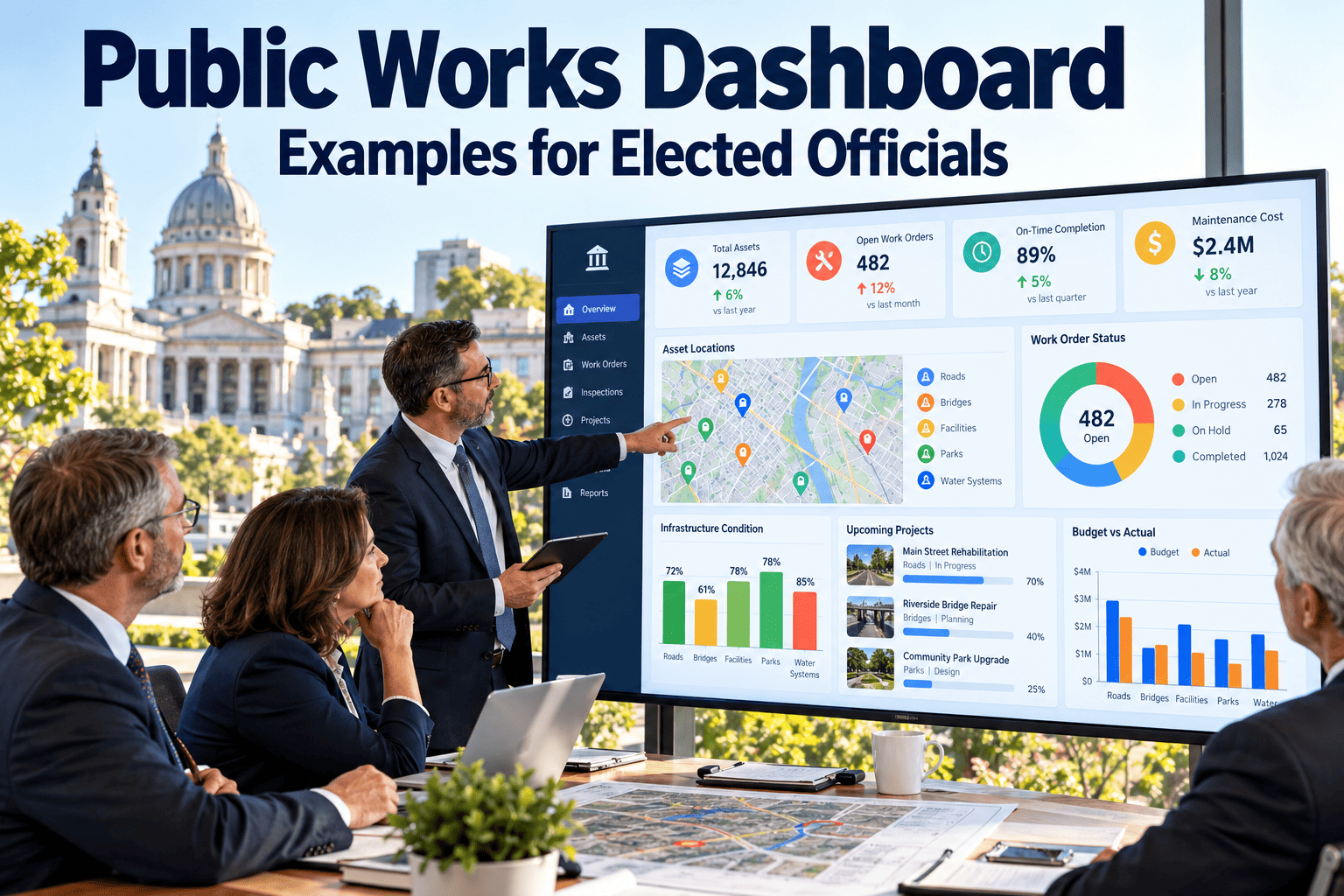
A single page for the packet. It answers whether the department is keeping up, whether response targets are met and whether spend tracks the budget.
- Best for: regular council or committee meetings
- Update frequency: monthly
- Include a short list of actions requested of council, if any
Roads and streets view
Connects treatment spending to condition. Council can see how many miles were treated and what remains untreated.
- Best for: budget hearings and paving program reviews
- Pair cost per mile with condition, never alone
- Show drainage and signage work separately from paving
Water and sewer view
Highlights how quickly repairs are made and whether preventive programs are keeping up, with repeat problem areas flagged for capital planning.
- Best for: utility boards and rate discussions
- Link repeat breaks to replacement priorities
- Show regulatory task completion without technical clutter
Public-facing summary
A simplified version for residents. It shows activity and outcomes without sensitive details such as security locations or personnel information.
- Best for: website and annual report
- Use clear categories residents recognize
- Review what is published with legal or communications staff
Build council reports from live maintenance data
Oxmaint dashboards draw on work orders, assets and costs already recorded by crews, so reporting does not depend on month-end spreadsheet work.
How the key measures are calculated
Three dashboard traps to avoid
Vanity measures
Work orders completed sounds impressive but means little without demand and backlog beside it. Show output together with the outcome it should produce.
Averages that hide problems
An average response time can look healthy while a few neighborhoods wait far longer. Break results out by district or priority.
Unreliable source data
If work orders close late or lack asset links, the dashboard will be challenged. Fix recording habits before polishing the visuals.
Presenting it in the meeting
Data habits behind a dashboard you can defend
Every figure on the page should trace to a work order. That means crews close jobs promptly, requests are logged with a time stamp and costs are tied to assets and budget lines. Oxmaint provides work order management, asset records, mobile completion and reporting dashboards in one workspace, which supports that traceability.
Set definitions before building charts
Agree on what counts as a request, when the response clock starts and which costs belong in cost per mile. Write these down so the numbers stay consistent when staff or council members change.
Minimum data checklist
- Every request has a logged time
- Every job is linked to an asset and location
- Work type is set to planned or reactive
- Labor and materials are recorded at closure
- Priority levels are used the same way across departments
Measures by department
| Department | Measures worth showing | Pair it with |
|---|---|---|
| Streets | Pothole response, miles treated, deferred pavement work, cost per lane mile | Pavement condition so spend is tied to results |
| Water | Main break repair time, customers affected, valve and hydrant program compliance | Repeat breaks by area |
| Sewer and stormwater | Blockage response, cleaning and inspection miles, flooding complaints | Backlog of open drainage work |
| Facilities | Work order aging, preventive compliance, deferred maintenance value | Facility condition by building |
| Fleet | Preventive service on time, downtime days, repair cost per vehicle class | Replacement planning and age |
| Parks and grounds | Safety inspection completion, open repair requests, playground issues closed | Seasonal workload |
Questions council will ask, and how to answer
Roll out the dashboard in 90 days
Make the page easy to read for everyone
Elected officials read dashboards on tablets, printed packets and phones, often minutes before a meeting. A page that works only on a large monitor will be ignored. Design for the smallest screen and the shortest attention span first.
Clarity checklist
- Use strong contrast and avoid color alone to signal good or bad
- Put the title, date range and data source on every page
- Label charts directly instead of relying on a legend
- Provide a printable version that keeps the same layout
- Test with someone who has never seen the data
Public release cautions
- Remove personal information from request details.
- Check whether locations of critical infrastructure should be generalized.
- Use the same definitions in public and internal versions.
- Note when data was last updated.
Operational dashboards and council dashboards are different tools
| Feature | Operational view for managers | Council and public view |
|---|---|---|
| Purpose | Direct crews and fix problems this week | Show results and support decisions |
| Update rhythm | Daily or weekly | Monthly, quarterly or annual |
| Level of detail | Individual work orders, crews and assets | Totals, trends and notable exceptions |
| Language | Technical codes and asset names | Plain terms residents recognize |
| Measures | Overdue tasks, crew workload, parts shortages | Response, backlog, spend and service outcomes |
| Source | Live work order data | The same data, summarized and reviewed |
Write the cover note that goes with the dashboard
Data problems that undermine a dashboard, and fixes
Annual report version: tell the year in four panels
What we maintained
Miles of road, pipe, buildings and vehicles in the inventory, with changes during the year.
What we did
Work completed by category, with planned work separated from emergency response.
How we performed
Response and resolution against targets, and the trend in backlog.
What comes next
Priorities for the coming year and the funding needs behind them.
Review and improve the dashboard each year
Retire what nobody uses
After a year, ask council members and staff which measures they actually referred to and which questions the page failed to answer. Remove measures that never prompted a discussion, add the ones people keep requesting, and note every definition change so trends stay comparable across years.
Frequently asked questions
What should a public works dashboard for council include?
Open versus closed requests, response times by priority, backlog age, planned versus reactive work and spend against budget. Keep it to one page with a stated target for each measure.
How often should we update it?
Update operational views weekly for staff and monthly for council packets. Public pages can refresh monthly or quarterly depending on your policy.
How do we calculate cost per mile fairly?
Divide the maintenance cost for a defined asset class by its lane miles, and publish which costs are included. Compare like with like, such as arterials with arterials.
Can we build these dashboards without a CMMS?
You can assemble them from spreadsheets, but updates are slow and hard to verify. A CMMS produces the figures from daily work.
Can Oxmaint support council reporting?
Oxmaint offers work order, asset and cost reporting with dashboards. You can book a demo to see how it fits your reporting calendar.
Let the numbers tell council what the budget achieved
Show backlog, response and cost in plain language, backed by records your crews already keep. Oxmaint helps public works teams report with confidence.