Every plant that runs on reactive maintenance has already decided — without realizing it — that unplanned breakdowns are acceptable. They are not. OxMaint's work order management system gives maintenance planners and operations leaders the structure to move from fire-fighting to scheduling, from verbal task assignments to auditable workflows, and from guesswork to measurable schedule compliance. The average plant loses 25 hours every month to unplanned downtime — book a demo to see how structured planning eliminates most of it.
OxMaint · Work Order Management
Plan It. Schedule It. Execute It.
Stop Losing Hours to Reactive Maintenance.
A complete system for maintenance planning, work order scheduling, backlog control, and schedule compliance — built for maintenance managers who need results, not just reports.
25 hrs
Lost monthly per plant to unplanned downtime
87%
Of facilities use preventive maintenance — yet 59% spend less than half their time on it
40%
Maintenance cost reduction achievable with structured predictive scheduling
49%
Of plants still rely on spreadsheets despite having a CMMS installed
Planning vs. Scheduling: The Distinction That Changes Everything
Most maintenance teams use "planning" and "scheduling" interchangeably — and that confusion is exactly why their programs underperform. These are two distinct functions with different owners, different outputs, and different failure modes. Getting both right is what separates a proactive maintenance program from a reactive one.
Maintenance Planning
WHAT and HOW
Planning defines the scope of a maintenance task before it reaches a technician. A well-planned work order arrives with parts identified, procedures attached, tools listed, and safety requirements documented. The planner's job is to eliminate every obstacle a technician might hit during execution.
Identify parts and quantities required
Attach step-by-step procedures
Estimate labor hours accurately
Define safety permits and PPE requirements
Sequence tasks for efficient execution
Owner: Maintenance Planner
+
Maintenance Scheduling
WHEN and WHO
Scheduling assigns the right planned work to the right technician at the right time — coordinated with equipment availability, production windows, crew capacity, and task priority. The scheduler's job is to maximize planned work completion without disrupting operations.
Match tasks to technician skills and availability
Align with production and shutdown windows
Balance workload across the maintenance team
Prioritize by asset criticality and risk
Publish weekly schedule with daily commitments
Owner: Maintenance Scheduler / Supervisor
Combined Outcome:
Work arrives fully prepared, gets assigned to the right person at the right time, and executes without delay. Schedule compliance climbs. Reactive work orders shrink. Backlog becomes manageable.
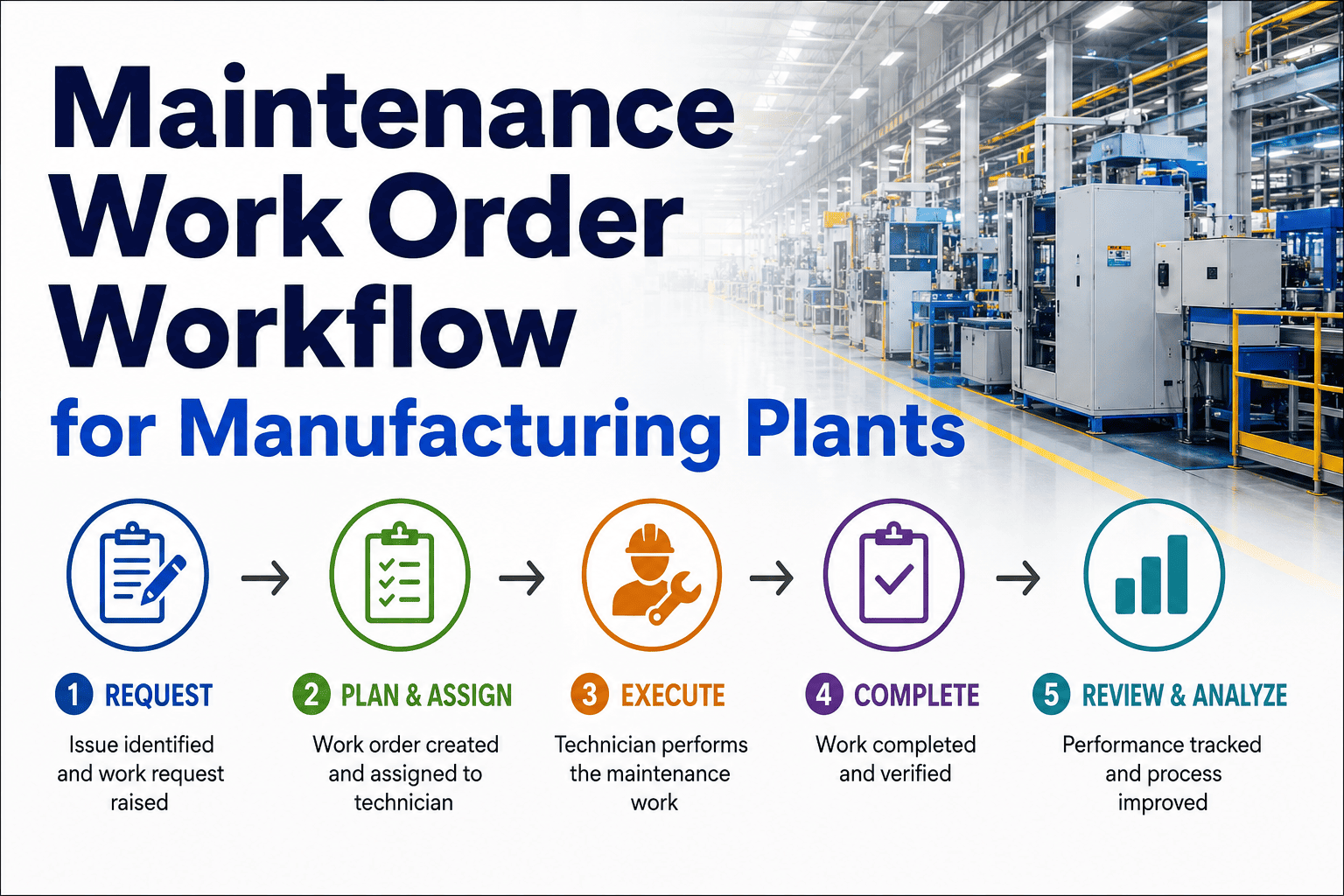
The Work Order Lifecycle: From Request to Asset Record
A work order is not just a task slip. It is the single unit of accountability in a maintenance program — the record that connects a maintenance request to asset history, labor costs, parts consumption, and regulatory compliance. Understanding every stage of the lifecycle is the foundation of workflow optimization.
1
Request Received
Technician, operator, or sensor trigger creates a maintenance request. Captured with asset ID, symptom description, location, and priority flag. Unstructured requests are the most common source of planning delay.
↓
2
Planning and Scoping
Planner reviews the request, identifies required parts, attaches procedures, estimates labor hours, and defines safety requirements. Work order achieves "ready to schedule" status only when all inputs are confirmed available.
↓
3
Scheduling and Assignment
Scheduler matches the planned work order to a qualified technician during an available equipment window. Priority, skill match, and crew capacity all factor into the assignment. Work enters the weekly schedule with a committed execution date.
↓
4
Execution
Technician receives work order on mobile device with full context: procedure steps, parts list, safety permits, and asset history. Execution data — actual hours, parts used, observations — is captured at the point of work, not retrospectively.
↓
5
Closure and Asset Record Update
Closed work order updates the asset's maintenance history, triggers parts reorder if stock fell below threshold, feeds MTBF and MTTR calculations, and contributes to schedule compliance reporting for the period.
OxMaint manages all five stages from a single platform — with automatic escalation alerts when work orders stall between stages and compliance documentation generated at closure without manual input.
Still managing work orders in spreadsheets or a whiteboard?
OxMaint replaces fragmented planning tools with a single workflow — from request capture to asset record update. Most teams are live within one week.
Backlog Management: Why Most Maintenance Teams Are Buried and How to Get Out
Work order backlog is the most reliable indicator of a maintenance program in trouble. When backlog grows faster than it is resolved, reactive work expands to fill the available capacity — and planned maintenance gets pushed to next week, permanently. Breaking the cycle requires understanding what drives backlog growth in the first place.
Root Causes of Backlog Growth
Work enters faster than it exits
Requests accumulate without a triage process that matches incoming volume to actual planning and execution capacity. Every unplanned breakdown adds three work orders: the emergency repair, the root cause investigation, and the follow-up PM that should have prevented it.
Work orders not ready when scheduled
Parts not confirmed, procedures missing, permits not arranged. Technicians arrive at the job and return to the shop — the work order re-enters the queue. One unprepared work order blocks two slots in the schedule.
Scheduling without capacity data
Schedulers assign more work than the crew can complete in the week because there is no real-time view of available hours versus committed hours. Overloaded schedules produce missed commitments that roll forward and compound.
No priority triage system
Without a defined priority framework, every work order seems equally urgent or equally deferrable. Low-priority tasks crowd out high-impact planned work. Critical preventive maintenance gets skipped while cosmetic fixes get completed.
Healthy Backlog Benchmarks
Target Backlog Size
2–4 Weeks
Of planned work capacity. Below 2 weeks signals under-investment in PM. Above 4 weeks signals capacity or planning breakdown.
Planned vs. Reactive Ratio
80 / 20
World-class target: 80% planned work, 20% reactive. Most industrial plants run this ratio in reverse until structured planning is implemented.
Schedule Compliance Rate
90%+
Percentage of scheduled work orders completed in the committed week. Below 70% indicates the schedule is not realistic or work orders are not ready at assignment time.
PM Completion Rate
95%+
The most widely tracked maintenance KPI (used by 56% of facilities). Falling below 85% directly predicts rising unplanned failure rates within 60–90 days.
Work Order Priority Framework: How to Sequence What Gets Done First
Not all work orders are equal. A structured priority framework prevents schedulers from making ad hoc decisions under pressure and ensures that the most critical work always reaches the front of the queue — regardless of who submitted the request or how loudly they asked for it.
| Priority Level |
Definition |
Response Target |
Examples |
Planning Requirement |
| P1 — Emergency |
Safety risk, environmental incident, or total production stoppage |
Immediate — same shift |
Hydraulic line burst, fire suppression fault, conveyor drive failure |
Execute first, document after. Trigger root cause investigation on closure. |
| P2 — Urgent |
Significant production or safety impact if not resolved within 24 hours |
Within 24 hours |
Critical pump vibration spike, partial line shutdown, regulatory inspection due |
Expedite parts and planning. Schedule within current shift or overnight window. |
| P3 — Planned |
Asset degradation or deferred PM — no immediate production impact |
Within current week |
Bearing wear detected, minor fluid leak, filter replacement due |
Full planning cycle: parts confirmed, procedure attached, slot reserved in weekly schedule. |
| P4 — Deferred |
Low-impact work that can wait for a scheduled opportunity window |
Within 30 days |
Cosmetic repairs, non-critical lubrication, housekeeping tasks |
Batch with related planned shutdowns or PM windows. Eliminate unnecessary trips to equipment. |
OxMaint automatically assigns priority scores based on asset criticality, failure impact, and due date — preventing scheduler judgment calls that create inconsistent queue ordering.
OxMaint Work Order Management: What the Platform Delivers
OxMaint is built around the complete planning and scheduling workflow — from the moment a maintenance request is submitted to the asset history update when the work order closes. Here is what each capability delivers for maintenance teams in practice.
01
Structured Work Request Capture
Every request submitted through OxMaint includes asset ID, location, symptom description, and initial priority flag. Operators submit via mobile without training. Planners receive structured input — not verbal reports or sticky notes — every time.
Eliminates: incomplete requests that waste planner time on follow-up calls
02
PM Template Library and Auto-Scheduling
Preventive maintenance work orders are generated automatically from pre-built templates on calendar, meter, or condition triggers. Procedures, parts lists, and labor estimates are pre-loaded. The planner reviews rather than creates — cutting PM planning time by over 60%.
Eliminates: manual PM schedule creation and missed trigger-based work orders
03
Weekly Schedule Board with Capacity View
Schedulers see a live board showing technician availability, committed hours, and open planned work ordered by priority and due date. Drag-and-drop assignment with automatic overload alerts prevents the classic scheduling failure of committing more than the crew can complete.
Eliminates: overloaded schedules and work orders that roll forward every week
04
Mobile Execution for Technicians
Technicians receive work orders on their phone or tablet with full context: step-by-step procedure, parts to collect, safety requirements, and asset history. Execution data is captured at the point of work — actual hours, parts consumed, readings taken, photos attached — before the job is closed.
Eliminates: retrospective data entry, incomplete closure records, lost execution data
05
Backlog and Schedule Compliance Dashboard
Real-time view of total backlog by priority, age, and asset class. Schedule compliance calculated automatically each week — the percentage of committed work orders completed on time. Trend data identifies whether the program is improving or drifting back toward reactive mode.
Eliminates: end-of-month manual reporting and blind spots in program health
06
Asset History and KPI Reporting
Every closed work order automatically updates the asset's maintenance history — making MTBF, MTTR, and failure code analysis available without any additional data entry. PM completion rate, reactive work ratio, and cost per work order are calculated in real time across the entire equipment portfolio.
Eliminates: end-of-period manual KPI compilation from spreadsheets
Maintenance Planning Roles: Who Does What in a Structured Program
A structured maintenance planning and scheduling program requires clear role separation. When planners schedule their own work or supervisors plan their own crews' tasks, the accountability gaps that follow are the most common reason planning programs fail to sustain themselves.
Maintenance Planner
Responsible for transforming maintenance requests and PM triggers into fully prepared work orders. The planner is a field engineer who plans from the shop — never working on the tools directly — so they can dedicate 100% of their time to improving the readiness of every work order before it enters the schedule.
Key KPIs
Work Order Readiness Rate
PM Template Coverage
Planning Lead Time
Maintenance Scheduler
Responsible for producing the weekly schedule: assigning planned, ready work orders to qualified technicians within the crew's confirmed capacity. The scheduler coordinates with operations to align equipment availability windows and commits to a realistic weekly work plan published before the week begins.
Key KPIs
Schedule Compliance Rate
Scheduled Capacity Utilization
Rollover Rate
Maintenance Supervisor
Responsible for daily execution against the schedule: directing technicians, removing execution barriers, managing emergency work that enters the week, and escalating when schedule compliance is at risk. The supervisor's goal is to protect the weekly plan rather than continuously re-prioritize it.
Key KPIs
Daily Schedule Adherence
Emergency WO Rate
Technician Utilization
Frequently Asked Questions
What is the difference between maintenance planning and maintenance scheduling, and why does it matter operationally?
Maintenance planning answers "what needs to be done and how" — it is the preparation phase where parts are identified, procedures attached, and labor estimated before any assignment is made. Maintenance scheduling answers "when and by whom" — it translates ready work orders into committed crew assignments within a weekly timeframe. Most plants that struggle with schedule compliance are conflating both functions into one role, which means neither is done well. Separating them is the single highest-leverage structural change in a maintenance program.
OxMaint supports both roles with distinct planning and scheduling workflows built into the same platform.
How do you calculate maintenance schedule compliance and what is a good target?
Schedule compliance is calculated as the number of work orders completed in the week they were scheduled, divided by the total number of work orders committed for that week, expressed as a percentage. A target of 90% or above is considered a well-run program. Below 70% typically indicates that work orders are being scheduled before they are fully planned — parts unavailable, procedures missing, or equipment access not confirmed.
OxMaint calculates this automatically and surfaces it on the weekly dashboard without any manual reporting effort from the maintenance team.
What is a healthy maintenance backlog, and when does backlog become a problem?
A healthy backlog of two to four weeks of planned work is actually a sign of a well-functioning program — it means work is being captured, planned, and queued ahead of crew capacity. The problem begins when backlog grows beyond four to six weeks, which signals that reactive work is consuming capacity that should go toward planned tasks, or that planning throughput is too slow. A shrinking backlog below two weeks suggests the PM program may not be generating enough proactive work to keep the asset base in good condition.
OxMaint's backlog dashboard tracks backlog by age, priority, and asset class in real time.
How quickly can OxMaint be deployed for a maintenance team that is currently using spreadsheets?
Most maintenance teams running on spreadsheets or basic work order systems reach full operational deployment on OxMaint within five to ten working days. Asset data and existing PM schedules are migrated during onboarding with support from OxMaint's implementation team. Technicians begin receiving and closing work orders on mobile within the first week, and schedule compliance reporting is live from the first completed weekly schedule cycle.
Book a demo to walk through the onboarding process specific to your team's current setup.
OxMaint · Work Order Management
Reactive Maintenance Is a Choice. So Is Stopping It.
OxMaint gives your planning and scheduling team the structure, visibility, and automation to move from reactive firefighting to a program where 90% of work is planned, every technician arrives prepared, and schedule compliance is measured — not guessed. Most teams are live and reporting within ten days.