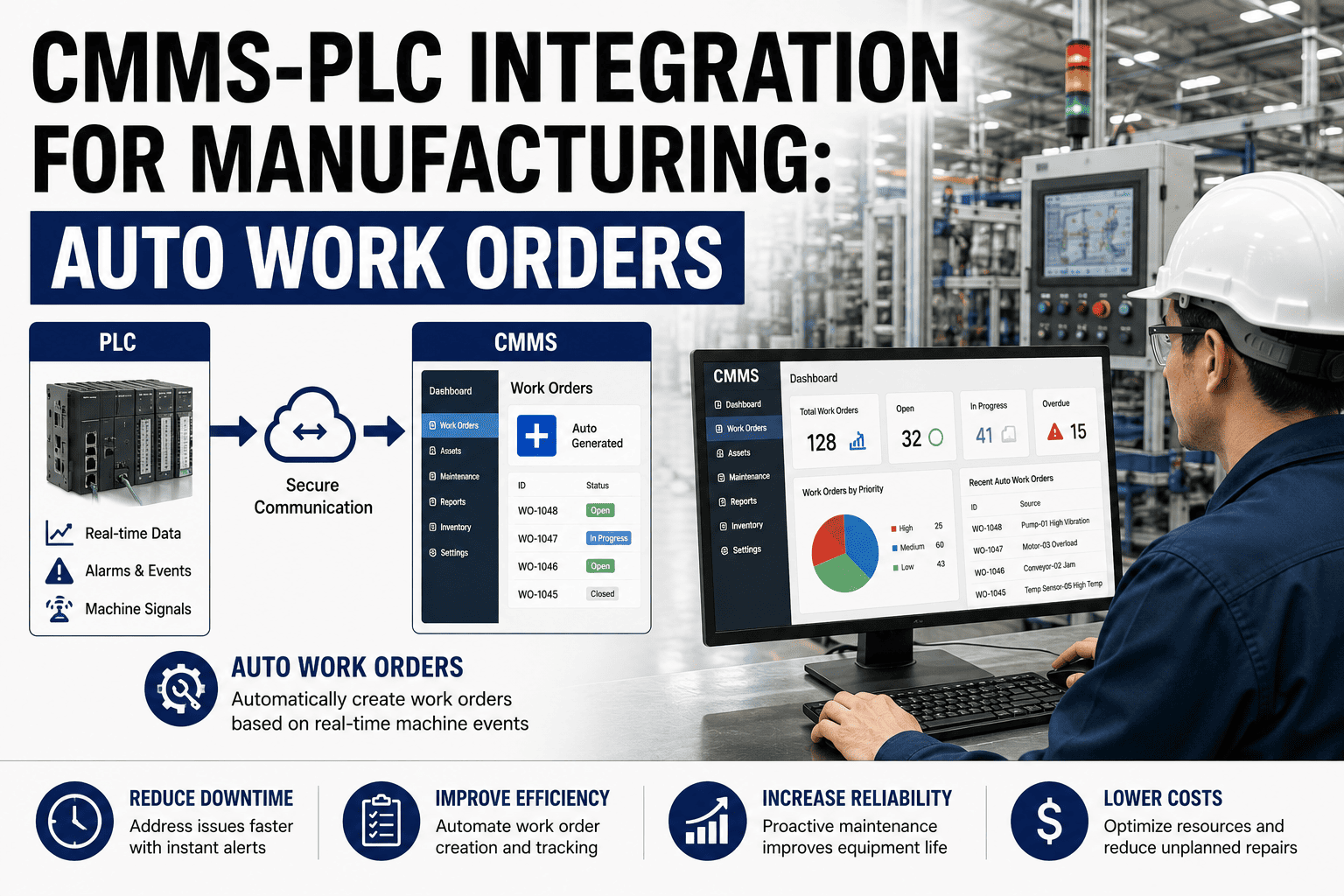
Manufacturing execution system maintenance integration connects your MES and CMMS so production events, downtime reasons, and OEE data flow automatically into your maintenance workflow — eliminating the silo where operators log breakdowns in one system and technicians discover them in another. When MES CMMS integration is done right, a production stop triggers a work order in seconds, maintenance windows are visible on the live production schedule, and reliability teams stop fighting over whose data is correct. Plants that align manufacturing MES maintenance through a shared ISA-95 data model typically cut unplanned downtime 20–40% within the first year. This guide walks through the architecture patterns, data streams, and ROI you can expect — and how OxMaint makes the integration fast enough to see results in weeks, not quarters. Ready to see it on your assets? Start Free Trial or keep reading.
One source of truth for production and maintenance
When your manufacturing execution system and CMMS share real-time data, work orders fire automatically from production stops, maintenance windows appear on the live schedule, and OEE becomes the metric both teams trust. No more spreadsheets, no more blame.
What MES CMMS integration actually solves
In most plants the MES knows a line stopped at 14:32 with reason code "mechanical," while the CMMS still shows that asset as "available." Maintenance learns from a radio call or a paper ticket — minutes or hours later. That gap costs a typical 180-asset plant roughly $42,000 per year in extended downtime, overtime parts expediting, and lost production.
Manufacturing MES maintenance integration closes that gap. Production events — downtime, speed loss, quality rejects, changeovers — flow into the CMMS as structured triggers. Maintenance status — "technician dispatched," "part on order," "asset back up" — flows back to the MES so schedulers see it on the live Gantt. Both teams work from one truth.
The four data streams that connect MES and CMMS
A robust MES maintenance integration isn't a single pipe — it's four parallel data streams, each mapped to ISA-95 levels so production (Level 3) and maintenance (Level 3/4) speak the same language. Here's what flows, in which direction, and why.
Production events as maintenance triggers
Downtime reason codes, speed-loss thresholds, and quality-reject spikes flow from the MES into the CMMS. A stop coded "bearing vibration" auto-generates a work order tagged to the exact asset ID with the operator's note attached — no manual entry, no lost context.
OEE and availability context
Real-time OEE, availability, and performance rates feed the CMMS asset records. When availability on Line 3 drops below 85% for two consecutive shifts, OxMaint can auto-create an inspection work order — catching degradation before it becomes a breakdown.
Maintenance status on the production schedule
Work order status — planned, in-progress, parts-delayed, completed — flows back to the MES and appears on the live production schedule. Planners see exactly when a maintenance window opens, how long it will last, and whether parts are ready, so they can sequence changeovers around it.
Asset availability and capability signals
When a critical asset is marked "down for PM" or "running under restriction" in the CMMS, the MES adjusts routing and scheduling logic automatically. The system reroutes production to a backup line or holds orders until the asset is cleared — preventing the scheduler from committing to capacity that doesn't exist.
How to architect MES CMMS integration: three patterns that work
There's no single "correct" architecture — the right pattern depends on your MES vendor, your CMMS API maturity, and how real-time your triggers need to be. Below are the three patterns we see succeeding in real manufacturing plants, ranked from simplest to most sophisticated.
Event-driven webhook bridge
The MES publishes downtime and OEE events to a REST webhook; OxMaint consumes them, evaluates trigger rules (e.g. "reason code = mechanical, duration > 5 min"), and auto-creates a work order. Status callbacks flow back via the same bridge.
ISA-95 message bus (OPC UA / MQTT)
Both systems publish and subscribe to an ISA-95-aligned message bus using OPC UA or MQTT. Production events, maintenance requests, and asset capability updates are standardised messages — any subscribing system can consume them.
Unified data platform with AI layer
MES, CMMS, and sensor data land in a shared operational data store. OxMaint's AI engine analyses the combined stream, predicts failures, and generates work orders automatically — then signals the MES to schedule the maintenance window.
A 180-asset automotive parts plant
A Tier-1 supplier running Siemens Opcenter MES on 12 production lines integrated it with OxMaint CMMS using Pattern 1 (webhook bridge). Before integration, the average delay between a line stop and a maintenance dispatch was 11 minutes; maintenance was informed by radio or a whiteboard ticket. After integration, MES downtime reason codes auto-trigger OxMaint work orders in under 4 seconds, tagged with asset ID, operator note, and shift context. The plant cut unplanned downtime 31% in the first 6 months, reduced emergency parts expediting by $18,400, and eliminated 22 hours/week of manual data reconciliation between production and maintenance reports.
How work orders signal maintenance windows to the production schedule
The single highest-value data flow in MES CMMS integration is the maintenance-window signal — the moment the CMMS tells the MES "this asset will be unavailable from 10:00 to 11:30 for PM, parts are staged, technician assigned." Here's what that signal chain looks like in practice.
PM work order auto-generated
OxMaint creates a preventive maintenance work order based on the asset's calendar or meter-based trigger. The work order carries estimated duration, required parts, and technician assignment.
Maintenance window published to MES
OxMaint pushes the planned maintenance window to the MES via API. The MES blocks that asset's capacity on the production schedule and flags it for the planning team.
Production sequenced around the window
The MES reroutes orders to a parallel line, sequences a changeover to coincide with the downtime, or pulls the schedule forward — maximising the productive use of every minute.
Maintenance begins, status live
Technician clocks in on the work order in OxMaint; the MES shows the asset as "in maintenance — live." If the job overruns, the MES re-sequences downstream orders automatically.
Completion signals capacity back
Work order closed in OxMaint — asset status flips to "available" and the MES releases the blocked capacity. OEE data resumes flowing; the cycle repeats for the next PM.
How OxMaint makes MES CMMS integration fast and measurable
OxMaint is built as an API-first CMMS and EAM platform, which means integration with your existing MES isn't a custom consulting project — it's a documented, supported connection. Here are the four capabilities that deliver the fastest payback when you connect OxMaint to your manufacturing execution system.
Auto-triggered work orders from MES events
Configure rules that turn MES downtime reason codes, OEE thresholds, and quality-reject spikes into OxMaint work orders — automatically, in under 4 seconds, with full operator context attached.
Maintenance windows on the live schedule
OxMaint publishes planned and in-progress maintenance windows back to your MES via API, so production planners see exactly when capacity is blocked — and when it comes back online.
AI predictive maintenance from combined data
OxMaint's AI engine analyses MES production data alongside CMMS work history and sensor readings to predict asset failures 7–21 days in advance — and generates the work order before the MES ever logs a stop.
Unified OEE and maintenance analytics
Stop debating whose numbers are right. OxMaint merges MES OEE data with CMMS downtime and work-order history into one dashboard — the reliability metric both production and maintenance trust.
What manufacturing MES CMMS integration costs — and what it returns
Integration projects stall when the ROI is fuzzy. Here's a concrete payback model based on a mid-size plant (180 assets, 3 production lines, $12K/hr downtime cost) connecting their MES to OxMaint CMMS.
| Savings source | Before integration | With OxMaint + MES | Annual savings |
|---|---|---|---|
| Unplanned downtime (hrs/yr) | 420 hrs | 290 hrs (31% reduction) | $156,000 |
| Emergency parts expediting | $24,500/yr | $6,100/yr | $18,400 |
| Manual report reconciliation | 22 hrs/week | 4 hrs/week | $23,400 |
| Overtime from reactive dispatch | $19,800/yr | $7,200/yr | $12,600 |
| Total measurable annual savings | $210,400 | ||
Against an OxMaint subscription of $12,000–$18,000/yr for a plant this size, payback lands between 4 and 7 weeks after go-live. The integration bridge itself — webhook configuration, trigger rules, MES API mapping — is included in onboarding.
See OxMaint integrated with your MES — in 30 minutes
We'll map your production events, downtime reason codes, and maintenance triggers live on a call. You'll see exactly how a line stop becomes a work order and how a maintenance window appears on your schedule.
MES CMMS integration: questions plant teams ask
What is MES CMMS integration and why does it matter for manufacturing?
MES CMMS integration connects your manufacturing execution system and your computerized maintenance management system so production events automatically trigger maintenance actions and maintenance status flows back to the production schedule. It matters because disconnected systems cause delays of 8–14 minutes between a line stop and a maintenance dispatch, cost plants tens of thousands in extended downtime, and force teams to reconcile conflicting reports. Integration closes that gap — typically cutting unplanned downtime 20–40%.
How does ISA-95 align MES and maintenance systems?
ISA-95 is the international standard for enterprise-control system integration. It defines a common data model — asset hierarchy, production capability, maintenance requests, and equipment availability — that both MES and CMMS can map to. When both systems use ISA-95-aligned message structures (often over OPC UA or MQTT), they exchange production and maintenance events without custom point-to-point mapping, making the integration vendor-neutral and future-proof.
How long does it take to integrate an MES with OxMaint CMMS?
For a webhook-based event bridge (Pattern 1), most plants go live in 2–4 weeks including trigger-rule configuration and testing. For an ISA-95 message-bus architecture, expect 6–10 weeks. OxMaint's API-first design means there's no custom middleware to build — your integration partner or in-house team configures endpoints using our documented REST API. You can book a 30-minute demo to see the exact integration steps for your MES vendor.
Can OxMaint auto-create work orders from MES downtime events?
Yes. You configure trigger rules in OxMaint — for example, "if MES downtime reason code = mechanical and duration > 5 minutes, create a corrective work order on the affected asset." The work order inherits the asset ID, operator notes, shift, and production context from the MES, so the technician arrives with full situational awareness. Typical trigger-to-work-order latency is under 4 seconds.
What data flows from CMMS back to the MES?
Three key signals flow from OxMaint back to your MES: planned maintenance windows (so the scheduler can block capacity and reroute production), live maintenance status (in-progress, parts-delayed, technician on-site), and asset availability/capability updates (asset available, running under restriction, or down). This lets the MES sequence changeovers around maintenance, hold orders when capacity is blocked, and release them the moment the asset comes back online. You can try it on your data with a free 14-day trial.
Stop running production and maintenance from two truths
Connect your MES to OxMaint and watch line stops become work orders in seconds, maintenance windows appear on your live schedule, and OEE become the number both teams trust. Setup takes weeks — payback takes less than a quarter.
Free 14-day trial · No credit card