The handover from capital project to operations is the moment that determines whether a new power plant asset enters service with a complete, reliable maintenance foundation — or spends its first five years accumulating risk from missing data, undefined PM plans, and untracked warranties. Most project turnover failures aren't technical; they're documentation failures. Tag data entered incorrectly, OEM manuals missing, spare parts lists never validated, and PM schedules never built. OxMaint provides the structured CMMS handover checklist that capital project teams and plant maintenance managers need to make every new asset transfer clean, complete, and auditable.
ASSET HANDOVER · CMMS READINESS
Is Your New Asset Ready for Maintenance — or Just Ready to Run?
A commissioned asset without complete CMMS data is a liability waiting to happen. OxMaint ensures every asset that comes through project turnover has its tag data, PM plan, spares list, and warranty records in place from day one.
Asset CMMS Readiness Score
Average CMMS completeness at first operations handover without a structured process
The Hidden Cost of a Poor Project Handover
Missing PM Plans
New assets run to failure on the most expensive components because no preventive maintenance schedule was ever defined at handover. First major failure often occurs within 18 months of commissioning.
Untracked Warranties
Warranty claims on early equipment failures are lost because the warranty terms, expiry dates, and OEM contact information were never entered in the CMMS. Industry data suggests 30–40% of valid warranty claims go unfiled.
Wrong Spare Parts
Without validated OEM spare parts lists in the CMMS, storeroom buyers order generic equivalents that may not meet equipment specs — voiding warranties and reducing asset reliability from the first maintenance event.
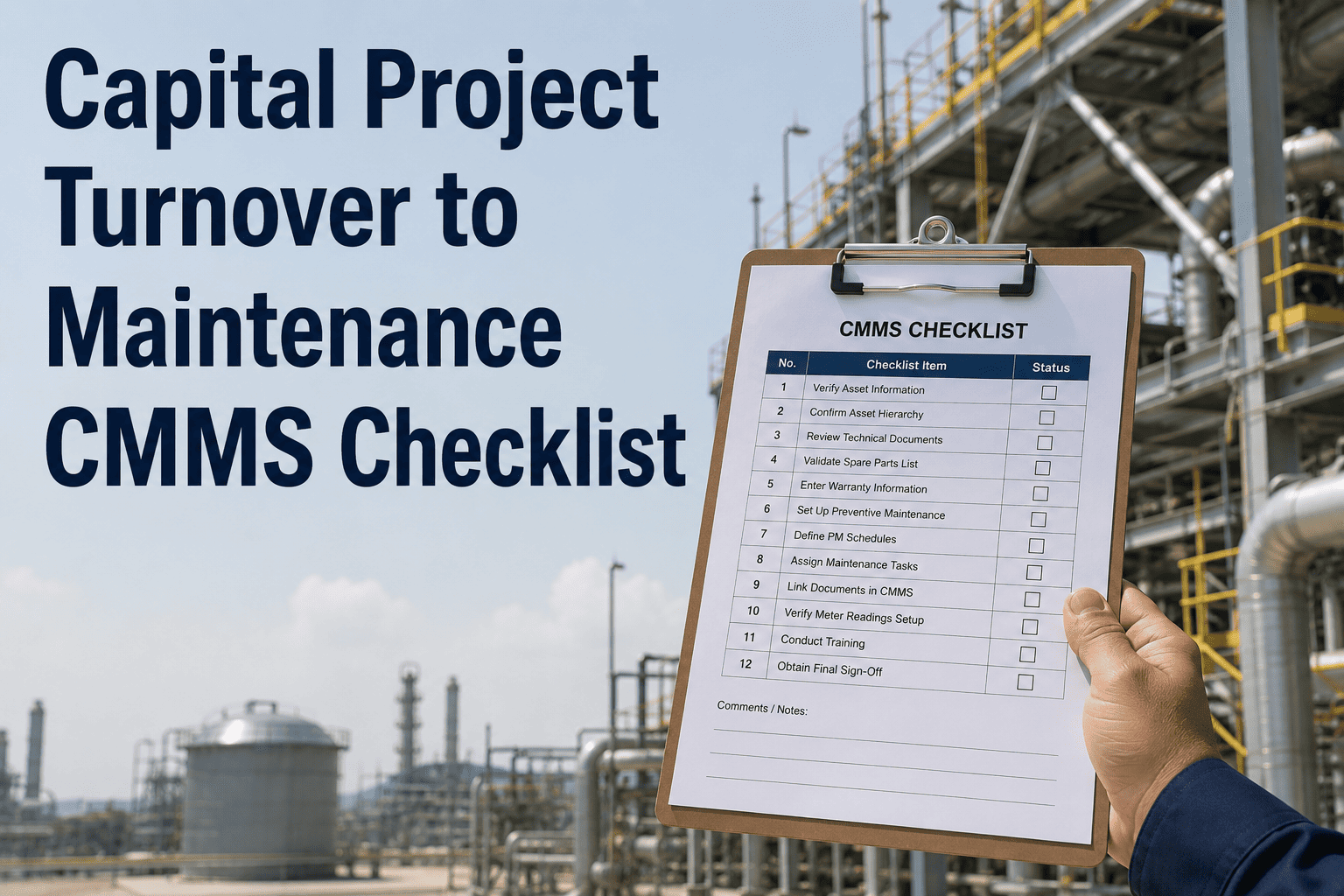
Capital Project Turnover to Maintenance — CMMS Checklist
This checklist is organized in the sequence of a structured handover — from pre-acceptance data collection through final PM activation. OxMaint enables project teams and maintenance planners to work through each stage collaboratively, with completion tracking visible to both sides of the handover.
Capital Project CMMS Handover Checklist
Asset Management · OxMaint CMMS Integrated
STAGE 1 — ASSET REGISTRATION AND TAG DATA
Create asset record in OxMaint with correct tag number, description, and location hierarchy
Asset tag must match P&ID and plant document control system. Location hierarchy — plant, train, system, equipment — determines work order routing and PM scheduling. Incorrect location hierarchy is one of the most common causes of PM plan failures at new assets.
Enter manufacturer, model number, serial number, and installation date
Manufacturer and model data are required for spare parts procurement and OEM service call identification. Serial number is essential for warranty claims and OEM technical service records. Installation date sets the baseline for calendar-based PM triggers.
Record design parameters — rated capacity, operating pressure, temperature, speed
Design parameters are reference data for operations and maintenance planning. They define the acceptance criteria for post-maintenance functional testing and the baseline against which performance degradation is measured over the asset's operating life.
Link asset to its P&ID drawing number and as-built document references
OxMaint allows document attachments and external drawing references to be linked directly to the asset record. Maintenance technicians can access the as-built P&ID from the work order without searching document control, reducing troubleshooting time significantly.
STAGE 2 — OEM DOCUMENTATION UPLOAD
Upload OEM operation and maintenance manual to asset record in OxMaint
O&M manual is the foundation of the PM plan. Confirm the manual is the correct revision for the installed model — not a generic series manual. Upload to the asset document library in OxMaint so it is accessible from mobile devices during maintenance activities.
Upload commissioning test records and acceptance test report
Commissioning test data — vibration baseline, alignment records, insulation resistance readings, functional test results — establishes the as-new performance baseline for the asset. This data is essential for comparing measurements at future maintenance events to detect degradation.
Attach vendor data sheets, inspection certificates, and code compliance documentation
Pressure vessel inspection reports, NDE records, electrical test certificates, and code compliance documentation belong in the asset record — not in a filing cabinet. OxMaint stores these with the asset and makes them immediately available for regulatory inspections or insurance audits.
STAGE 3 — PM PLAN CREATION
Build PM tasks from OEM manual recommended maintenance schedule
Extract all OEM-specified maintenance tasks from the O&M manual and configure each as a PM task in OxMaint with the correct interval type — calendar, runtime hours, or condition-triggered. OEM-based PM plans are the starting point; experienced maintenance planners refine intervals based on plant-specific operating conditions.
Assign trade, estimated hours, and required permits to each PM task
Proper PM task configuration includes the craft trade (electrical, mechanical, instrumentation), estimated labor hours, required safety permits (LOTO, confined space, hot work), and minimum technician qualification. This data enables accurate outage planning and crew scheduling when PMs are due.
Set PM plan activation date and confirm first work orders generate correctly
After PM plan configuration, set the activation date and verify OxMaint generates the first batch of PM work orders on the correct schedule. Confirm work orders are routed to the correct planner or supervisor, and that all required materials and documents are linked. A test generation before go-live prevents scheduling errors.
STAGE 4 — SPARE PARTS AND WARRANTY
Load OEM recommended spare parts list into CMMS storeroom inventory
OEM recommended spares lists are typically provided at project closeout. Validate each part number against the installed model and enter into OxMaint's inventory module linked to the asset. Define initial stock quantities based on criticality classification and vendor lead time for each item.
Record warranty terms, start date, expiry, and OEM warranty contact in asset record
Enter warranty coverage scope, start date, expiry date, and OEM warranty representative contact details directly in the OxMaint asset record. Configure a warranty expiry alert so the maintenance team is notified 90 days before warranty ends — enough time to schedule a final warranty inspection with the OEM.
Confirm initial spares are physically received and stored per OEM storage recommendations
Verify that the initial spare parts order is physically received, inspected, and stored in the correct storeroom location. Some spare parts — particularly elastomers, electronics, and bearings — have OEM-specified storage requirements for shelf life preservation. Document storage location and condition check in OxMaint.
STAGE 5 — ACCEPTANCE AND SIGN-OFF
Maintenance manager reviews and accepts asset CMMS record completeness
The maintenance manager performs a final review of the asset record in OxMaint — confirming all required data fields are complete, all documents are uploaded, PM plans are active, and spares are loaded. Incomplete handover items are returned to the project team as open action items before formal acceptance is issued.
Close project turnover checklist in OxMaint and archive project team access
Formal handover completion is recorded in OxMaint with project manager and maintenance manager signatures. The asset transitions from project responsibility to operations and maintenance ownership. All handover documents, checklist records, and commissioning data are permanently archived in the asset record.
CMMS Handover Completeness — What to Verify by Asset Class
| Asset Class |
Critical CMMS Fields |
Must-Have Documents |
Warranty Tip |
| Rotating equipment (pumps, fans) |
Alignment baseline, vibration baseline, lube spec |
Alignment certificate, vibration report |
OEM typically requires alignment records for warranty claims |
| Pressure vessels and heat exchangers |
MAWP, inspection date, NDE records, NBIC number |
Form U-1, NDE reports, hydro test cert |
State registration required before commercial operation |
| Electrical switchgear and transformers |
Nameplate data, test dates, insulation resistance |
Factory test reports, IR test records |
Transformer warranty often voids without initial oil test |
| Instrumentation and control valves |
Calibration baseline, range, process fluid |
Calibration certificates, loop test records |
Document as-found calibration before any adjustment |
| Safety relief valves |
Set pressure, test date, next test due |
SRV test certificate, nameplate data |
Jurisdictional test interval must be configured as PM trigger |
We took over a 400 MW combined cycle plant from the EPC contractor with 3,200 assets and a CMMS that was 40% populated. It took my team 14 months to fill in what should have been handed over at commissioning. In that time, we had three warranty claims we couldn't file because we didn't have the documentation the OEM required, and we built three PM plans from scratch after the OEM manual had already been buried in an unindexed document archive. A structured handover checklist with mandatory completion gates changes that completely. What should take 6 weeks takes 6 weeks — not 14 months.
POWER PLANT PROJECT TEAMS AND MAINTENANCE MANAGERS
Make Every Asset Handover Complete — From Day One
OxMaint gives project teams and maintenance managers a shared, structured handover checklist that ensures every new asset enters the CMMS with complete tag data, PM plans, spare parts, and warranty records before operations accepts it.
Frequently Asked Questions
Can OxMaint track capital project turnover completion separately from ongoing maintenance?
Yes. OxMaint supports a dedicated project turnover workflow where the handover checklist is separate from the operational PM and work order workflow. Project managers can track completion percentage by asset, identify open action items, and generate a handover completion report for formal sign-off.
Sign up free to see the project asset management module.
How does OxMaint handle warranty tracking and expiry notifications for new assets?
Warranty start date, expiry date, coverage scope, and OEM contact details are stored in each asset record in OxMaint. The system generates an automated notification to the maintenance manager and planner 90 days before warranty expiry, providing time to schedule a final OEM inspection and document any warranty-eligible defects.
Book a demo to configure warranty tracking for your asset base.
Can we import asset data from the EPC contractor's project database into OxMaint?
Yes. OxMaint supports bulk asset import from CSV and Excel formats, which are the standard export formats from most project document management and tag register systems. The OxMaint onboarding team assists with field mapping from contractor data formats to the OxMaint asset data structure. Most project-scale imports complete in 2–3 weeks.
How do we build PM plans from OEM manuals when the manuals are in PDF format?
OxMaint allows maintenance planners to create PM task libraries directly from OEM manual content, using the manual as the source reference. The PDF is attached to the asset record, and PM tasks are built by extracting the maintenance schedule table from the manual.
Sign up free to see the PM plan builder and OEM manual linking workflow.
What happens to handover checklist records after the project is formally closed?
All project turnover checklist records, document attachments, commissioning data, and acceptance sign-offs are permanently archived in OxMaint's asset record history. They remain accessible to the maintenance team indefinitely — providing critical reference data for major overhauls, insurance inspections, and future plant expansions.
Book a demo to review the archive and audit trail features.