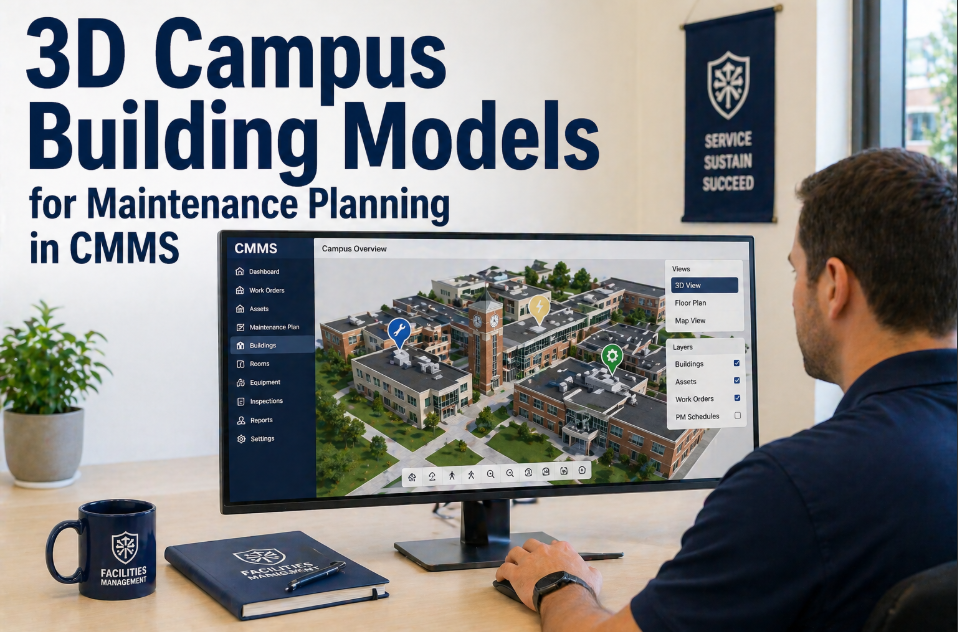
A facilities director at a private research university in the Northeast described the problem this way: "We have thirty-one buildings. I can tell you the square footage of every one of them. I can tell you when each one was built. What I cannot tell you is where the air handler serving the second-floor wet lab in Building 14 actually is, whether it has been serviced in the past eight months, or what its current condition is — without walking over there and looking." That is the defining operational reality for campus facilities teams in 2026: comprehensive building data exists at the portfolio level, but asset-level spatial intelligence — where exactly is this piece of equipment, what floor, what room, what wall, and what is its maintenance status right now — lives in the heads of senior technicians who have worked the campus for twenty years. When those technicians retire, the institutional knowledge walks out with them. Three-dimensional building models integrated with CMMS asset records change this equation fundamentally. When a new technician can open OxMaint on a smartphone, navigate a 3D model of Building 14, tap the air handler on the second floor, and see its complete maintenance history, next scheduled PM, current condition score, and open work orders — all before setting foot in the building — the knowledge transfer problem is solved at the system level. If your campus is still navigating with paper as-builts and tribal knowledge, start a free trial with OxMaint or book a demo to see 3D campus building models integrated with CMMS asset management.
3D Campus Building Models — CMMS Integration
When the Senior Technician Who Knows Every Building Retires, the Knowledge Must Live in the System — Not in Their Memory
$4.2M
Average value of facilities knowledge lost per senior technician retirement
APPA estimate across institutional membership — includes spatial knowledge, undocumented system configurations, and institutional memory
47 min
Average time for a new technician to locate an unfamiliar asset without floor plans
Reduced to under 90 seconds with interactive 3D building model integrated with CMMS asset registry
68%
Of campus facilities teams lack current digital floor plans for more than half their buildings
APPA 2025 Facilities Performance Indicators survey — paper as-builts remain the primary navigation tool at most institutions
35%
Faster emergency response when first responders have accurate building model data
Time savings on locating shutdown valves, electrical panels, and mechanical rooms during emergency response scenarios
The Campus Spatial Intelligence Problem
Every campus facilities team manages two parallel realities simultaneously. The first reality is the official record: building square footage, construction dates, general system categories, and capital asset values recorded in financial systems. The second reality is operational: where exactly is the expansion tank for the domestic hot water system in the east wing of the science building, which electrical panel feeds the vivarium on the third floor, and which access panel in which ceiling tile leads to the fire suppression control valve for the chemistry lab suites. The second reality — the operational spatial intelligence that makes maintenance possible — lives almost exclusively in the memory of long-tenured technicians. It is not written down anywhere. It is not in the CMMS. It is not on any drawing that was updated after the last renovation. The result is an institutional knowledge crisis that accelerates every year as the facilities workforce ages. The average campus maintenance technician is 54 years old. When they retire, they take the spatial map of the campus with them. Three-dimensional building models integrated with CMMS address this at the root — by creating a permanent, navigable, technician-maintained record of exactly where every maintained asset is located within every building, linked to its complete maintenance history. Campus teams managing this knowledge transfer challenge can start a free trial or book a demo to see how 3D model integration works with an existing campus asset registry.
What 3D Campus Building Models Actually Deliver in a CMMS Context
The term "3D building model" encompasses a wide range of capability levels — from a simple interactive floor plan that shows room layouts to a full BIM (Building Information Model) with embedded MEP system data, component specifications, and maintenance history at every asset node. Campus facilities teams do not need the most complex end of this spectrum to capture most of the operational value. Here is what each level delivers and what it costs.
Level 1
Interactive 2D Floor Plans With Asset Pins
Floor plan images uploaded to CMMS with asset location markers placed by facilities staff. Each pin links to the full asset record — maintenance history, work orders, condition score, and PM schedule. No CAD software required. Fastest to deploy — most campuses can cover all buildings in 2–4 weeks.
Deployment: 2–4 weeks. No software license beyond CMMS.
Value: Eliminates asset location ambiguity — any technician can navigate to any asset using the CMMS map
Level 2
3D Navigation Model With Asset Layer
Three-dimensional building model allowing floor-by-floor navigation with assets displayed as interactive objects. Technicians rotate the view, navigate to specific floors, and tap assets to access maintenance records. Requires CAD floor plan data or LiDAR scan of buildings. Covers the spatial relationships between assets that 2D plans miss.
Deployment: 4–12 weeks depending on floor plan data availability.
Value: Spatial context — technicians understand which systems share infrastructure and how assets relate to each other
Level 3
Full BIM Integration With MEP Data
Complete Building Information Model with mechanical, electrical, and plumbing system data embedded at the component level. Every pipe, duct, cable, and valve is modeled with material, specification, installation date, and maintenance linkage. Highest deployment cost and time — most valuable for new construction and major renovations where BIM deliverables are contractually required.
Deployment: 3–18 months for existing campus buildings. Best practice for new construction.
Value: Complete system traceability — from symptom to component to upstream system without site visit
Six Operational Problems 3D Building Models Solve for Campus Facilities
01
New Technician Orientation — From Months to Days
A new hire at a large campus typically requires 3–6 months of working alongside experienced colleagues before they can independently locate assets across unfamiliar buildings. With 3D building models in OxMaint, a new technician studies the model before their first solo assignment — building layout, asset locations, access points, and shutdown locations all navigable from the mobile app before stepping through the door. Independent productivity arrives in days, not months.
Reduces new technician orientation period from 3–6 months to under 2 weeks
02
Emergency Shutdown Location Under Pressure
A pipe bursts in the basement of the chemistry building at 11 PM. A technician who has never worked that building is dispatched. Without spatial intelligence, they are searching for the isolation valve in an unfamiliar mechanical space under time pressure while water is flowing. With OxMaint's 3D building model, the technician navigates to the building, opens the model on their phone, and finds the isolation valve location and access path before reaching the building.
Emergency response time for unfamiliar buildings reduced by 35%
03
Post-Renovation Asset Location Drift
A renovation moves a mechanical room, relocates an air handler, and adds 400 square feet of new lab space. The CMMS still shows the old locations. Technicians arrive at the original location, find the space converted to office, and spend 20 minutes locating the relocated equipment. 3D model update workflows in OxMaint assign the renovation contractor responsibility for updating asset locations as part of project closeout — the model reflects reality within days of completion.
Eliminates post-renovation asset location drift — model updated as part of renovation closeout
04
Contractor Coordination Without Escorted Site Visits
External contractors typically require a campus escort to locate the equipment they are contracted to service — consuming facilities staff time that could be spent on other work. When a contractor can access a read-only 3D building model of the relevant floor through OxMaint's contractor portal, they can self-navigate to the work location with their work order context pre-loaded. The escort requirement drops to security-sensitive areas only.
Reduces contractor escort requirement by 60% — recovering approximately 280 staff-hours annually per 50-building campus
3D Building Models in OxMaint
Navigate Any Campus Building. Find Any Asset. See Its Full History — Before You Walk Through the Door.
OxMaint integrates interactive building models directly with the asset registry. Every asset pin links to complete maintenance history, current condition score, next scheduled PM, open work orders, and attached documents. Floor plans update as assets are moved or commissioned. No separate BIM viewer required.
How OxMaint Integrates 3D Building Models With Campus Maintenance
01
Asset-Linked Building Navigation
Every asset in the OxMaint registry is geo-referenced to its building, floor, room, and precise location within the floor plan. Technicians open the building model from any work order, navigate to the asset's location, and access the full asset record — without needing to know the building, floor, or room number from memory. Navigation is available offline for areas with poor connectivity.
Any technician can locate any asset in any building — regardless of prior campus experience
02
Multi-Format Floor Plan Support
OxMaint accepts floor plan data in multiple formats — PDF, DWG (AutoCAD), DXF, Revit BIM export, and raster image uploads. Campuses without CAD data can upload scanned paper floor plans and place asset pins manually. Campuses with existing BIM data can import asset locations and system linkages directly. No single standard format required — the platform meets campuses where their data currently is.
Works with existing campus drawing data — no CAD standardization required before deployment
03
System Relationship Mapping
Assets that share infrastructure are linked within the building model — the air handler is linked to its upstream chiller, the chiller to its cooling tower, the cooling tower to its chemical treatment system. When a work order is opened on the air handler, OxMaint displays the upstream system context — helping technicians understand cascade effects and identify related assets that may need concurrent inspection.
System relationships visible from any asset — upstream and downstream context always available
04
Maintenance History Visual Overlay
Building model view shows asset condition as a color overlay — green for assets current on PM, amber for assets with overdue maintenance, red for assets with open fault conditions or failed inspections. A facilities manager can visually identify maintenance risk concentrations by building, floor, or zone without running a single report — the building model is itself the status dashboard.
Maintenance risk visible spatially — floor managers identify problem zones at a glance
05
CapEx Planning From Building Model Data
Asset age, condition scores, and replacement cost values linked to each building model pin feed directly into OxMaint's rolling CapEx forecasting model. Facilities directors can navigate the 3D model and click any asset to see its projected replacement year and cost — and the aggregate view across a building or campus produces the capital planning data that institutional finance and board presentations require.
CapEx planning grounded in spatial asset data — not spreadsheet estimates
06
Contractor and Emergency Responder Read-Only Access
External contractors and campus emergency services can be granted read-only access to specific building models within OxMaint. Contractors see their assigned work location within the building context. Emergency responders pre-load critical campus buildings with shutdown valve locations, electrical panel locations, and access routes marked — reducing response time when every second counts.
Emergency responders navigate campus buildings with asset context before they arrive on scene
Deployment Pathway — 3D Building Models Across a 30-Building Campus
Identify 5–8 highest-priority buildings — highest asset density, most critical systems, highest renovation activity
Upload existing floor plans in available format — PDF, scanned drawing, or CAD file
Facilities staff place asset location pins for every maintained asset in each building — average 2–3 hours per building for a team of two
Link each pin to existing CMMS asset record — maintenance history automatically attaches
Validate with senior technician walk-through — correct any location discrepancies
Extend floor plan upload and asset pinning to all remaining campus buildings — assign one building per week per facilities team pair
Map system relationships between linked assets — chillers to AHUs, boilers to distribution, panels to served equipment
Configure maintenance status color overlay — green, amber, red thresholds per asset type and criticality
Train all maintenance technicians on mobile building model navigation — 1-hour session per technician
Grant contractor portal access with building model read access to active service vendors
Establish renovation closeout requirement — contractor updates asset locations in OxMaint as part of project handover documentation
New equipment commissioning workflow includes floor plan pin placement before first PM schedule activation
Retiring technicians assigned building model review and update as part of knowledge transfer protocol — their last 60 days include walking every building they manage and verifying model accuracy
Annual model audit — facilities team verifies asset location accuracy across all buildings once per year
Building Model Data — What Campuses Typically Have and How to Work With It
| Campus Situation |
Available Data |
OxMaint Approach |
Deployment Time |
Model Quality |
| New construction (2015+) |
BIM deliverable from contractor — Revit or equivalent |
Direct BIM import — asset data maps to CMMS registry automatically |
1–2 weeks per building |
Full 3D with MEP system data |
| Recent renovation (2000–2015) |
CAD floor plans (DWG) — may not include MEP detail |
CAD floor plan import with manual asset pin placement by facilities staff |
2–4 weeks per building |
Interactive 2D/3D with asset layer |
| Older buildings (pre-2000) |
Paper as-builts or scanned drawings — minimal detail |
Scanned drawing upload with manual asset pinning — validated by technician walk-through |
3–6 weeks per building |
Interactive floor plan with asset pins |
| Historic buildings (pre-1970) |
No reliable drawings — institutional knowledge only |
LiDAR scan or photogrammetry survey creates base model — facilities staff populate asset locations |
6–12 weeks per building including survey |
3D model created from physical survey |
| Mixed campus portfolio |
Combination of all above by building vintage |
Phased deployment by building type — new buildings first, historic last — mixed format support throughout |
12–24 weeks for full campus |
Consistent CMMS interface regardless of underlying data quality |
Frequently Asked Questions
Does OxMaint require BIM data to implement building model navigation?+
No. BIM data (Revit, IFC, or equivalent) is the richest starting point and produces the highest-quality model, but it is not required. OxMaint works with PDF floor plans, scanned paper drawings, CAD files, and even hand-sketched layouts uploaded as images. The asset location pin system works on any base image — the sophistication of the underlying drawing affects model richness, not model functionality. A scanned 1970s floor plan with asset pins placed by facilities staff delivers the core value — any technician can locate any asset — from day one of deployment. Full BIM integration is an upgrade path, not a prerequisite.
Start a free trial and upload your first building floor plan today.
How do we keep the building models current as buildings change over time?+
Model currency is maintained through two mechanisms: renovation closeout requirements and ongoing technician updates. OxMaint's project closeout workflow includes a mandatory asset location verification step — when a renovation project is marked complete, the project manager must confirm that all affected assets have been updated in the building model before the project is fully closed. For day-to-day changes (a piece of equipment relocated during a repair, a new piece of equipment commissioned), the technician who performs the work updates the asset location pin as part of the work order completion — a 30-second task. The combination keeps models within 48–72 hours of physical reality in active buildings.
Can emergency services access campus building models through OxMaint?+
Yes. OxMaint provides read-only external access credentials for specific building models that can be shared with campus emergency services, local fire departments, and emergency management coordinators. The access is scoped — emergency responders see building layout, critical asset locations (shutdown valves, electrical panels, mechanical rooms, emergency exits), and access routes, but not maintenance records or cost data. Many campuses provide campus police and local fire station commanders with pre-loaded access to their highest-priority emergency response buildings — the hospital, the laboratory complex, and the largest residence halls. Pre-incident familiarization using the OxMaint building model reduces emergency response time by an average of 35% in documented campus deployments.
How does 3D building model data feed into CapEx planning and bond requests?+
Every asset pin in the building model carries age, condition score, and replacement cost value from the CMMS asset record. OxMaint's rolling CapEx forecast aggregates these values across buildings, systems, and the full campus portfolio — projecting replacement cost curves over a 5–10 year horizon. When facilities directors prepare capital planning documentation for institutional finance, board presentations, or bond issuance support, they export the CapEx forecast directly from OxMaint — an investor-grade, asset-by-asset projection that is defensible because it is grounded in actual condition scores, not engineering estimates. The building model makes the underlying asset data spatially navigable — leadership can literally click through the campus and see where the capital risk is concentrated.
Book a demo to see the CapEx forecasting module built on building model data.
3D Campus Building Models — OxMaint
Every Building. Every Asset. Located, Linked, and Maintained — In the System, Not in Someone's Memory.
OxMaint integrates interactive building models with the campus asset registry, maintenance history, condition scoring, and CapEx forecasting — so any technician can find any asset in any building in under 90 seconds, new staff reach independent productivity in days not months, and institutional knowledge is permanent regardless of workforce turnover.
90 sec
To locate any asset in any building
2 weeks
New technician independent productivity
35%
Faster emergency response time
100%
Knowledge retained when technicians retire