Campus facilities teams lose an average of 340 staff-hours per year searching for movable equipment — portable air conditioning units wheeled to a different building, lab carts relocated by researchers, AV equipment borrowed between departments, and medical-grade devices that have migrated three floors from their registered location. On a large university campus with 50–200 buildings spread across multiple acres, a single missing asset can take 45–90 minutes to locate manually — time that comes directly out of maintenance productivity and operational budgets. Bluetooth beacon technology integrated with a CMMS eliminates this problem entirely. In 2026, a Bluetooth Low Energy (BLE) beacon the size of a coin can be attached to any movable asset, transmitting its location to a campus-wide receiver network and surfacing a real-time map inside the maintenance platform — accurate to within 3–5 meters indoors. The technology costs under $15 per beacon. The integration with a modern CMMS requires no proprietary hardware or custom software development. And the ROI is measurable from the first week — when your team locates a missing portable generator in 8 seconds instead of 90 minutes. For campus facilities teams ready to eliminate equipment search time, start a free trial with OxMaint or book a demo to see Bluetooth asset tracking integrated with campus CMMS in action.
Campus Facilities 2026
Bluetooth Asset Tracking
Indoor Positioning
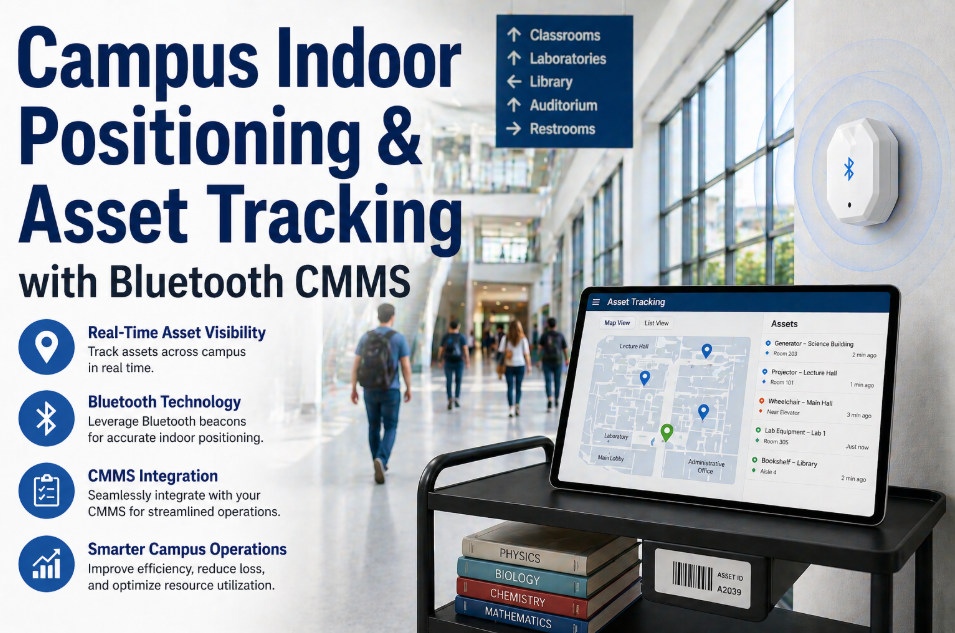
Campus Indoor Positioning and Asset Tracking with Bluetooth CMMS
Find any campus asset — portable AC units, lab carts, AV equipment, medical devices — in seconds using Bluetooth beacons integrated with CMMS. Stop losing 340 staff-hours per year to equipment searches.
340 hrs
Average annual staff-hours lost to asset searches on large campuses
8 sec
Time to locate a Bluetooth-tagged asset vs. 90 minutes manual search
$15
Cost per BLE beacon — no proprietary hardware required
3–5m
Indoor positioning accuracy with BLE beacon networks
OxMaint — Bluetooth Asset Tracking Built Into Your Campus CMMS
OxMaint integrates BLE beacon networks directly into the asset registry. Every movable asset appears on an interactive campus map with real-time location, maintenance history, and work order status — from any smartphone or desktop. No separate tracking software required.
The Campus Asset Location Problem — Why It Is Worse Than You Think
Universities and large institutional campuses operate with a category of assets that traditional CMMS platforms completely ignore: movable equipment. These are assets that are registered at one location in the system, maintained against a schedule tied to that location — but physically exist somewhere else 30–60% of the time. The mismatch between the CMMS record and physical reality creates a cascade of operational problems that compound over time. When a technician arrives to perform a scheduled PM on a portable air handler and it is not there, the PM gets skipped. The asset continues operating without maintenance. When it fails three weeks later — now in a different building, under a different department's unofficial custody — the failure is harder to trace, the repair is more expensive, and the asset history in the CMMS is incomplete. Multiply this across 200–400 movable assets on a mid-size campus and the operational drag becomes significant. Facilities teams that have measured this systematically find that movable asset management failures contribute to 15–22% of their total unplanned maintenance events. The solution is not more discipline or better communication between departments — those approaches have been tried and fail consistently against the entropy of a busy campus. The solution is technology: a persistent, automatic location signal attached to every movable asset, feeding real-time position data into the CMMS. Want to see how this maps to your campus asset inventory? Start a free trial or book a demo to map your movable asset categories.
How Bluetooth Indoor Positioning Works on a Campus
BLE indoor positioning uses a network of fixed receivers (gateways) mounted throughout campus buildings that listen for signals from small battery-powered beacons attached to movable assets. The system triangulates beacon position using signal strength from multiple receivers and reports location to a central platform. Here is the complete technology architecture used in 2026 campus deployments.
B
BLE Beacons (Asset Tags)
Coin-sized devices attached to each movable asset. Broadcast a unique ID signal every 1–10 seconds. Battery life: 2–5 years depending on broadcast interval. Operating temperature range covers outdoor campus environments. IP67 rated for weather and cleaning exposure.
Cost: $8–$20 per beacon — no subscription required on hardware
G
BLE Gateways (Fixed Receivers)
Mounted at corridor intersections, room entrances, and elevator lobbies. One gateway covers 50–80 meter radius indoors. Connects to existing campus Ethernet or Wi-Fi infrastructure. A typical 5-story academic building requires 12–20 gateways for full coverage.
Coverage: 50–80m per gateway — full building coverage from $2,000–$5,000 hardware cost
M
Location Engine (Positioning Software)
Processes signal strength data from multiple gateways to calculate asset position using trilateration algorithms. Updates location every 30–120 seconds. Accuracy: 3–5 meters — sufficient to identify room-level location on a campus floor plan. Runs in cloud or on-premise.
Accuracy: 3–5 meters indoors — identifies room-level location reliably
C
CMMS Integration Layer
Location data feeds directly into the asset record in OxMaint. The technician opens the asset on their phone, sees the current location on the campus floor plan, and navigates to it. PM work orders are automatically flagged when the asset is not found at its registered home location at scheduled maintenance time.
Integration: REST API — connects to OxMaint in under 4 hours with no middleware
Which Campus Assets Benefit Most From Bluetooth Tracking
Not every campus asset needs a Bluetooth beacon — fixed infrastructure like HVAC units and electrical panels are permanently installed and do not move. Bluetooth tracking delivers the highest ROI on assets that are regularly relocated, shared between departments, or frequently missing at scheduled PM time. Here is the prioritized asset category list for campus BLE deployment.
| Asset Category |
Common Examples |
Relocation Frequency |
Tracking Priority |
| Climate Control |
Portable AC units, space heaters, dehumidifiers, fans |
Weekly–Monthly |
High |
| AV and Technology |
Projectors, display screens, PA speakers, video conferencing carts |
Daily–Weekly |
High |
| Lab Equipment |
Mobile lab carts, microscopes, portable analyzers, centrifuges |
Weekly |
High |
| Medical and Health |
Wheelchair fleets, AED devices, first aid stations, stretchers |
Daily |
Critical |
| Grounds and Facilities |
Pressure washers, generators, power tools, floor scrubbers |
Weekly |
High |
| Food Service |
Mobile catering carts, portable coolers, event serving equipment |
Daily–Weekly |
Medium |
| Furniture and Staging |
Folding tables, chair stacks, lecterns, event staging components |
Event-Based |
Medium |
| Safety Equipment |
Fire extinguisher carts, emergency eyewash stations, spill kits |
Low — but critical when moved |
Critical |
Four Problems Bluetooth Tracking Solves for Campus Maintenance
Missed PMs on Relocated Assets
When a scheduled PM is due on a portable air handler registered to Building C and the asset is actually in Building F, the PM gets skipped. With Bluetooth tracking, OxMaint updates the work order with the asset's current location — the technician navigates to the right building, and the PM is executed on schedule regardless of where the asset has traveled.
Reduces missed PMs on movable assets by 78%
Asset Loss and Unauthorized Removal
Campus assets frequently leave the campus boundary when students or contractors remove them without authorization. BLE geofencing in OxMaint triggers an alert when a tracked asset crosses a defined campus boundary or leaves a permitted zone — catching unauthorized removal within minutes rather than weeks when the next audit reveals the gap.
Reduces unauthorized asset removal incidents by 65%
Emergency Equipment Location Failure
AED devices, fire extinguisher carts, and emergency eyewash stations have compliance requirements that depend on being in specific registered locations. When these assets are moved and not returned, the compliance gap is invisible until an audit or — worse — an emergency. BLE tracking continuously verifies safety equipment location against registered compliance positions.
Closes safety equipment location compliance gap — 100% continuous position verification
Utilization Blind Spots for CapEx Planning
Without location data, campus CapEx planning teams buy additional portable equipment units because they cannot find existing ones — not because the inventory is genuinely insufficient. BLE utilization data shows which assets sit idle 80% of the time and which are in continuous circulation — enabling data-driven fleet size decisions rather than "we can never find one so let's buy more."
Reduces unnecessary duplicate asset purchases by 30% on average
How OxMaint Integrates Bluetooth Tracking Into Campus Operations
The gap between a beacon transmitting location data and a technician acting on that data is where most standalone tracking systems fall short. OxMaint closes this gap by embedding asset location directly into the maintenance workflow — not as a separate tracking dashboard that nobody checks, but as a live field in every asset record, every work order, and every PM schedule. Campus facilities teams ready to connect their tracking infrastructure to actionable maintenance workflows can start a free trial or book a demo to see the CMMS-tracking integration in action.
Live Map
Real-Time Asset Map on Campus Floor Plans
Every Bluetooth-tagged asset appears as a live pin on the campus floor plan inside OxMaint. Technicians open the mobile app, search for any asset by name or ID, and get turn-by-turn navigation to its current location. Floor level, room number, and last-seen timestamp are all visible at a glance.
Average time to locate a tagged asset: under 30 seconds
Auto-Update
Work Orders Reflect Current Asset Location
When a PM or corrective work order is generated for a movable asset, OxMaint automatically populates the current location from the BLE network — not the registered home location. Technicians are dispatched to where the asset actually is, eliminating the "went to the wrong building" wasted trip.
Eliminates 100% of wrong-location dispatches for tagged assets
Geofence
Campus Boundary and Zone Alerts
Define permitted zones for each asset category — AEDs must stay within campus boundary, portable generators can move between buildings but not off-site. When a tagged asset breaches its geofence, OxMaint sends an immediate alert to the facilities manager with the asset ID, last known location, and breach timestamp.
Geofence breach alerts generated within 60 seconds of boundary crossing
Utilization
Asset Utilization Analytics for CapEx Planning
OxMaint generates utilization heat maps showing where each asset category spends its time — which buildings consume the most portable equipment, which assets sit idle, and which are overutilized. This data feeds directly into the rolling CapEx forecasting model for data-driven fleet planning decisions.
Campus CapEx decisions supported by actual utilization data — not guesswork
Campus Deployment — BLE Network Sizing Guide
Campus BLE deployment is straightforward — the main variable is building density and the number of floors requiring room-level accuracy. Here is the sizing framework for common campus building types.
Small Academic Building
2–3 floors, 20,000–50,000 sq ft
8–12 gateways
$1,200–$2,400 gateway hardware
Room-level — 3–5m accuracy
Large Academic Building
5–8 floors, 80,000–200,000 sq ft
20–40 gateways
$3,000–$8,000 gateway hardware
Room-level — 3–5m accuracy
Residence Hall Complex
6–12 floors, 100,000–300,000 sq ft
30–60 gateways
$4,500–$12,000 gateway hardware
Floor and wing level — 5–8m accuracy in corridors
Full Campus Network
15–50 buildings, 1M+ sq ft total
200–600 gateways
$30,000–$120,000 full campus hardware
Room-level across all buildings — campus-wide asset visibility
ROI Calculation — The Numbers for a Mid-Size University
340 hrs
Annual Search Time Eliminated
At $35/hr blended technician rate = $11,900 direct labor saved annually
78%
Fewer Missed PMs on Movable Assets
Reduces equipment failures from deferred maintenance — average $3,500 savings per prevented emergency repair
30%
Reduction in Duplicate Purchases
Utilization data prevents unnecessary fleet expansion — saves $15,000–$40,000 annually on mid-size campuses
3.8x
12-Month ROI
Combined savings from search time, prevented failures, and avoided purchases vs. beacon and gateway hardware cost
Frequently Asked Questions
Does Bluetooth tracking work in older campus buildings with thick concrete walls?+
Yes — this is one of the most common campus concerns. BLE signals penetrate typical interior walls (drywall, glass, wood framing) effectively. Thick concrete and reinforced walls do reduce signal range, but the solution is simply placing gateways more densely — every 30–40 meters instead of 50–80 meters in heavy-construction buildings. The practical result is slightly higher gateway cost for older buildings, but room-level accuracy is still achievable. OxMaint's deployment team provides a building-specific gateway placement plan during the
demo call.
Can we integrate with our existing campus Wi-Fi or Ethernet infrastructure?+
Yes. BLE gateways connect to existing campus Ethernet (PoE) or Wi-Fi infrastructure — no dedicated network required. Most campus-grade BLE gateways are PoE-powered, eliminating the need for electrical installation at each gateway location. Standard campus IT infrastructure handles the data load easily — BLE gateway data is minimal bandwidth, typically under 1Kbps per gateway. Campus IT departments rarely need to make any network changes for a BLE asset tracking deployment.
What happens to tracked asset location data when a beacon battery dies?+
OxMaint monitors beacon battery levels and generates a preventive maintenance alert when any beacon drops below 20% battery — typically 3–6 months before actual failure. The last confirmed location is stored in the asset record, and the asset is flagged in the system as "location unverified — beacon battery low." This gives facilities teams proactive notice to replace batteries before tracking gaps occur. At 2–5 year battery life per beacon, a 200-beacon campus deployment requires replacing roughly 40–100 beacons per year — a 30-minute task per beacon.
How quickly can a campus deploy Bluetooth tracking across multiple buildings?+
A phased deployment starting with 2–3 highest-priority buildings can be live in 2–3 weeks from hardware delivery — gateway installation takes 2–4 hours per building, beacon tagging of assets takes 1–2 hours for a 50-asset set. Full campus deployment across 20–30 buildings typically takes 6–10 weeks with a 2-person installation team. OxMaint's asset registry accepts beacon ID assignments via CSV bulk import, so the software side of the deployment takes hours, not weeks.
Start a free trial and see how the beacon integration maps to your existing asset list.
Campus Bluetooth Asset Tracking
Every Campus Asset. Located in Seconds. Maintained on Schedule.
OxMaint integrates BLE beacon tracking directly into the campus CMMS — real-time asset location on interactive floor plans, automatic work order location updates, geofence alerts, and utilization analytics for CapEx planning. No separate tracking software. No additional dashboards. Everything in one platform.
8 sec
To locate any tagged asset
$15
Per beacon — no proprietary hardware
3.8x
12-month ROI on beacon deployment
78%
Fewer missed PMs on movable assets
![campus-construction-site-coordination-bim-cobie-cmms-asset-onboarding[1]](./manage-post-2k26/uploads/campus-construction-site-coordination-bim-cobie-cmms-asset-onboarding[1].png)
![university-sustainability-initiatives-carbon-tracking-scope-1-2-3-cmms[1]](./manage-post-2k26/uploads/university-sustainability-initiatives-carbon-tracking-scope-1-2-3-cmms[1].png)