Water treatment plants have quietly become some of the most heavily robotic environments in municipal infrastructure. Pipe-crawlers map corrosion inside transmission mains, remotely operated vehicles inspect clarifiers and reservoirs without draining them, and inspection drones survey tank roofs and chemical storage structures that used to require confined-space entry. The problem is rarely the robot itself — it is what happens to what the robot finds. Most plants still treat robotic inspection data as a standalone report that someone has to remember to act on, and a defect flagged in a vendor dashboard rarely becomes a work order before the next inspection cycle arrives. Closing that gap is what separates a plant running robotics as a maintenance program from robotics as an expensive demo.
Water Treatment Robotics · CMMS Integration · WO Loop Guide
Water Treatment Robotics Integration Software — Closing the Work Order Loop
Pipe-crawlers, ROVs, and inspection drones generate more defect data than any WTP maintenance team can manually triage. Here is how leading plants connect robotic findings directly to work orders — automatically, every time.
61%
Of robotic inspection findings at WTPs never convert into a tracked work order within 30 days
9 days
Average delay between a robotic defect flag and a technician acting on it, without integration
3.6x
Higher repair cost when a corrosion defect is left undocumented past one inspection cycle
72 sec
Time to auto-generate a work order from a robotic finding when the CMMS is integrated
Where Robots Already Work
The Four Robots Doing Inspection Work Inside Most Modern Water Treatment Plants
Robotic inspection did not arrive at water treatment plants all at once — it grew asset by asset, wherever confined-space entry, dewatering, or shutdown cost made manual inspection impractical. The result is a fleet of purpose-built machines, each producing its own stream of defect data that needs somewhere to go.
Transmission Mains
Pipe-Crawler Robots
Tethered or free-swimming units travel inside pressurized and gravity mains, logging wall-thickness readings, corrosion pitting, and joint condition without taking the line out of service.
Typical output: corrosion map, GPS-tagged defect list, video log
Clarifiers and Reservoirs
Remotely Operated Vehicles
Submersible ROVs inspect sludge collector arms, baffle walls, and reservoir liners while the basin stays in service, replacing a dewater-and-enter inspection that once took a facility offline for days.
Typical output: sonar imagery, sediment depth readings, liner defect photos
Tanks and Structures
Inspection Drones
Fixed-wing and multirotor drones survey elevated tank roofs, chemical storage structures, and clarifier weirs, replacing rope-access and confined-space entries for routine visual condition checks.
Typical output: high-resolution imagery, thermal scans, defect coordinates
Valve and Gate Operations
Robotic Actuation Arms
Fixed robotic arms exercise and inspect valves and sluice gates in locations where manual operation would expose staff to submerged or hazardous atmosphere conditions during routine cycling.
Typical output: torque readings, cycle counts, operational fault codes
The Silo Problem
Why Robotic Findings Stall Before They Become Repairs
The robot is rarely the bottleneck. Most robotic inspection platforms ship with their own proprietary dashboard, built to display corrosion maps and sonar imagery well — but not to talk to a maintenance system. A pipe-crawler operator finishes a run, exports a PDF report, and emails it to a supervisor. The supervisor reviews it during a busy week, forwards a subset of findings to a planner, and the planner manually keys a work order for the ones that seem urgent. Every handoff is a place a defect can be deprioritized, forgotten, or simply lost between two software systems that were never meant to connect. Want to see what it looks like when that handoff disappears entirely? Start a free trial or book a demo to walk through the integration live.
The WO Loop
Five Steps From Robotic Finding to Closed Work Order
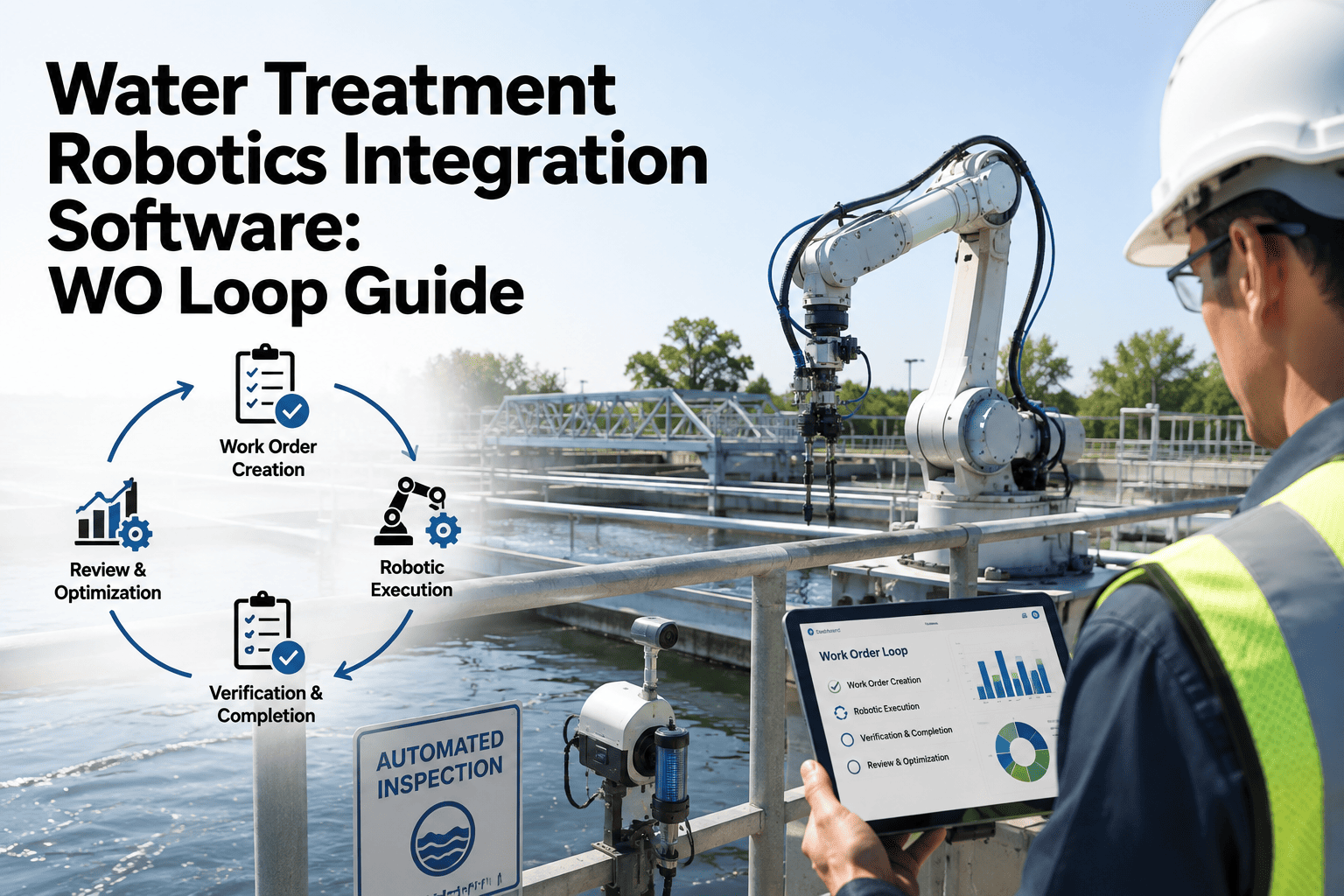
A closed WO loop means every defect a robot detects has a traceable path to resolution — and a record proving it was resolved. This is the sequence OxMaint runs underneath every robotic inspection integration, regardless of which platform generated the finding.
01
Robot Flags a Defect
A pipe-crawler, ROV, drone, or actuation arm completes its run and its native software marks an anomaly against a severity threshold — a wall-thickness drop, a sediment depth spike, or a fault code.
02
Finding Streams Into OxMaint
The integration layer pulls the flagged finding — coordinates, severity, imagery, and asset reference — directly into OxMaint, matched automatically to the correct pipe segment, tank, or basin asset record.
03
Work Order Generates Automatically
A work order is created without manual entry, pre-populated with the asset, defect location, severity, and the original robotic evidence attached, then routed by priority rule to the right crew.
04
Technician Resolves and Signs Off
The assigned technician completes the repair, logs parts and labor, and signs off in the same record — creating a single continuous file from detection to correction for that specific defect.
05
Next Inspection Confirms Closure
When the robot returns to that asset on the next inspection cycle, OxMaint flags whether the same defect reappears, giving supervisors a direct verification that the repair actually held.
Before and After
What Changes When the WO Loop Closes
OxMaint · Robotics Integration · CMMS
Your Robots Already Found the Problem. Make Sure It Reaches a Work Order.
OxMaint connects to pipe-crawler, ROV, and drone inspection platforms and turns every flagged finding into a routed, evidence-attached work order automatically — no export, no manual re-entry, no lost defect between systems.
What the Loop Prevents
The Cost of Letting Robotic Findings Sit Unactioned
High Risk
Undetected Main Failure
A corrosion reading flagged but never routed to a crew is a main break waiting on a schedule nobody set, often surfacing during a demand peak instead of a planned outage.
High Risk
Compliance Exposure
Primacy agency audits ask for a documented trail from defect detection to repair. A report sitting in a vendor dashboard with no linked work order is a gap auditors flag first.
Rising Cost
Escalating Repair Scope
A pitting defect caught early is a spot repair. The same defect found again a year later, unaddressed, is frequently a section replacement at several times the original cost.
Rising Cost
Wasted Inspection Spend
Robotic inspection contracts are not cheap. Findings that never convert into action mean the plant paid for data it then failed to use, inspection after inspection.
Plant Managers Ask
Robotics and CMMS Integration — Common Questions
Does OxMaint replace our robotic inspection vendor's software?
+
No. OxMaint sits alongside your pipe-crawler, ROV, or drone platform and pulls flagged findings into the maintenance workflow. Your inspection vendor still owns the raw sensor data and imagery capture.
Book a demo to see which robotic platforms connect directly.
What if our current robotic vendor has no integration option at all?
+
Findings can still be imported on a scheduled basis from exported reports, which is slower than a live feed but still removes the manual re-entry step.
Start a free trial to test an import workflow against your current reports.
How is a robotic finding matched to the correct asset automatically?
+
Matching uses GPS coordinates and asset ID tags from the robotic platform against your existing asset register, so a defect on a specific pipe segment or tank routes to that exact record every time.
Can we set different severity rules for different asset types?
+
Yes. Severity thresholds and routing rules are configured per asset class, so a critical transmission main defect and a minor tank coating flag do not follow the same escalation path.
Does the WO loop help with our next primacy agency audit?
+
Yes. Every work order generated from a robotic finding keeps the original evidence attached, giving you an exportable chain from detection to repair sign-off.
Start a free trial to see a sample audit export.
OxMaint · Water Treatment Robotics · WO Loop
Stop Letting Robotic Findings Die in a Separate Dashboard
Every pipe-crawler run, ROV survey, and drone pass generates data worth acting on. OxMaint turns that data into routed, evidence-backed work orders automatically, so your plant gets the full value of the robotics program it already paid for.