Maintenance automation workflows are the backbone of high-efficiency manufacturing operations. When work orders, inspection triggers, spare parts requests, and compliance alerts run on automated logic instead of manual coordination, maintenance teams shift from firefighting to proactive reliability management. This guide covers the complete architecture of maintenance automation workflows in manufacturing — from trigger-based PM scheduling and automated work order routing to escalation rules, inventory replenishment, and compliance notification systems. If your plant is ready to eliminate manual coordination overhead, Sign Up Free on OxMaint and deploy your first automated maintenance workflow within days.
What Are Maintenance Automation Workflows and Why Manufacturing Plants Need Them
A maintenance automation workflow is a pre-defined logic chain that triggers maintenance actions automatically based on time, condition, meter reading, or event — without requiring manual intervention at each step. In manufacturing environments where hundreds of assets require coordinated maintenance across multiple shifts and trade groups, manual workflow management creates dangerous gaps: PM tasks missed because no one issued the work order, spare parts not ordered until the technician arrives on site, and compliance records incomplete because sign-offs were not collected. OxMaint's workflow engine closes these gaps by running maintenance coordination logic automatically — so the right work order reaches the right technician with the right parts and safety requirements already loaded. Book a Demo to see how manufacturing plants configure automation workflows in OxMaint within a single setup session.
Preventive maintenance work orders auto-generate when an asset reaches a defined runtime hour, calendar interval, or production cycle count — no manual scheduling required.
New work orders are routed to the correct technician or trade group based on asset type, skill requirement, shift schedule, and location — eliminating supervisor coordination overhead.
When a critical work order is not acknowledged within a defined window, the system automatically escalates to the supervisor — preventing high-priority tasks from falling through the cracks.
Sensor alerts or inspection findings automatically generate corrective work orders with pre-loaded asset history, recommended parts, and safety permit requirements attached.
When inventory levels for critical spare parts drop below defined thresholds, the system generates purchase requests automatically — preventing maintenance delays caused by stockouts.
Regulatory inspection due dates, permit renewals, and certification expirations trigger automated reminders to responsible parties — keeping compliance obligations on schedule.
7 Maintenance Automation Workflows Every Manufacturing Plant Should Configure
Most manufacturing plants have the CMMS infrastructure to automate their maintenance workflows but have never configured the logic. Sign Up Free on OxMaint to access pre-built workflow templates for all seven of the automation patterns below — ready to customize for your plant's asset structure and maintenance team.
Set a maintenance interval for each asset — daily, weekly, monthly, or quarterly — and the CMMS generates the work order automatically at the defined cadence. The work order includes the task checklist, required tools, estimated duration, and assigned technician with no manual input.
For production equipment where maintenance intervals are measured in operating hours or production cycles, meter readings from PLCs or manual technician input automatically generate work orders when the threshold is reached — regardless of calendar date.
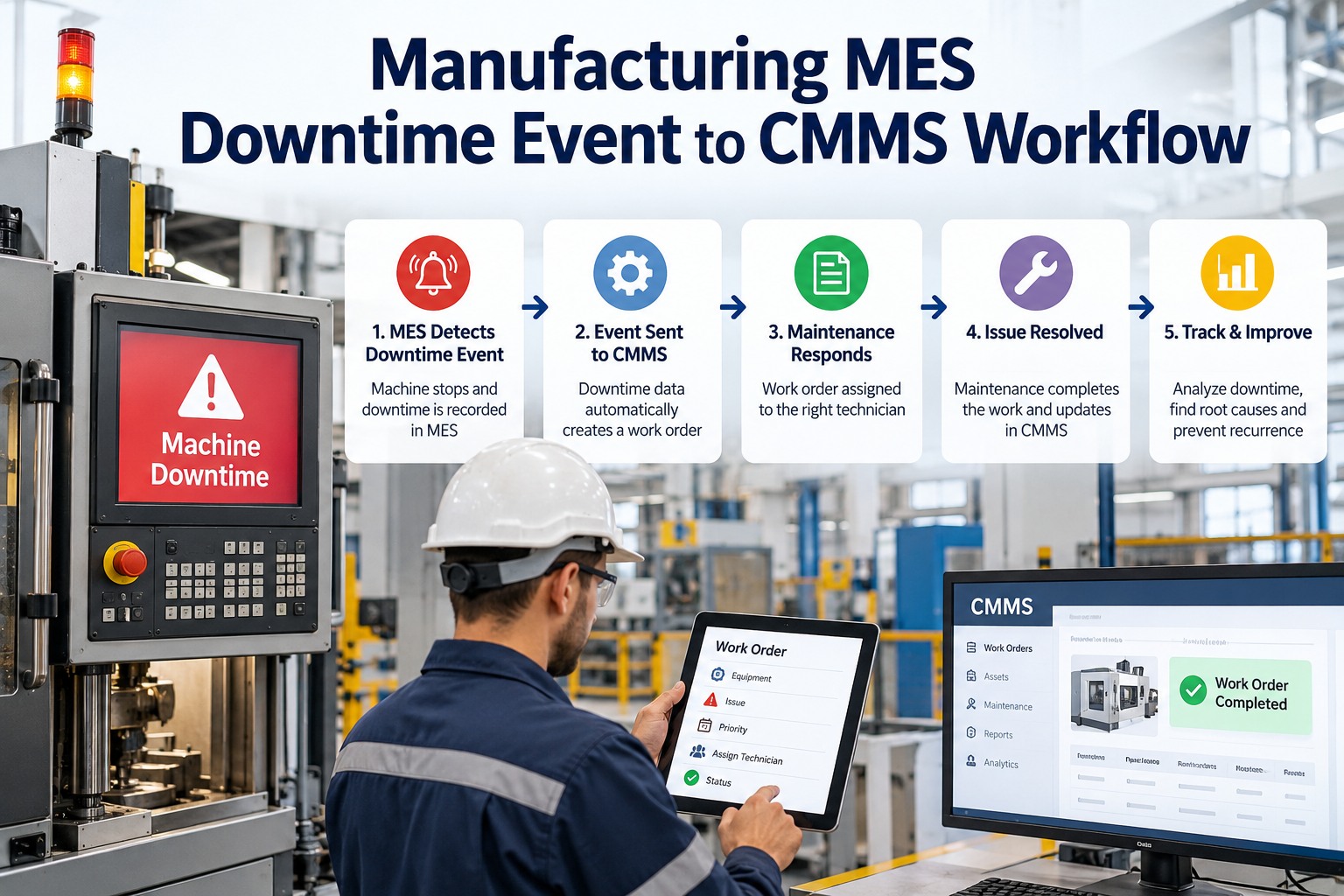
When a technician or operator submits a failure report or breakdown notification, the system automatically creates a corrective work order, assigns it based on priority and trade skill, attaches the asset's maintenance history, and notifies the supervisor — all within seconds of the report submission.
When a technician marks a work order complete and records parts used, the inventory system automatically deducts those parts from stock, checks remaining quantity against reorder thresholds, and raises a purchase request if replenishment is needed — closing the loop between maintenance execution and parts management.
Structured inspection checklists in OxMaint allow technicians to flag individual line items as defective or requiring follow-up. Flagged items automatically generate a linked corrective work order — so no finding from a scheduled inspection is ever lost without a response action created.
Define escalation thresholds for each work order priority level. If a critical work order is not acknowledged within two hours or completed within the target time, the system automatically notifies the maintenance manager and updates the work order status — ensuring no high-priority task ages silently in the queue.
For high-risk maintenance tasks, the CMMS automatically triggers the required permit type when a work order is created, routes it through the approval chain, and locks task execution until all authorizations are confirmed — preventing technicians from starting work without safety clearances in place.
Maintenance Automation Impact: Performance Benchmarks for Manufacturing
Automation Workflow Failure Points: What Goes Wrong Without a CMMS
Manual PM scheduling depends on a planner remembering to issue work orders at the correct interval. When planners are overloaded during production peaks, PM tasks are delayed or forgotten entirely — allowing equipment to deteriorate beyond its safe operating window.
Without automated routing logic, supervisors manually match work orders to technicians — creating assignment errors when skill requirements, certifications, or shift schedules are not checked. OxMaint's routing rules enforce skill and availability matching automatically.
Without work order-to-inventory integration, technicians discover required parts are out of stock only after arriving at the job site — causing delays while parts are sourced. Automated inventory checks at work order creation prevent this by flagging stock availability before task scheduling.
Critical repairs aging in the queue without escalation represent the highest unplanned downtime risk in manufacturing maintenance. Automated escalation workflows ensure supervisors are alerted when high-priority work orders exceed their target response time — before the asset fails.
Paper-based or disconnected inspection checklists generate findings that never become work orders. OxMaint's inspection-to-work-order automation ensures every flagged defect has a tracked corrective action — closing the loop between inspection programs and maintenance execution.
Which Workflow Type to Automate First: A Decision Framework
How OxMaint Powers Maintenance Automation Workflows in Manufacturing
OxMaint's workflow engine is built specifically for manufacturing maintenance operations — with pre-configured logic for PM triggers, work order routing, escalation, inventory replenishment, and compliance notifications. Unlike generic workflow tools, every automation in OxMaint is directly linked to asset records, maintenance history, and spare parts data — ensuring automated actions are context-aware and actionable when they reach the technician. Book a Demo to walk through how manufacturing plants configure their first five automation workflows in OxMaint in under two hours.
| Workflow Type | OxMaint Automation | Manufacturing Benefit |
|---|---|---|
| PM scheduling | Time, meter, and condition-based auto-triggers | 95%+ PM compliance without manual scheduling |
| Work order routing | Skill, shift, and location-based assignment logic | Faster task start and reduced assignment errors |
| Failure reporting | Breakdown notification to corrective WO in seconds | Reduced mean time to repair on critical assets |
| Parts management | WO completion triggers inventory deduction and reorder | Eliminates stockouts on critical components |
| Escalation management | Priority-based overdue alerts to supervisors | Critical repairs never age without management visibility |
| Compliance tracking | Automated reminders for inspections and permit renewals | Audit-ready compliance documentation |