A blast furnace maintenance technician fitting a replacement tuyere copper block works within two metres of 1,400°C hot metal, under time pressure, often on a night shift, with a job procedure they may have performed three or four times in their career. A rolling mill hydraulic engineer diagnosing a servo valve fault on a 4-high stand has access to a schematic on paper, a vibrating metal structure that makes conversation impossible, and the pressure of a stopped mill behind them. In both cases, the right information — delivered at the right moment, overlaid on the physical equipment in front of them — would reduce repair time, reduce errors, and reduce risk. That is the functional promise of augmented reality in steel plant maintenance, and it is why AR has moved from concept to active deployment at ArcelorMittal, Tata Steel, ThyssenKrupp, and POSCO in the last three years. Sign up for Oxmaint to connect AR work instruction delivery with your CMMS work order system today.
Six High-Return AR Applications Across Furnaces, Mills and Cranes
AR guidance delivers the highest return in situations where the procedure is complex, the environment is hazardous, the consequence of error is severe, or the experienced person who should be guiding the work is not physically available. In steel plants, all four conditions occur simultaneously and frequently. Sign up for Oxmaint to connect AR work instructions with your CMMS work orders.
Tuyere replacement on a blast furnace or EAF operates within two metres of 1,400°C hot metal. AR overlays the correct torque sequence directly on the visible fasteners, displays real-time cooling water pressure from BF instrumentation in the technician's field of view, and shows the safe approach angle relative to the furnace operating state. A technician performing their third tuyere replacement with AR guidance executes the procedure with the same contextual accuracy as an experienced operator who has done it 300 times — without that experienced operator being physically present in the hot zone.
MTTR impact: 35–45% reduction on complex first-time repairsHydraulic cylinder seal replacement on a rolling mill AGC system requires exact sequence adherence — incorrect assembly of the seal stack or improper torque on the gland nut will cause a pressure leak that is not detected until the first gauge correction under load. AR guidance displays the seal stack assembly in 3D overlay on the actual cylinder, tracks completed steps, and prevents the technician from advancing to the next step until the current step's torque value is recorded in the linked Oxmaint work order.
Error rate reduction: 60% fewer rework eventsEvery steel plant has equipment whose failure mode is seen once every 3–5 years — the EAF transformer cooling pump that cavitates under a specific load-temperature combination, the casting machine gearbox with a second-stage planet carrier bearing signature. When these events occur, no one on site may have seen it before. AR remote assistance connects the on-site technician with an OEM specialist anywhere in the world, who sees exactly what the technician sees and annotates their view with directional indicators and labels in real time. Specialist travel is eliminated. Book a demo to see remote expert integration.
Avoided specialist travel: $8,000–$25,000 per incidentTraditional steel plant apprenticeships require 12–18 months of shadowing before a technician performs complex procedures independently. AR training compresses this by delivering supervised procedure guidance on the real equipment — the technician follows AR instructions on the actual asset while their performance is recorded for competency assessment. Plants using AR training report 40–50% reduction in time-to-competency on complex procedures. The tacit knowledge of the experienced technician is captured in the AR instruction set rather than retired with them.
Time-to-competency: 40–50% faster on complex proceduresBlast furnace relining, EAF refractory work, and major rolling campaigns concentrate infrequent complex procedures into compressed time windows. AR guidance during shutdown maintenance ensures procedures are performed exactly as specified — in sequence, with correct torques, with hold-point inspections documented — regardless of how long since the last performance. Each completed step links directly to the shutdown work order in Oxmaint, giving the shutdown coordinator a live completion record from the control room without radio check-ins.
Shutdown overrun reduction: 20–30% fewer schedule extensionsOverhead crane and ladle car maintenance in a steelmaking bay involves work at height on structures where the technician cannot safely hold a procedure manual. AR headsets overlay the inspection sequence and torque specifications directly on the crane structure as the technician moves through the inspection route, and capture photographic evidence of each inspection point automatically via the headset camera — creating a timestamped inspection record in Oxmaint without manual data entry. Sign up to configure crane inspection AR templates.
Crane inspection time: 40% reduction with AR-guided roundsWhat Changes When a Technician Follows AR Guidance vs. a Paper Procedure
The difference between AR guidance and a paper procedure is not just convenience. It is a fundamental change in the information available to the technician at the point of work — and therefore a change in the quality and speed of the work itself.
Paper Procedure — What It Provides and What It Cannot
A paper procedure manual is a static document. It describes steps in text and diagrams that the technician must interpret, remember, and apply to the physical equipment in front of them. In a noisy, visually complex steel plant environment, the cognitive gap between reading a step and correctly applying it to the specific equipment is where errors accumulate.
- Cannot show the technician which specific bolt or component to act on in a complex assembly — only describes it in text
- Cannot display real-time system state data (pressure, temperature, valve position) alongside the procedure step
- Cannot prevent the technician from skipping a step or performing steps out of sequence under time pressure
- Cannot capture procedure completion evidence automatically — technician must separately log work order completion
- Becomes inaccessible when the technician needs both hands for the task or is working in PPE that prevents tablet use
How AR and Oxmaint Work Together — Five Integration Points
AR guidance is most valuable when connected to the maintenance management system. An AR system delivering instructions from a static procedure library is useful. One delivering instructions from a live Oxmaint work order — with the specific asset's maintenance history, current condition data, and required parts list pre-loaded — is transformative. Book a demo to see the AR-Oxmaint workflow demonstrated.
When a sensor alarm or operator report triggers a work order in Oxmaint, the system automatically identifies the correct AR procedure for the asset type and fault category. The technician receives the work order on their mobile or AR headset with the AR procedure pre-linked — no manual procedure lookup, no risk of selecting the wrong procedure version for the installed equipment specification.
Before the AR procedure activates, the headset confirms the required safety permit is active, the isolation points have been verified in Oxmaint, and the LOTO record is complete. A work order requiring a hot work permit cannot initiate the AR guided procedure until the permit is approved in Oxmaint — enforcing permit-to-work compliance at the point of work, not just at the paper sign-off stage. Sign up for Oxmaint to configure AR-permit integration.
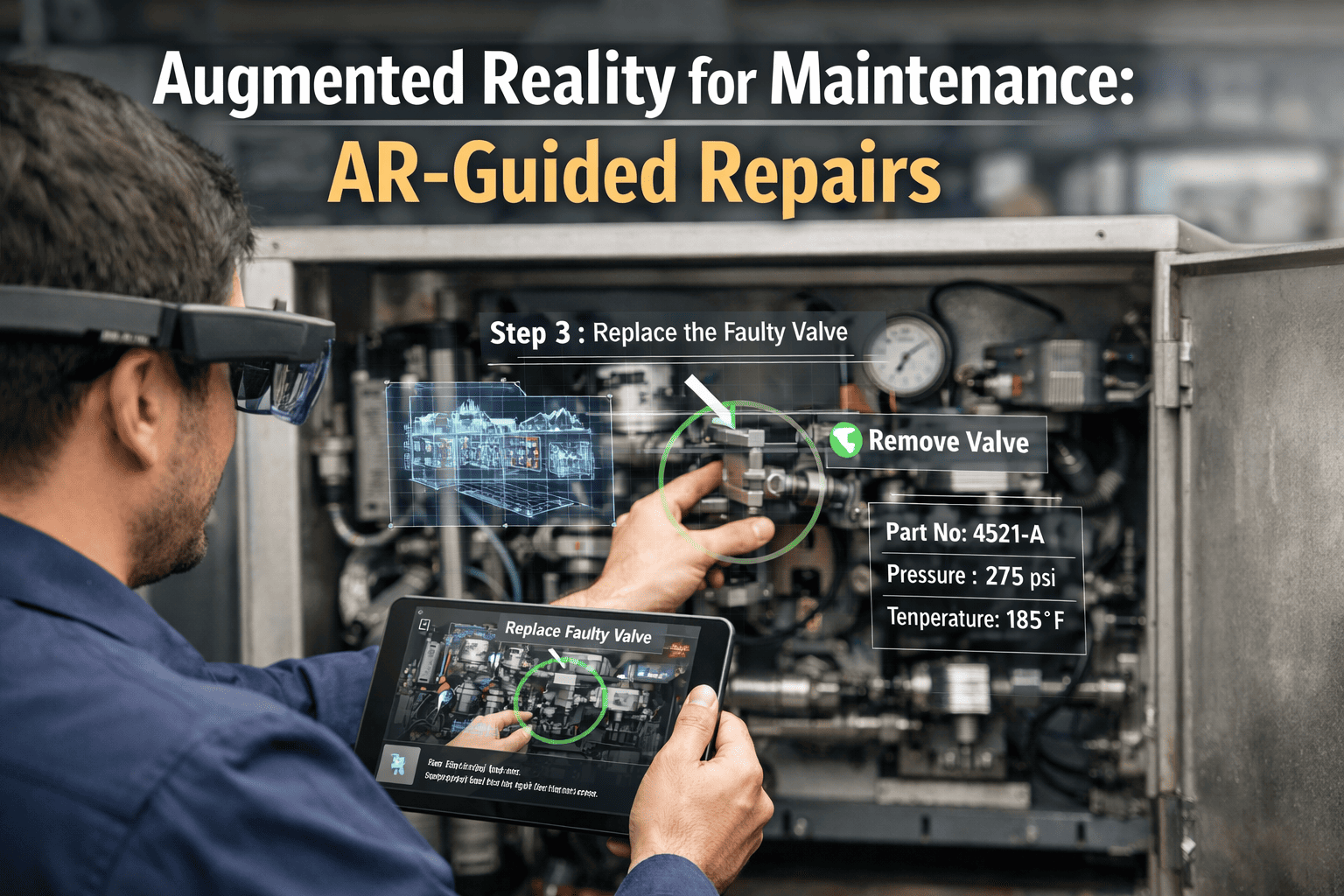
During the repair, the AR headset overlays each procedure step on the physical components visible to the technician — highlighting the specific bolt, valve, or component to act on, displaying torque specifications, and showing live sensor data from Oxmaint (cooling water pressure, hydraulic circuit pressure, temperature readings) in the technician's field of view. Each step completion is voice-confirmed or gesture-confirmed without the technician removing their hands from the work.
If the technician encounters a condition outside the scope of the AR procedure — an unexpected component condition, an anomaly not covered by the standard fault classification — they connect to a remote expert with a single tap. The expert joins a live view of the technician's headset camera, can annotate the technician's field of view with directional arrows and labels, and can access the Oxmaint work order and asset history simultaneously to inform their guidance.
When the final procedure step is completed and confirmed, the AR system automatically closes the Oxmaint work order with a complete record: timestamp per step, photo evidence captured by the headset camera at configured hold points, torque values entered during the procedure, and remote expert session log if applicable. No separate data entry. No paper form to transcribe. The maintenance record is complete the moment the repair is complete. Book a demo to see automatic work order completion from AR.
AR Maintenance Performance Data Across Heavy Industry Deployments
The following performance data is drawn from documented industrial AR deployments in steel, petrochemical, and heavy manufacturing operations — the industrial environments most analogous to steel plant maintenance conditions.
| Performance Metric | Without AR | With AR Guidance | Improvement |
|---|---|---|---|
| MTTR — complex procedures (first-time performer) | 6.8 hrs average | 3.7–4.5 hrs average | 35–45% reduction |
| Procedure error rate (incorrect sequence/torque) | 18% of events | 7% of events | 61% error reduction |
| New technician time-to-competency | 12–18 months | 7–10 months | 40–50% faster |
| Remote expert travel per incident | $15,000 average | $0 (video-assisted) | 100% cost elimination |
| Work order documentation time per job | 22 min per event | Under 2 min (auto) | 91% admin reduction |
| Shutdown task overrun rate | 31% of planned tasks | 12% of planned tasks | 61% fewer overruns |
Swipe to view full table
AR Guidance Connected to Oxmaint Work Orders — See It Running in 30 Minutes
Our steel industry team will show you AR work instruction delivery triggered from an Oxmaint work order, with live CMMS sensor data integrated and automatic work order completion at the end of the procedure.
What Oxmaint Delivers for AR-Integrated Steel Plant Maintenance
Oxmaint provides the CMMS backbone that makes AR guidance operationally meaningful — connecting the AR instruction layer to the asset history, permit system, and work order management that determines whether a repair is completed correctly, safely, and with a permanent record.
Pre-built AR procedure templates for blast furnace, EAF, rolling mill, and casting machine asset types. Each template is linked to the asset register so the correct procedure version is automatically selected based on the specific equipment specification installed at your plant.
AR procedures cannot be initiated until the required permit is active and approved in Oxmaint. The headset displays permit status, expiry time, and isolation confirmation before allowing the technician to begin guided work. Permit expiry alerts appear in the technician's field of view. Sign up for permit-to-work integration.
Cooling water pressure, hydraulic circuit pressure, bearing temperature, and other CMMS-monitored parameters are displayed as live overlays in the technician's AR field of view at the relevant procedure step. The technician sees the system state of the asset they are repairing without leaving the work position to check a separate instrument panel.
One-tap connection to a remote expert who sees the technician's headset camera stream in real time. The expert can place directional arrows, labels, and highlight boxes directly on the technician's field of view, annotating specific components without the technician describing their location verbally. The session is recorded and attached to the Oxmaint work order as evidence.
When the final AR procedure step is confirmed, Oxmaint closes the work order automatically — attaching headset camera photos from configured hold points, recording torque values entered during the procedure, logging step timestamps, and archiving remote expert session recordings. The maintenance record is complete the moment the repair is complete. Book a demo to see this workflow.
Every AR-guided procedure completed by a technician is recorded in their Oxmaint competency profile — procedure name, completion time, error flags, supervisor sign-off if required. Managers can view which technicians are qualified to perform which procedures based on documented AR-guided completions, and identify training gaps before they become safety events. Sign up to activate competency tracking.
What Steel Plant Teams Say After AR Deployment
We had an EAF transformer cooling system fault on a Saturday night. The fault mode — a combination of pump cavitation and a control valve that had failed partially open — was one that none of our current team had seen before. Our most experienced person who had handled this exact condition had retired 18 months earlier. With AR remote assistance, we connected him via a video call from his home. He could see exactly what our technician was seeing on the headset. He annotated the screen to show the secondary valve position that our technician could not see clearly, walked us through the diagnostic sequence, and we had the pump back in service in four hours. Without AR, that would have been a Monday call to the OEM and at least 30 hours of unplanned downtime.
Augmented Reality in Steel Plant Maintenance — Common Questions
Oxmaint's AR integration is designed to work with the leading industrial AR platforms including Microsoft HoloLens 2, RealWear HMT-1 and Navigator 500, Vuzix M400, and Epson Moverio. For steel plant environments — where dust, heat, and the requirement for PPE compatibility are significant constraints — RealWear's Android-based head-mounted devices are most commonly deployed because they operate alongside safety helmets and face shields without modification and function in environments up to 50°C ambient. Oxmaint's mobile CMMS app also delivers a scaled-down AR-assisted workflow on rugged smartphones and tablets for operations that are not yet ready for headset deployment. Sign up for Oxmaint to discuss headset compatibility for your environment.
Oxmaint's AR procedure authoring tool converts existing maintenance procedures — whether held in paper, PDF, or a previous CMMS — into AR-deliverable instruction sets without specialist software development. A procedure author (typically a senior technician or maintenance engineer) works through the existing procedure steps, adds spatial anchors for each step, records the relevant sensor data fields to display, and sets hold-point photo requirements. The authoring process for a typical rolling mill seal replacement procedure takes approximately 4–6 hours for the first build and under an hour for revisions. Oxmaint's implementation team provides procedure authoring support as part of the AR integration deployment. Book a demo to see procedure authoring demonstrated.
Yes — the leading industrial AR headsets for noisy environments (RealWear HMT-1, RealWear Navigator 500) use noise-cancelling microphone arrays and voice command operation that function in environments up to 95 dB — covering most rolling mill and melt shop environments. The remote expert communicates via bone conduction or over-ear audio integrated with the headset. Visual annotation by the remote expert does not depend on voice communication — directional arrows and labels placed on the technician's field of view are visible regardless of ambient noise level. For environments above 95 dB, gesture confirmation replaces voice confirmation in the AR workflow.
A phased AR integration with Oxmaint typically follows this timeline: weeks 1–3 cover headset selection, environment assessment, and CMMS data integration configuration; weeks 4–8 cover AR procedure authoring for the first 15–20 high-priority maintenance tasks; weeks 9–12 cover pilot deployment with selected technicians on those procedures, with performance measurement and procedure refinement; weeks 13–16 cover full rollout to the maintenance team with training and competency assessment integration. Full deployment across a mid-size steel plant's critical maintenance procedures typically completes within 4–6 months. The remote expert capability is available from week 4 as soon as the CMMS integration is live. Sign up for Oxmaint to begin your AR integration timeline discussion.
The Knowledge Your Experienced Technicians Carry Should Not Retire When They Do
AR-guided maintenance captures the contextual knowledge of your most experienced technicians in a format that delivers it to every technician who performs that procedure — regardless of their experience level, regardless of whether the expert is on site, and regardless of how long since the procedure was last performed. Oxmaint provides the CMMS backbone that makes AR guidance operationally connected — triggering procedures from work orders, enforcing permit compliance, displaying live system data, and capturing evidence automatically.