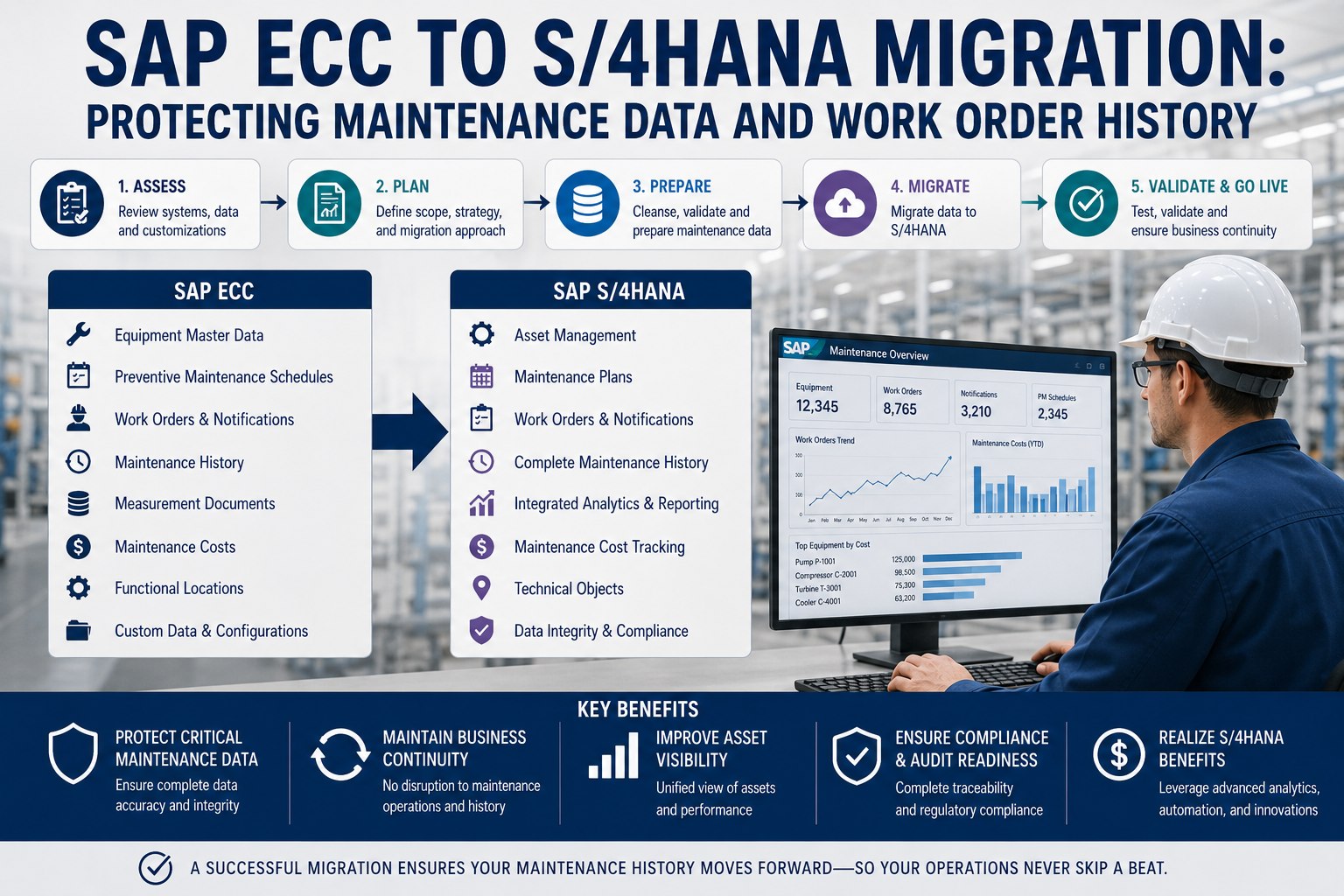
sap-ecc-to-s4hana-maintenance-migration

SAP ECC to S/4HANA Migration: Protecting Maintenance Data and Work Order History


Your SAP system holds decades of hard-won maintenance knowledge: every equipment record, every closed work order, the BOMs, the task lists, the PM schedules tuned over years. When you migrate from ECC to S/4HANA, all of that is suddenly at risk—and the path you choose decides whether it survives intact, arrives partial, or gets stranded in a system you're shutting down. The 2027 deadline forces the move, but the real danger isn't the move; it's losing the asset history that makes your maintenance program work. Book a free demo to see a data safety net.

Why Maintenance Data Is the Hard Part
The migration numbers that put asset history at risk
2027
ECC support ends; the migration is no longer optional
12–24 mo
Typical migration timeline depending on path and complexity
Only 8%
Of projects finish on schedule—most run ~30% over plan
~60%
Of custom ABAP typically needs remediation before moving

What's Actually at Stake in a Maintenance Migration

Maintenance data is uniquely fragile in a migration because it's deeply interconnected and accumulated over years. Asset structures, bills of materials, and task lists carry institutional knowledge that's extremely difficult and expensive to recreate—and errors here don't just cause inconvenience, they jeopardize asset availability and lead to costly production downtime. The SAP Migration Cockpit supports data transfer but reaches its limits with complex equipment hierarchies, unclean master data, and inconsistent processes. That's exactly the condition most long-running PM environments are in. So before choosing a path, it's worth being clear about which maintenance objects you cannot afford to lose.

The Maintenance Objects You Must Protect
Equipment Hierarchy
Functional locations and equipment masters—the structural backbone that's painful to rebuild from scratch.
Work Order History
Years of closed orders—the failure record that powers reliability analysis and warranty claims.
BOMs & Task Lists
The parts and procedures tied to each asset—institutional knowledge built over years of maintenance.
PM Schedules
Preventive plans and cycles tuned over time—losing them means re-tuning intervals from zero.
Errors in these objects don't just inconvenience—they jeopardize asset availability and cause downtime

The Three Paths—and What Each Does to Your Data

The single most consequential decision is the migration approach, because each one treats historical maintenance data differently. Brownfield converts the existing system and brings everything along. Greenfield rebuilds clean but leaves history behind unless you selectively migrate it. Bluefield, the selective transition, lets you choose exactly what to keep. There's no universally right answer—the better question is what your business needs to preserve, improve, and leave behind.

Migration Path vs Maintenance Data
Swipe to compare →
Consideration Brownfield Greenfield Bluefield
Historical dataAll migrates with systemLeft behind unless selectedChoose what to keep
Equipment hierarchyPreserved as-isRebuilt or re-importedSelectively carried
Process redesignLimitedClean slateTargeted
Legacy complexityCarried forwardEliminatedReduced
TimelineFasterLongerModerate
Best whenHistory is criticalHeavy tech debtBalance both

Most asset-intensive plants lean Brownfield precisely to preserve decades of hierarchies and histories that are nearly impossible to recreate. Teams weighing the paths can sign up free to assess their data readiness before committing to an approach.

The Data-Readiness Sequence That Prevents Loss

Whichever path you choose, clean data is the cornerstone of a successful transition—and the work happens before the migration, not during it. The longer planning is delayed, the more complex data cleansing becomes, and data migration is already the most demanding phase. The discipline is a sequence: understand what you have, clean it, decide what to transform versus archive, then move. Skipping a step is how histories get corrupted or stranded.

From Analysis to Clean Migration
The data-readiness path for maintenance objects
1
Analyze
Evaluate the structure, volume, and quality of existing maintenance data and map the equipment hierarchy.
2
Cleanse
Eliminate duplicates, correct errors, and remove outdated records before they replicate into S/4HANA.
3
Transform & Archive
Convert legacy formats to the S/4HANA model; archive what's needed for compliance but not the live system.
4
Migrate & Validate
Move the data, then verify hierarchies, histories, and PM schedules arrived intact before go-live.
Protect Your Maintenance Data Through the Move
See how a bridge CMMS independently captures and preserves equipment history, work orders, BOMs, and PM schedules throughout an ECC-to-S/4HANA migration—a safety net for any path—in a focused 30-minute session.

The Safety Net: A Bridge CMMS During Transition

Here's a strategy that de-risks the data question regardless of path: run a connected CMMS that independently captures and preserves your maintenance data throughout the transition. It acts as a bridge—holding equipment records, work order histories, BOM structures, and maintenance plans in a system that doesn't depend on the migration succeeding perfectly. If a Greenfield rebuild leaves history behind, it's still captured. If a Brownfield conversion corrupts a hierarchy, you have a clean reference. And because the bridge keeps technicians working in a mobile-first tool the whole time, maintenance operations don't pause while IT executes the migration in the background.

What a Bridge CMMS Protects
Independent capture
Maintenance data preserved outside the migration, so nothing depends on a flawless transfer
Operational continuity
Technicians keep working in a mobile tool while IT runs the migration in the background
Validation reference
A clean source to verify that hierarchies and histories landed correctly post-go-live
Path-agnostic
Works whether you choose Brownfield, Greenfield, or a selective Bluefield transition

That independence is what turns a high-stakes migration into a recoverable one. Teams ready to set up a safety net can sign up free to start capturing data now, well ahead of the migration itself.

Expert Perspective: Protect History Before You Move It

The migrations that go badly aren't usually the ones with technical problems—they're the ones where someone discovers, three months after go-live, that fifteen years of work order history didn't make the trip. You can't run reliability analysis on data you no longer have. My rule is simple: decide what maintenance history is critical, capture it in a system independent of the migration before you touch anything, and validate it landed afterward. The Migration Cockpit is a fine tool, but it assumes clean, well-structured data—and most long-running PM environments aren't that. Protect the history first; the rest is recoverable.

History Is Irreplaceable
Failure records and tuned PM intervals took years to build and can't be recreated after they're lost.
Clean Before You Move
The Migration Cockpit assumes clean data—cleanse and validate before transfer, not after.
Keep a Safety Net
An independent capture of maintenance data turns a risky migration into a recoverable one.

Getting Started Before the Clock Runs Out

With the 2027 deadline approaching and most projects running long, the time buffer is shrinking fast—and the data work is the part you can start today, independent of when IT schedules the migration. Begin by inventorying your critical maintenance objects: equipment hierarchies, work order history, BOMs, task lists, and PM schedules. Cleanse and standardize them, decide what to migrate versus archive for compliance, and stand up a bridge CMMS to capture everything independently. Teams can sign up free to inventory their critical assets first. Then, whichever path your organization chooses, you migrate from a position of safety rather than hope.

The move to S/4HANA is unavoidable, but losing your maintenance history is not. The danger was never the migration mechanics—it's the decades of equipment records, failure histories, and finely tuned PM schedules that quietly slip away when a Greenfield rebuild leaves them behind or a rushed conversion corrupts them. Choose your path deliberately, clean your data before you move it, and keep an independent safety net so nothing critical depends on a perfect transfer. Teams ready to protect their asset history through the transition can book a free demo to review their migration strategy.
Don't Let Your Asset History Slip Away
Preserve equipment hierarchies, work order history, BOMs, and PM schedules through your ECC-to-S/4HANA move with an independent bridge CMMS. Migrate from safety, not hope—on any path. See it on your data.

Frequently Asked Questions

What happens to maintenance history during an ECC-to-S/4HANA migration?
It depends entirely on the migration path. In a Brownfield system conversion, all historical maintenance data—equipment records, work order histories, BOM structures, and maintenance plans—migrates with the system. In a Greenfield new implementation, historical data is left behind unless it's selectively migrated using the SAP Migration Cockpit, which can be challenging for complex equipment hierarchies. A Bluefield or selective transition lets you choose exactly what to carry forward. Because this history powers reliability analysis and can't be recreated, deciding what must survive—and protecting it—is a critical early step.
Which migration path is best for asset-intensive plants?
Most asset-intensive operations lean toward Brownfield because it preserves decades of equipment hierarchies, maintenance histories, and BOM structures that are extremely difficult and expensive to recreate. However, plants with severe technical debt or a need to consolidate multiple legacy systems may benefit from Greenfield or a hybrid Bluefield approach. The right choice depends on the volume of custom ABAP code, the importance of historical data, and your tolerance for process re-engineering. There's no universally correct answer—it's about what your business needs to preserve, improve, and leave behind.
What maintenance objects are most at risk of being lost?
The highest-risk objects are equipment hierarchies and functional locations, work order history, bills of materials, task lists, and preventive maintenance schedules. These carry institutional knowledge accumulated over years—failure records, tuned PM intervals, and the parts-and-procedures linkages tied to each asset. Errors here don't merely inconvenience; they jeopardize asset availability and cause costly production downtime. The SAP Migration Cockpit reaches its limits with complex hierarchies and unclean master data, which is exactly the condition many long-running PM environments are in, making these objects especially vulnerable.
What is a bridge CMMS and how does it protect data?
A bridge CMMS is a connected maintenance system that independently captures and preserves your maintenance data—equipment records, work order histories, BOMs, and maintenance plans—throughout the migration, so nothing depends on a flawless transfer. If a Greenfield rebuild leaves history behind or a Brownfield conversion corrupts a hierarchy, you retain a clean reference to validate against. It also keeps technicians working in a mobile-first tool during the transition, so maintenance operations don't pause while IT runs the migration. Crucially, it's path-agnostic—it works whether you choose Brownfield, Greenfield, or a selective Bluefield transition.
When should we start preparing maintenance data for migration?
Now. With ECC support ending in 2027, migration timelines running 12 to 24 months, and only about 8% of projects finishing on schedule, the buffer is shrinking. Importantly, the data-readiness work is something you can begin today, independent of when IT schedules the actual migration. The longer cleansing is delayed, the more complex it becomes, and data migration is already the most demanding phase. Start by inventorying critical maintenance objects, cleansing and standardizing them, deciding what to archive for compliance, and standing up an independent capture so you migrate from a position of safety.


Share This Story, Choose Your Platform!