How Small & Mid-Size Plants Can Afford SAP–CMMS Integration in 2026
SAP integration has a reputation problem with small and mid-size manufacturers. The assumption: 12-month projects, six-figure budgets, dedicated Basis teams. The reality in 2026: SMB-focused integration patterns can deliver working SAP-CMMS connectivity in 4-6 weeks at fractions of enterprise cost—if you choose the right architecture. SAP Business One environments, pre-built connectors, SaaS CMMS platforms, and phased integration approaches change the math entirely. This guide maps the 8 strategies that make SAP-CMMS integration affordable for plants without enterprise IT budgets. Book a free demo to see SMB-friendly integration.
SMB INTEGRATION REALITY
Working SAP-CMMS Integration in 4-6 Weeks at SMB Budgets
4-6 wk
Realistic SMB Deployment Timeline
70-85%
Cost Reduction with Right Architecture
8
Affordability Strategies
$20-50K
Typical SMB Implementation Range
Why "SAP Integration" Doesn't Have to Mean Enterprise Cost
The pricing horror stories you've heard about SAP integration are real—but they describe S/4HANA enterprise deployments at Fortune 500 manufacturers, not SMB scenarios. A 50-asset plant integrating SAP Business One with a SaaS CMMS is a fundamentally different project from a 5,000-asset enterprise deployment on S/4HANA. Different SAP product. Different connector landscape. Different scope. Different timeline. The math that scares CFOs at small plants comes from the wrong reference class.
The right reference class for SMB SAP-CMMS integration looks like this: SAP Business One environments connecting to SaaS CMMS platforms via pre-built connectors, deployed in 4-6 weeks for $20-50K total implementation cost, with ongoing subscription costs in the low thousands per month. The integration delivers working maintenance workflows—not the bells and whistles enterprise plants need. Plants ready to assess SMB-fit options can Sign up free to assess SMB-fit integration options.
The 8-Strategy Affordability Framework for SMB Plants
The framework below covers eight strategies that make SAP-CMMS integration affordable for SMB plants. Each strategy shows its typical cost savings, implementation difficulty, and when to apply it. Adopting SaaS CMMS anchors the framework as the single highest-impact decision for SMBs—the cost delta vs perpetual licenses changes everything else.
Stacking these strategies compounds the savings. A plant applying strategies 1, 2, 3, 5, and 6 simultaneously typically gets to 70-85% lower total cost than enterprise-pattern integration—exactly the math that makes SAP-CMMS integration affordable for SMBs. Plants ready to model their savings stack can Sign up free to model your SMB savings stack.
SEE IT IN PRACTICE
Walk Through Affordable SAP-CMMS Integration
30-minute walkthrough showing real SMB-friendly integration—SAP Business One connected to SaaS CMMS via pre-built connectors—from setup to first work order in real time.
SAP Business One vs S/4HANA: What's Different for SMBs
The fundamental cost difference between SMB and enterprise SAP integration starts with which SAP product you're integrating to. The four characteristics below explain why Business One integration costs and complexity are dramatically lower than S/4HANA equivalents.
Simpler Architecture
B1 has fewer modules, simpler data model, lighter customization framework. Less to integrate, less to maintain.
Cloud-First APIs
B1 Service Layer is REST/OData natively. Modern CMMS platforms speak the same language. No middleware required.
No Basis Team Needed
B1 doesn't require dedicated SAP Basis expertise. Standard IT skills suffice for most integration scenarios.
Pre-Certified Connectors
SAP Business Hub features many SAP-certified pre-built connectors for B1. Adoption is install-and-configure, not develop.
The integration patterns that work for B1 are categorically different from S/4HANA. A plant choosing B1 is choosing a fundamentally more SMB-friendly path. Plants ready to map B1-specific integration patterns can Sign up free to explore B1-specific integration patterns.
What to Look for in an SMB-Friendly CMMS Platform
Not every CMMS markets itself as SMB-friendly, but the actual SMB-fit characteristics are predictable. A platform with pre-built SAP Business One connectors saves weeks of integration effort. Per-user monthly billing scales naturally with growth or contraction. Cloud-native architecture eliminates IT infrastructure costs. Standard mobile work order workflows mean technicians can start using the system on day one. Strong out-of-box reports remove the need for custom BI work. When evaluating CMMS platforms, weight these characteristics heavily—the platforms that score well across all of them produce dramatically better SMB total cost of ownership than feature-rich enterprise platforms applied at smaller scale.
SMB Integration Cost Breakdown & ROI
Real numbers help SMB plants right-size expectations. The cost ranges below reflect actual SMB SAP-CMMS integration projects—from initial implementation through 12 months of operation. The ROI math typically becomes positive within 6-9 months for well-scoped SMB projects.
ENTERPRISE-PATTERN vs SMB-PATTERN INTEGRATION
Cost & Time Reality for Small/Mid-Size Plants
Initial Implementation Cost
$200K+
$20-50K
−80%
Time to First Value
6+ months
4-6 weeks
−85%
Annual Maintenance Cost
$50K+
$5-15K
−75%
IT Staff Effort Required
2 FTE
0.25 FTE
−88%
Payback Period
24+ mo
6-9 mo
−70%
6-9 mo
Typical SMB payback period when scoping is disciplined
$20-50K
Total implementation cost for typical SMB scope
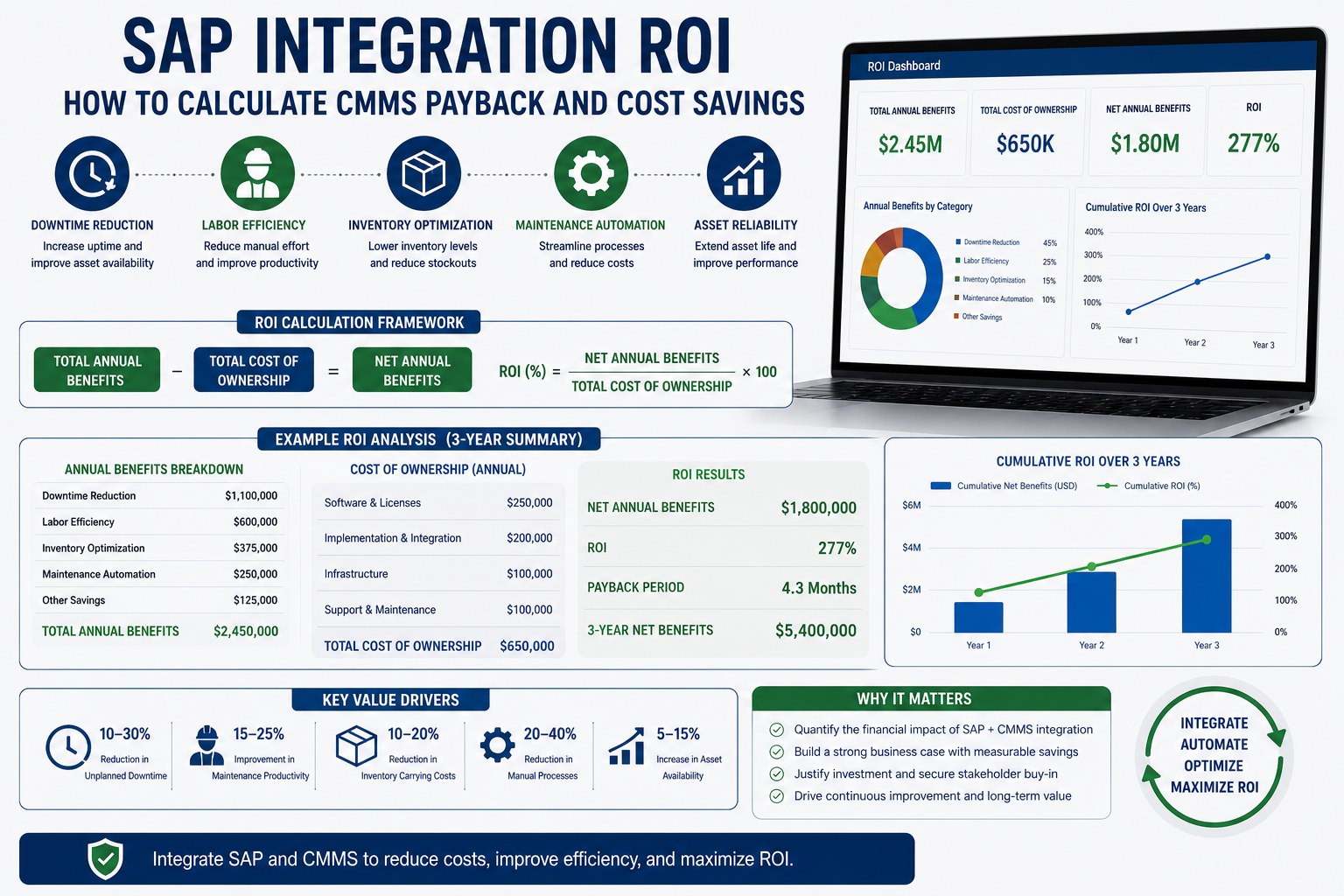
The financial reality: SMB SAP-CMMS integration projects look more like SaaS rollouts than enterprise SAP transformations. Predictable costs, fast payback, manageable scope. Plants ready to model their specific ROI scenarios can Book a free demo to model your SMB ROI scenario.
Expert Perspective for SMB Maintenance Leaders
"
The SMB plants I've watched succeed with SAP-CMMS integration share a counterintuitive pattern: they didn't try to do enterprise integration on a smaller budget. They did a fundamentally different kind of integration designed for their reality. SaaS CMMS, B1 native APIs, pre-built connectors, phased scope. The plants that struggle are the ones still trying to do enterprise patterns—custom development, on-premise deployment, comprehensive scope from day one—just at smaller scale. Same architecture, smaller budget, predictable problems. The right question for an SMB plant isn't "how do we afford enterprise integration?" It's "how do we choose the right kind of integration for our scale?" Once that question is asked correctly, the affordability falls out naturally.
01
Different Kind, Not Smaller Scale
SMB integration isn't enterprise integration at smaller scale. It's architecturally different and economically different.
02
SaaS Is the Foundation
SaaS CMMS changes the economics fundamentally. Capex avoidance plus predictable opex transforms the math.
03
Start Small, Prove Value
Get phase 1 working in 4-6 weeks; demonstrate ROI; expand from a position of proven success.
90-Day SMB Quick-Start Roadmap
The 90-day program below establishes a working SAP-CMMS integration for SMB plants—from platform selection through operational deployment.
90-DAY SMB QUICK-START
From Platform Selection to Operational Integration
DAYS 1–25
01
Platform Selection
Confirm SAP product (B1 or S/4HANA). Evaluate SaaS CMMS options. Check pre-built connector availability. Negotiate pricing.
DAYS 26–50
02
MVP Configuration
Map core 15-20 fields. Configure standard workflows. Set up bidirectional sync for work orders and equipment master.
DAYS 51–75
03
Pilot & Training
Pilot with one production area. Train technicians and supervisors. Capture early issues. Refine workflows based on use.
DAYS 76–90
04
Plant-Wide Rollout
Expand to full plant scope. Establish support cadence. Document phase 2 backlog. Measure ROI against baseline.
AFFORDABLE INTEGRATION
Make SAP-CMMS Integration Work for Your Plant Budget
Eight strategies mapped. SMB-specific architecture defined. 4-6 week deployment achievable. The integration approach that delivers working maintenance workflows without enterprise-pattern costs.
What does typical SMB SAP-CMMS integration actually cost?
Realistic SMB ranges in 2026: initial implementation costs $20-50K total when using pre-built connectors and SaaS CMMS, including configuration, field mapping, training, and pilot deployment. Ongoing costs typically run $5-15K annually for maintenance and support, plus the SaaS CMMS subscription itself (varies by user count and features). Compare this to enterprise SAP-CMMS implementations that start at $200K and run six figures annually—the SMB approach uses fundamentally different architecture and tooling, not just smaller scope. Plants that try to apply enterprise patterns at smaller scale typically end up spending more, not less, because the patterns aren't designed for SMB economics.
Can we really integrate SAP Business One with a CMMS without a Basis team?
Yes—and this is one of the key reasons SMB integration costs are dramatically lower. SAP Business One was designed for organizations without dedicated SAP Basis teams. Its Service Layer provides REST/OData APIs that modern CMMS platforms consume directly. Standard IT skills (familiarity with REST APIs, basic JSON, common integration patterns) cover what's needed for most B1-CMMS integrations. SAP Basis expertise becomes important for advanced scenarios (complex authorization, custom ABAP, multi-instance landscapes) but isn't needed for standard SMB maintenance integration. Many SMB plants successfully deploy with their existing IT generalists plus modest vendor support.
How does SaaS CMMS compare to traditional perpetual license CMMS for SMBs?
For most SMB scenarios, SaaS CMMS wins decisively. Capex avoidance matters more for SMBs than for enterprises that have larger budgets to absorb upfront costs. Predictable monthly costs simplify budgeting. Vendor-managed infrastructure eliminates IT operational burden. Automatic updates ensure you have current features without upgrade projects. Cloud-to-cloud integration with SAP Business One is technically simpler than on-premise-to-cloud patterns. The exceptions where perpetual license still makes sense: heavily regulated environments requiring on-premise data residency, very large SMBs with existing data center investments, or specific industry compliance requirements. For most SMB plants, the SaaS path is faster, cheaper, and lower-risk.
What if our plant is on S/4HANA but we have an SMB-size operation?
This scenario is more common than the SAP product names suggest—plants that grew into S/4HANA from B1, or chose S/4HANA Cloud (Public Edition) which is mid-market positioned. The good news: many of the SMB strategies still apply. Use OData services, pre-built connectors, and SaaS CMMS to keep the integration economics SMB-friendly even though your SAP product is enterprise-class. Avoid custom ABAP development. Use SAP Build for low-code extensions. The integration architecture decisions matter more than the underlying SAP product class. Cost discipline is achievable on S/4HANA with the right approach—it just requires more deliberate scope and tool choices.
How quickly can we expect ROI from an SMB SAP-CMMS integration project?
Typical SMB payback periods run 6-9 months when scoping is disciplined and execution is steady. The biggest ROI drivers: reduced unplanned downtime (most SMBs see 20-40% reduction in the first year), maintenance technician productivity gains (15-25% from mobile work orders and clear work order routing), and reduced spare parts inventory waste (15-30% from better consumption visibility). For a plant currently losing $50K monthly to unplanned downtime, even a 30% reduction recovers $15K monthly—covering the entire $20-50K implementation cost within 4-6 months. The math works straightforwardly when the integration delivers actual operational improvements rather than just digitizing existing inefficiency.